
When a Bluetooth device appears: how BluetoothView keeps the record
Summary
BluetoothView is a small portable tool for Windows that keeps scanning for nearby Bluetooth devices and logs each one with its name, address, device class and the times it was first and last noticed, with a pop-up when something new turns up.
Recommend- Name
- BluetoothView
- Version
- 1.70
- Pricing
- Free
- Open source
- Proprietary
- Operating system
- Windows
- Updated
- 2026-10-05 13:49
A very narrow job
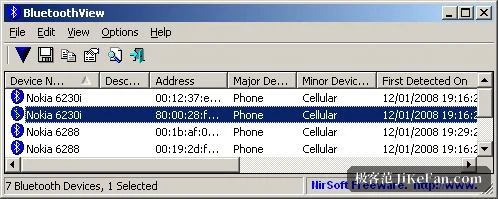
Run it and it starts sweeping for Bluetooth devices in range, and keeps sweeping. Every device it hears becomes a row: the name the device advertises, its Bluetooth address, a major device class and a minor device class, and two timestamps, one for the first time it was noticed and one for the most recent. There is no map and no graph. There is a list that grows as the day goes on.
The timestamps are what turn that list into something worth reading. A row on its own only says that a device exists somewhere nearby. A row with a first-seen and a last-seen says that something was close at a particular moment, and then was not, and if the same address comes back later in the afternoon it says that too. Questions that were previously guesswork become answerable: roughly when did this thing arrive, how long did it stay, how many separate visits were there in one day.
One honest wrinkle is worth knowing before reading too much into the log. A Bluetooth address is normally a fixed hardware identifier, which is why the same address turning up twice is a good sign it is the same device. Recent phones and some laptops rotate their address on purpose to make tracking harder, so a single handset can appear under several addresses in the same hour. A sudden flood of unfamiliar entries is often one familiar device hiding behind a new address rather than a crowd of strangers.
No installer, and it sits in the tray
It arrives as one file. There is no setup step, no service, no folder of dependencies; unpack it and run it, and the whole program fits on a memory stick that travels between machines. That matters more than it sounds. A tool you have to install is a tool you think twice about putting on someone else's computer, while a tool you can carry in a pocket is one you can run for ten minutes on a machine that is not yours and then simply close.
The window can be sent to the tray and left there. When an unfamiliar device shows up, the program can raise a balloon message, play a sound, or do both, so nobody has to sit and stare at a list. For devices worth remembering, a note can be attached to the entry, and that description then travels with the notification the next time the same address appears. Two lines of text about whose phone or which headset it is saves a lot of squinting at hex addresses later.
The details that decide whether it is useful
Scanning timeout is adjustable in the advanced options, and the trade-off is the usual one. A short timeout sweeps quickly and may walk past devices at the edge of range, which is fine if what you care about is close by. A longer timeout digs further and takes longer to come back, which is what you want when the question is whether a device is anywhere in the building. Neither setting is wrong; they answer different questions.
Vendor names can be shown as well, by putting the public vendor-prefix database file in the same folder. The program then looks up the manufacturer from the address itself, so a list of anonymous codes turns into a list of company names, which is far easier to reason about. That database ages, since new prefixes are handed out continuously, so an old copy will leave some entries blank rather than wrong.
Some builds also offer a connection test against a chosen device, which answers the narrower question of whether that one device is reachable right now, as opposed to merely visible in a scan.
What it needs, and what it cannot do
The program runs on Windows and leans on the Bluetooth support the system already provides, which is why anything from Windows 7 through 11 works and anything older without that support does not. It is free, and the download is measured in tens of kilobytes, so there is nothing to weigh before trying it.
The limit worth stating plainly is that it records what its own radio can hear. Range depends on the adapter, the antenna and the walls in between, so a device that is present but silent, or simply too far away, does not appear. This is a log of nearby Bluetooth activity, not a locator, and it will not tell you where anything is.
What the program amounts to is a list and a timestamp, and yet that is enough to turn invisible radio traffic into a record you can go back and read. It suits anyone curious about the pattern of devices around them, and it suits the narrower task of checking whether one of your own devices is connecting when it should not be.