
Tower: a native Git client that tidies branch cleanup, and reads squash and rebase merges
Summary
Tower is a native Git client for macOS and Windows where dragging and undo catch mistakes and AI writes the commit message. Windows 14 splits the question of whether a branch is truly merged into four separate checks.
Recommend- Name
- Tower
- Version
- 18
- Pricing
- Paid
- Open source
- Proprietary
- Operating system
- macOSWindows
- Website
- https://www.git-tower.com/
- Updated
- 2026-10-21 12:34
Git is a precise instrument with an unfriendly memory requirement. Tower takes the operations people misremember and turns them into menus, drags and buttons, while leaving the command line reachable. In 2026 both platforms received a round of updates: the Mac side rewrote its command line tool, the Windows side gained a branch overview.
Two version lines, one language of interaction
Tower has always kept macOS and Windows as separate products with separate version numbers. The current Mac build is 18.0, released on 6 October 2026 and requiring macOS 14.0 or later; the Windows build is 14.2, released on 19 October 2026 and requiring Windows 10 or later. The website puts the audience at more than a hundred thousand developers and designers.
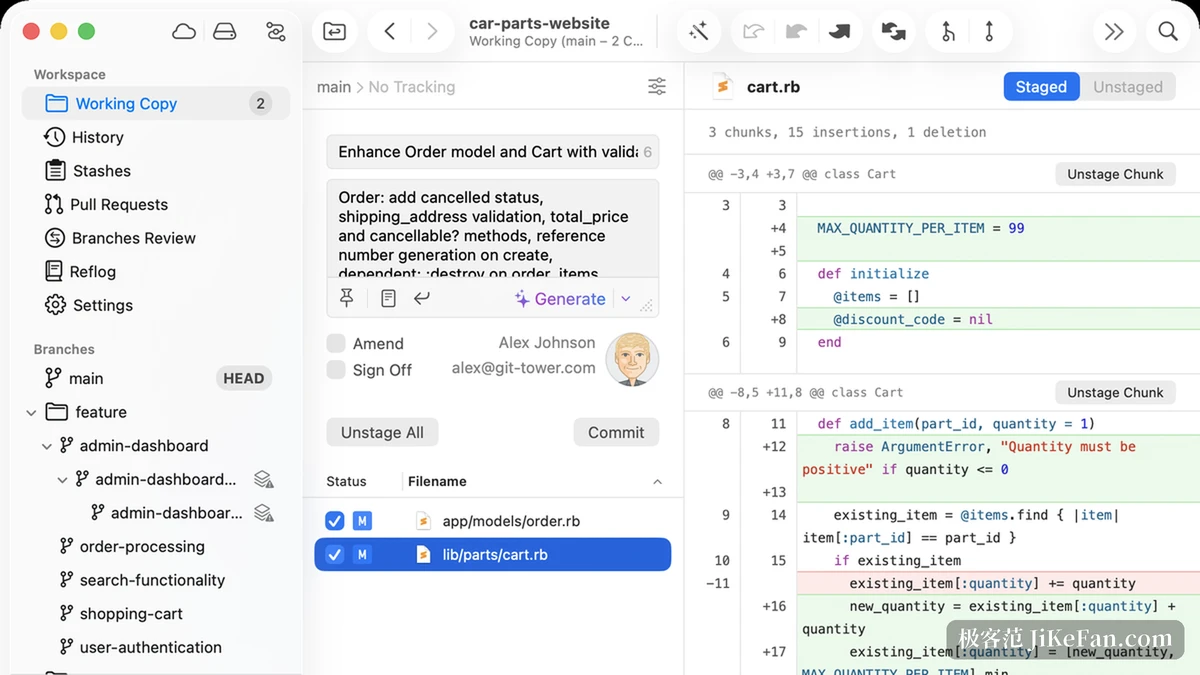
Both lines share one language of interaction: the left column holds repositories, the working copy, history, stashes and the branch tree; the middle column is the commit area; the right column compares differences. The divergence sits in system habits, since the Windows build has its own menu bar and shortcut scheme while the Mac build follows the macOS conventions for windows and toolbars.
Daily work: drag, undo, stage by line
What actually stops people learning Git is usually the question of what to type next. Tower turns those actions into visible objects: drag a file onto a branch and it merges, drag it onto the stash area and a stash entry appears, and even a new file not yet added to the repository can be dragged along.
Undo became a global shortcut, one press steps back, and a branch deleted or a commit or reset made by mistake all come back without first learning reflog well enough to fish them out. Staging goes down to the line, so part of a file's changes can be committed alone. Interactive rebase, a conflict wizard, submodules, Git LFS, Git-Flow, file history, blame, cherry-pick and worktrees all sit on the interface as well.
The AI writes only that commit message
With changes staged, a Generate button appears in the commit area; pressing it has the AI draft a summary and a description, and anything unwelcome can be edited on the spot. Preset prompts live in the settings, so different styles switch at will, and a team can define a template that follows its own commit convention.
The AI's place is restrained: it touches the commit message only, not the code, and it does not decide which files are committed. What to change and what to commit stays with the person, which matters to a team that has to audit its process.
Branch cleanup: the Windows 14 overview
Once branches multiply, cleaning up starts with knowing which one already went into the trunk. The Branches Review view added in Windows 14 does exactly that: every local branch laid out side by side, compared one by one against a base branch you choose, with the commit difference marked behind each.
The view filters on several conditions at once: active or stale, fully merged, mergeable or conflicting, whether a pull request is attached, and whether the upstream configuration looks wrong. Stack the conditions and what remains is a list to clean up directly, and the context menu archives or deletes on the spot.
Why full merge needs four checks
Whether a branch has gone into the trunk is normally a single question for git branch --merged. But when the branch went in through squash or rebase, every commit hash changed, Git itself cannot tell, and a pile of branches merged long ago keeps carrying an unmerged label forever.
Windows 14 replaced that judgement with four independent checks, one of which reconciles the local branch against pull requests already merged on the hosting service. Any one of them holding earns the fully merged mark. A new explanation view lists the checks that hit and offers a direct link to the merge commit or the pull request, so the ground can be verified before deleting.
Check | What it compares |
|---|---|
Commit ancestry | Whether the branch tip is reachable from the base |
Patch identity | Whether the same changes arrived under a different hash |
Squashed content | Whether the branch content sits in one squashed commit |
Hosted pull request | Whether the hosting service already merged that branch |
Mac 18: the command line becomes two way
The point of Mac 18 is a rewrite of the gittower command line tool. It used to do essentially one thing, open a repository in the terminal; now it jumps straight to history, blame, the working copy or the branch overview, and pasting a commit hash opens history with that commit selected.
It also gained a second direction: gittower branch reads and writes branch information inside Tower, and recording a parent branch makes the fork point show in the history view, so the shape of a stack of branches becomes visible. The tool keeps itself current with application updates, so nothing has to be reinstalled after an upgrade.
A companion piece is an Agent Skill: write a prompt, have the AI agent hand the branch it just finished to Tower, and then look through the differences line by line in the interface and decide what to commit. The command line handles speed, the interface handles the final review.
Price: no free tier, but thirty days of everything
The pricing page bills yearly and per user, and every tier covers both macOS and Windows. Basic for individuals is 399 yuan a year; Pro is 715 yuan a year for professionals and small teams, with a further ten percent off from ten seats; Enterprise is 849 yuan a year and adds advanced team management, invoices and bank transfer, priority support and single sign on.
The vendor explains in the FAQ why there is no free tier: rather than a crippled free layer, everyone should evaluate the complete product first. The trial is therefore thirty days of everything, counted as Pro, with no credit card, and a thirty day refund follows. Students in education, teachers and institutions use it free; one licence works on both macOS and Windows.
Who it suits
For anyone typing Git commands all day, the value sits at the review step: reading differences line by line before a commit, confirming each conflict before a merge, checking merge status before cleaning up branches. For someone learning Git it works as a crutch too, since dragging and undo catch most mistakes and every step on the interface maps back to a command line equivalent.
Both of this round's changes point one way: making Git's conclusions checkable. Windows 14 splits whether a branch is merged into four independent checks and shows the evidence, and Mac 18 joins terminal and interface into a two way channel, so a command can run and then be looked at again on screen. It is subscription software, and the thirty day trial is how it asks you to decide whether it is worth it.