
Ulysses: Markdown at the core, one library, sync that follows you
Version 20260919
Summary
Ulysses keeps documents as plain Markdown in a single library, syncs them across Mac, iPhone and iPad, and exports to Word, PDF, ePub or HTML once the piece is done.
Recommend- Name
- Ulysses
- Version
- 20260919
- Pricing
- Paid
- Open source
- Proprietary
- Operating system
- macOS
- Website
- https://ulysses.app/
- Updated
- 2026-10-06 01:59
Ulysses is a writing application built for the Apple ecosystem, and its position turns on a single idea: whoever is writing should be thinking about sentences, not about layout. The content is Markdown underneath, stored as plain text and shown on screen through a stylesheet, so a page that looks typeset is still a text file at heart. Notes, fragments, drafts and long manuscripts all live in one library, kept in step between a laptop, a phone and a tablet by the system cloud service. Plain text, a single library, continuous sync: it is the three together that make the tool interesting to people who write for a living or write a great deal on the side.
Plain text that looks typeset
Open a document and the words appear at a comfortable size, headings stand out, bold reads as bold, italics as italics, lists take their shape and code blocks sit in their own frame. None of that is stored as formatting. The source underneath is ordinary Markdown, which means the file stays portable, readable in any text editor and comparable line by line. It also means the writer never has to choose between something that looks good on screen and something that remains an open format. When plain text is what is wanted, the export hands the text back unchanged; the styling is a layer laid on at the moment of reading, not a constraint welded into the document.
One library, not a heap of files
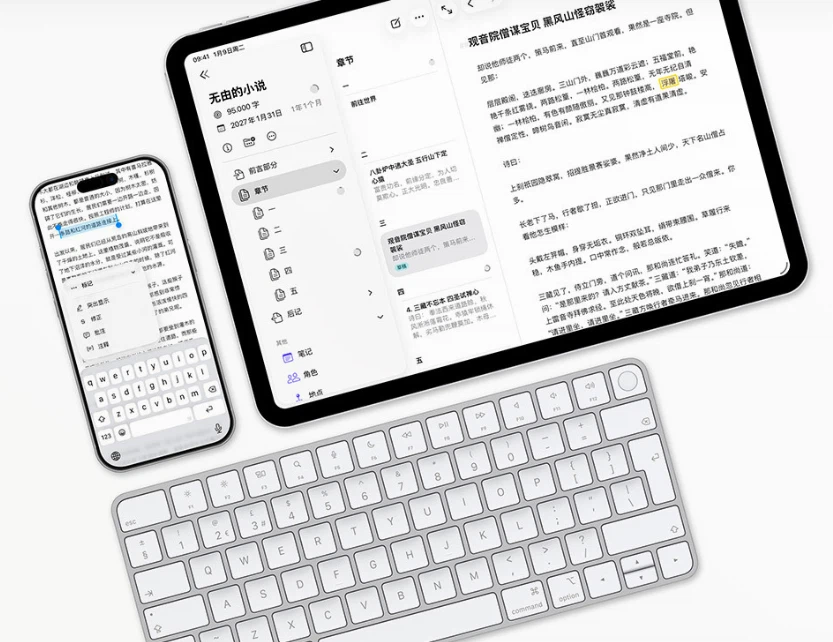
Everything sits in a single library instead of scattering across a file tree. Groups and subgroups behave like folders that nest freely: a book holds its chapters, each chapter holds its scenes, and loose ideas wait in their own corner to be promoted. Tags cut across the structure, and smart folders gather documents by rule rather than by hand, which is how years of material stay navigable. Search sweeps the whole library at once. For anyone who has lost an afternoon hunting for the right draft among a dozen similarly named files, the argument needs no demonstration.
Sync that follows the writer
With the cloud service switched on, a document is the same document everywhere. A paragraph typed on the phone during a commute is there when the laptop opens, and the cursor and the progress come with it. Most people settle into a rhythm: capture fragments on the phone, expand them at a desk where the keyboard and the screen suit the work better, then read the result back on a tablet. Because nothing is carried by hand, there is no moment where two versions of the same file exist and one of them is bound to be lost.
Getting the work out
Finishing is a first-class part of the app rather than a late addition. A document exports to Word, PDF, ePub or HTML, with the styling applied at the moment of export, and it can also go straight to a mainstream blogging platform without a detour through a converter on the desktop. For someone who has to hand in a manuscript, produce a book file or keep a blog running for years, that removes the usual middle step of copying the text elsewhere and fighting the result into shape. The formatting that made the writing pleasant is the formatting that ends up in the output.
The price and the machines
Ulysses is sold as a subscription rather than a one-time purchase. The individual plan costs about 5.99 dollars a month and covers use on the desktop side and the mobile side alike, so one payment buys the whole set of devices rather than a single platform. That model deserves an honest weighing: it is a recurring cost, and what it buys is continuous development rather than a frozen version. The tool is also Apple-only, available on macOS and iOS and nothing else. Anyone who writes mainly on other systems should check that their hardware is covered before committing, because there is no second platform here to fall back on.
Who it suits
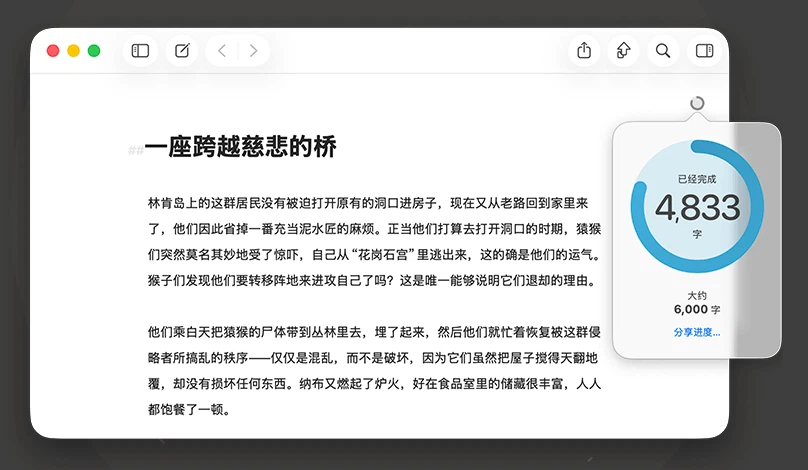
The natural match is someone who writes on a Mac, an iPhone or an iPad and wants an environment that does not interrupt the sentence with layout questions, then lets the finished piece leave in whatever format the recipient asks for. Beginners are not left behind either: writing goals and a live word count give a session a shape and a feeling of progress, which matters more than it sounds when a long text is assembled over several weeks. A free trial exists, and the honest way to judge the tool is to write something real in it for a few days and see whether the library and the sync earn their keep.