
Scrintal 0.2.13: cards on an endless canvas, gathered into a document later
Summary
Scrintal 0.2.13 keeps desktop on a single version number. Cards spread across an endless canvas, backlinks build structure, blocks collapse into a document, and collaboration plus templates come with one Pro tier aimed at students and researchers.
Recommend- Name
- Scrintal
- Version
- 0.2.13
- Pricing
- Paid
- Open source
- Proprietary
- Operating system
- WindowsmacOS
- Website
- https://scrintal.com/
- Updated
- 2026-10-21 15:51
Scrintal works from a plain premise: one thought per card, cards spread over a canvas that never runs out of room, and when a draft is finally due, the same cards get pulled back into a document. Spreading and gathering are two states of one surface rather than two separate programs.
The version stops at 0.2.13
The download area on the Scrintal site lists three desktop installers, and the version string inside each filename is identical: 0.2.13. That is the current desktop build. macOS is split into two packages, one for Apple Silicon and one for Intel, while Windows gets a single installer.
The number appears only on the desktop side. The product itself is an online service, and the web app never publishes a version, because changes land as soon as they are ready. The company behind it is Scrintal Labs AB in Stockholm, and the copyright line in the page footer reads 2025.
Cards go out first, the document comes back later
The basic unit is a block. The block picker holds paragraph, heading level three, bulleted list, numbered list, task list, quote and divider, alongside image, PDF, video, file, document and board. Any of them can be dropped anywhere on the canvas, and any of them can also be ordered in sequence inside a document.
The two shapes are not a choice between opposites. The site puts it as turning blocks into a document in one step, and the road runs both ways: a paragraph inside a document can be lifted out and left on the canvas on its own. That round trip is the central design decision here. Thinking starts scattered, because scattered material is easier to compare and easier to reposition; delivery needs linear text. Most tools pick one side and leave the other to an export.
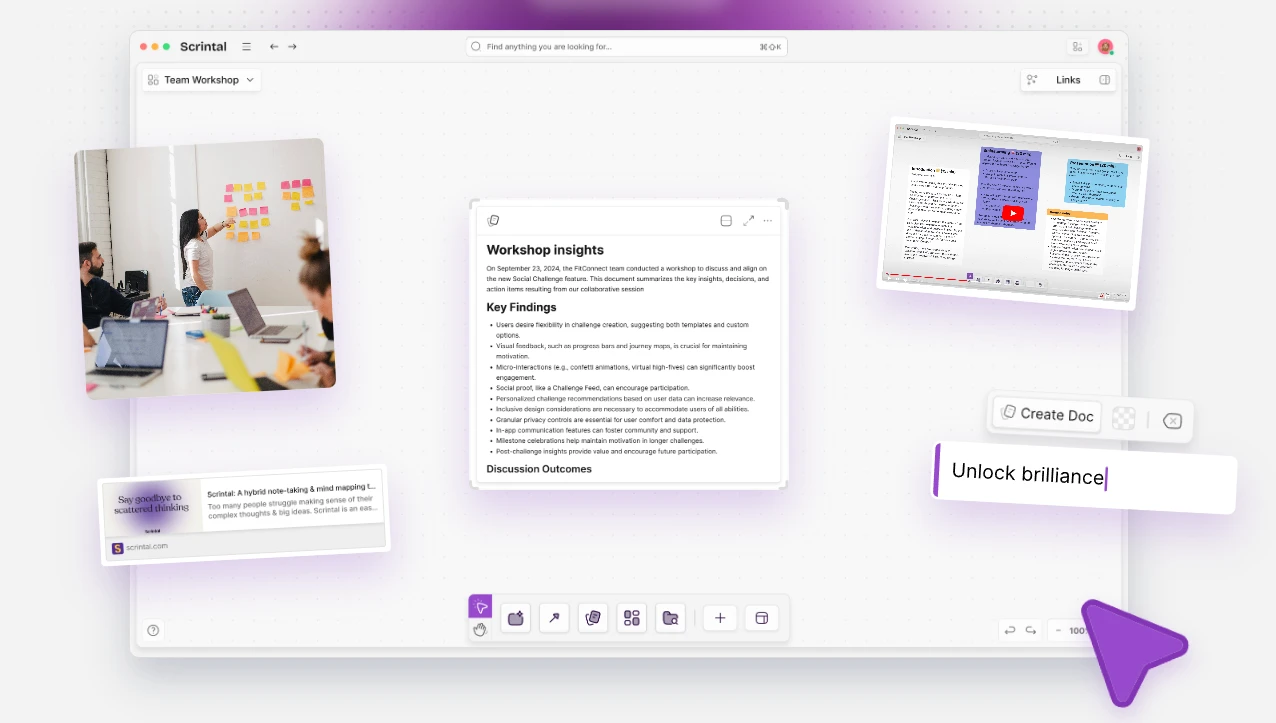
The canvas keeps extending. The homepage promises free thinking on an infinite canvas, and zooming has no boundary, so cards can sit as far apart as the author likes and still share one board. For anyone reading literature that matters: dozens of sources for a single topic occupy real space when laid out by theme, and a canvas does not start pushing people into folders just because the pile grew.
Links sit closer to thought than folders do
Cards can be joined with arrows, and they can also carry backlinks. The site describes connecting things with arrows and backlinks, and making all of it visible. An arrow records a spatial relation as it stands right now; a backlink records a relation between concepts, so once two cards are joined, either one leads to the other.
Folders and trees answer one question: where does this belong. They return exactly one answer each time. Links answer a different question: what is this connected to. A single card can belong to several themes at once. Research work tends to stall on the second question. An interview transcript is about user motivation and about pricing at the same time, and filing it under either heading is only partly right.
Templates point at study and research
The homepage spends a full paragraph on templates, worded as unlocking templates built for study and research, and says they follow best practice in research method and learning technique. Templates in a note tool slide into decoration easily, yet turning a method into a reusable skeleton does help a newcomer: what it hands over is not a pretty grid but an order of questions a topic should answer first.
Next to canvas and cards, a template behaves like scaffolding at the start. Material goes in following a ready structure, and once the routine settles, the structure gets taken down and replaced with personal habit.
Live collaboration and several cursors
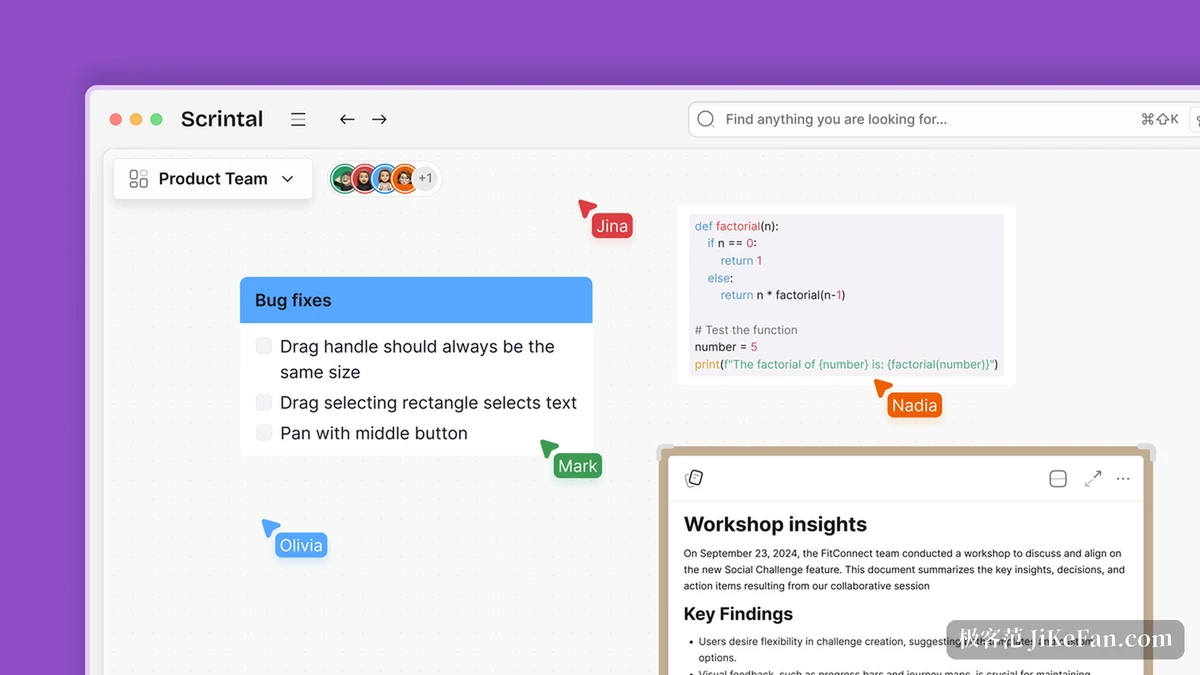
Collaboration belongs to the Pro tier. The site invites friends and colleagues to work together, and the interface shows it through multiple cursors: when someone works on a card on the same board, a name travels with the pointer. Official screenshots show three cursors in different colours resting on different parts of one paragraph, each labelled.
Collaboration on a canvas feels unlike collaboration on a linear document. Text work fights over the same sentence, while canvas work tends to split into territories where material is laid out side by side, so clashes are rarer and what people want most is seeing where the other person stands.
Two platforms, three installers
The desktop side covers macOS and Windows, and macOS is divided by chip architecture, with separate files for Apple Silicon and Intel. The web app is the main entrance; the desktop build is closer to a shell that puts the same canvas in its own window.
On imports, the site FAQ names a path for Markdown files and archives, and exports get matching notes. For a library built up over years, both directions being open is more reassuring than an entrance with no exit.
One subscription tier only
The pricing page lists a single line: Scrintal Pro at nine dollars per month, followed by a smaller note that it is billed annually, so the figure is a monthly rate charged once a year. The tier covers unlimited documents and canvases, unlimited uploads, live collaboration, priority support and community sessions held with the team. A small badge beside it marks the price as discounted.
A single tier is unusual for subscription software. The benefit is not having to work out which level is enough; the cost is that no cheaper slice exists, so one price anchor is all there is for anyone planning to stay.
The AI side has grown into its own product
A banner at the top of the site announces Gobu, a newly released AI research assistant. The pricing page describes it as built on the canvas and writing tools of Scrintal: it analyses papers against academic convention, shortens reading through summaries, traces every piece of information back to its source, and works alongside the writing itself.
It is no longer just a feature inside the subscription. Gobu has its own site, positioned as an AI research agent made for academic writing, shaped as a standalone product plus a plugin for Word, and it claims unlimited documents, direct conversation with a PDF, and answers that all point back to sources. The AI line has been cut out of the main product and built as a separate thing.
For someone already on Scrintal, the division of labour is the point: the canvas lays material out, joins it and gathers it into text, while the AI reads and summarises.
Who it suits
The site calls itself a visual note-taking and research tool, and gives a user base of more than ten thousand learners and researchers. What those people share is not a job title but a pile of material that has not taken shape yet: papers read, fragments noted, connections still unclear. Laying it all out first and deciding on organisation afterwards is the normal rhythm of that work.
Turn it around, and a project that arrives with chapter order already fixed, written and shipped in one pass, finds the canvas layer an extra burden, adding nothing except the labour of arranging cards attractively.
What deserves attention in Scrintal is not the length of a feature list but the admission that thinking clearly and writing it down are two stages: the canvas holds the first, the document holds the second, and nobody has to switch tools or finish thinking before starting to type.