
Pitch: unlimited presentations on the free tier, AI drafts, live co-editing, visitor data
Summary
Pitch is a presentation workspace from Berlin where an agent drafts, several people edit at once, and the sent link reports who opened it and which pages held them. The free tier builds presentations without limit and paid plans start at 10 euros.
Recommend- Name
- Pitch
- Version
- 20261020
- Pricing
- Free
- Open source
- Proprietary
- Operating system
- WindowsmacOSiOSAndroid
- Website
- https://pitch.com/
- Updated
- 2026-10-21 12:33
Eight people in Berlin started this in 2018 because they thought presentations were badly made. Seven years later the product describes itself as an AI presentation workspace for teams, and the number on the front page is four million of them. What it sells is not the slide itself but the stretch from the first prompt to the signed order.
A workspace built by eight people
The about page is plain about it: in 2018, eight friends wanted to do presentations properly, and Pitch came out of that. The team now runs close to fifty, the footer signs as Pitch Software GmbH, and the official summary of its position is made in Berlin, used around the world.
It places itself along the chain from the first prompt to the signed order, with drafting, collaboration, delivery and follow up each taking a stretch. That position decides where the features sit: the AI is not an extra button, it is where the chain begins.
An AI draft that lands as editable pages
On 27 May 2026 Pitch made the agent a proper feature: it starts from a real template and generates a whole presentation, and the pages stay editable, with layout, colours and typefaces all open to further work. The three claims are a draft in seconds, changes made in conversation, and a creative partner.
What matters is what comes out. The agent assembles inside the template system and hands back ordinary page objects in the editor, so changing a title, swapping colours or moving a layout all work as usual without starting over. That choice is what gives a generated first draft value as something to keep working on, rather than a picture to consult.
Anything Block: describe a component and it appears
The product update of 6 October 2026 added Anything Block. Describe what you want in one sentence, a pricing calculator, a tabbed view, a row of rotating customer quotes, and it appears on the slide already wearing the colours and typefaces of the current theme.
The examples given are all things that used to require leaving the presentation software: an return on investment calculator, a competitive landscape, a personalised proposal. These were once a static image or an embedded web page; now they are native blocks on the page, changed about as easily as a paragraph.
Brand consistency from a single source
Templates, styles, the brand library, typefaces and tone share one source. A designer puts the rules in, and every new page a salesperson makes draws its colours and type from that source, so whoever edits it, it looks the same. More than 150 designer made templates are listed, and a team can upload its own so the agent rebuilds to the brand.
Several people in one presentation
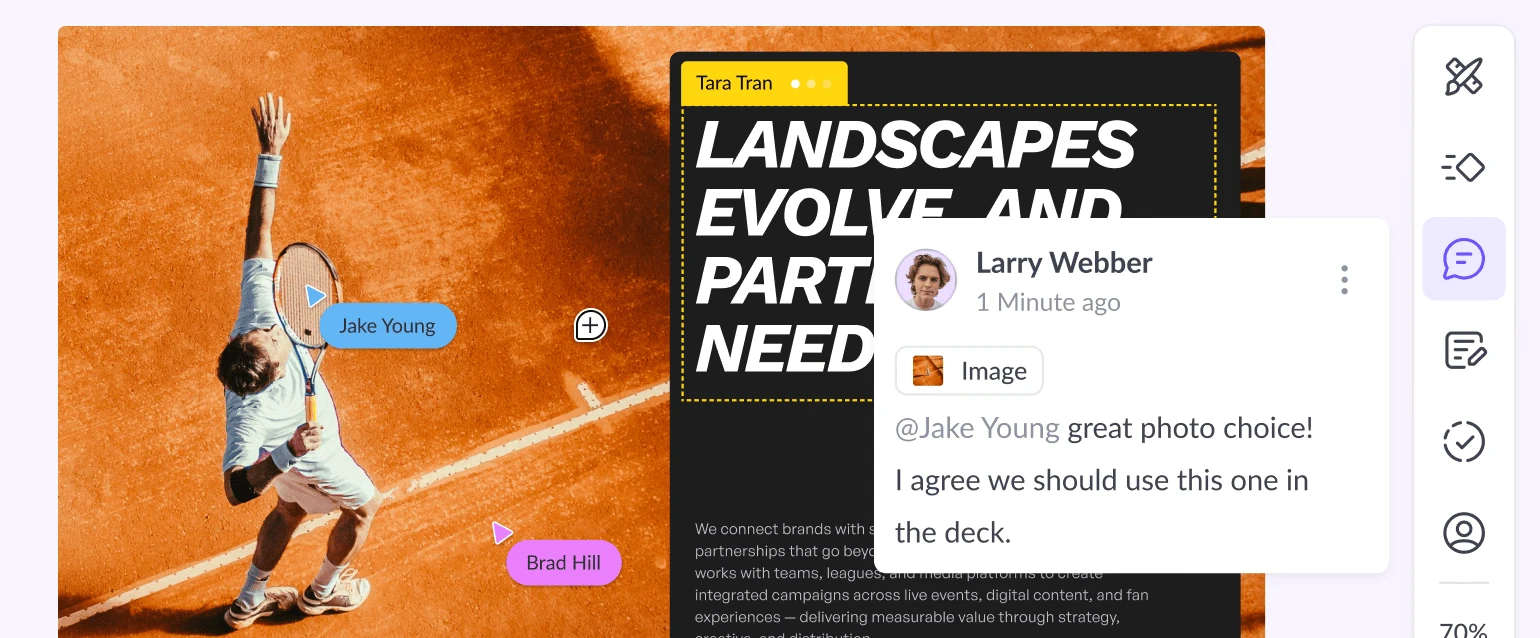
Collaboration is the difference Pitch established first. Several people edit the same presentation at once, comments are context comments pinned to a place, and slides can be assigned an owner. One press in the bubble bar hands a page to a colleague, status runs from to do through in progress to done, emoji reactions sit alongside, and the progress of a page is written on the page.
The comment panel hangs on the right, typing an at sign names a colleague, and the shortcut is Command Shift M. Resolved comments stay on the page as a record, which is what you want when checking later why something was changed. Bulk work is easy too: multi select in the slide navigator, then set status and owner in one go.
Recording the talk into the page
A Record button sits in the editor toolbar and drops a recording block onto the current page. The recording view lets you set camera and microphone first and see yourself inside the block, and the talk begins when the countdown ends. While recording you can move to the next page and keep going, pause, restart, discard, press R to redo the current take after a stumble, and press Enter to finish.
Speaker notes can be open while recording. The finished clip is bound to the page, so anyone with the link can turn pages and hear the explanation; a client who cannot find a slot can watch whenever suits them.
The data starts being useful after delivery
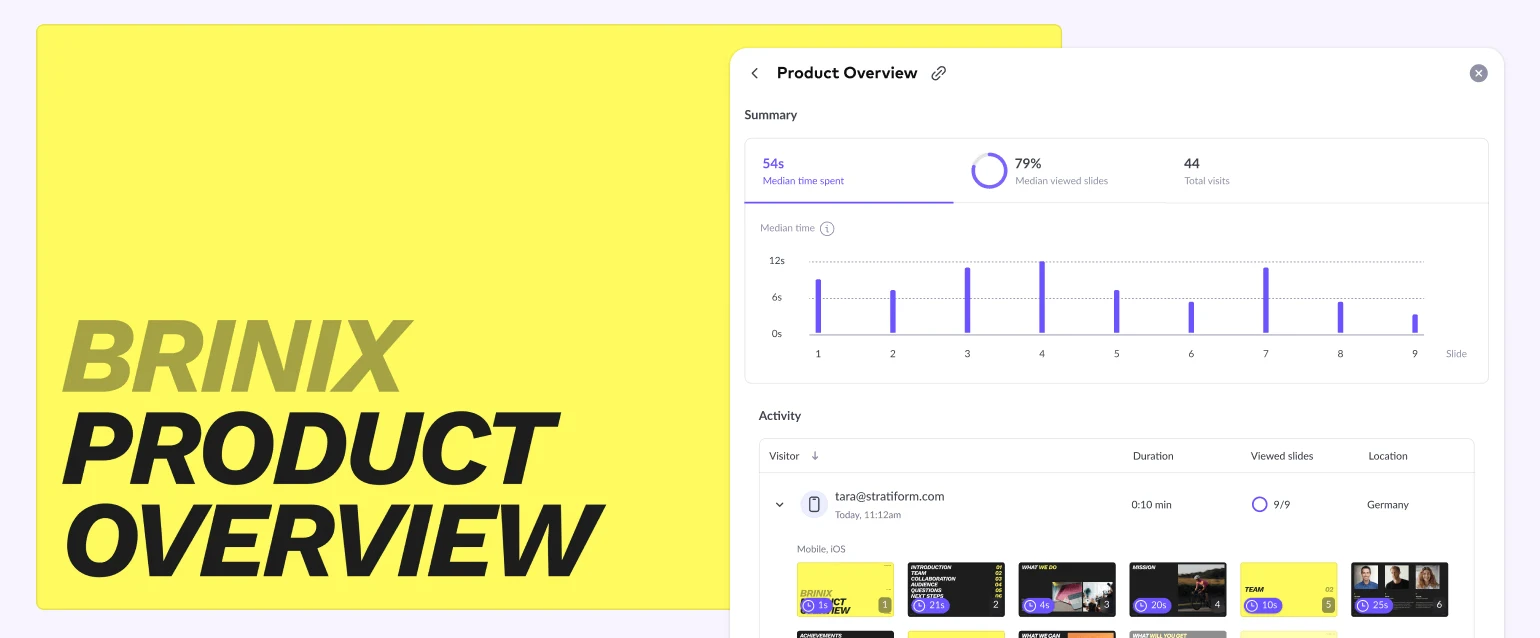
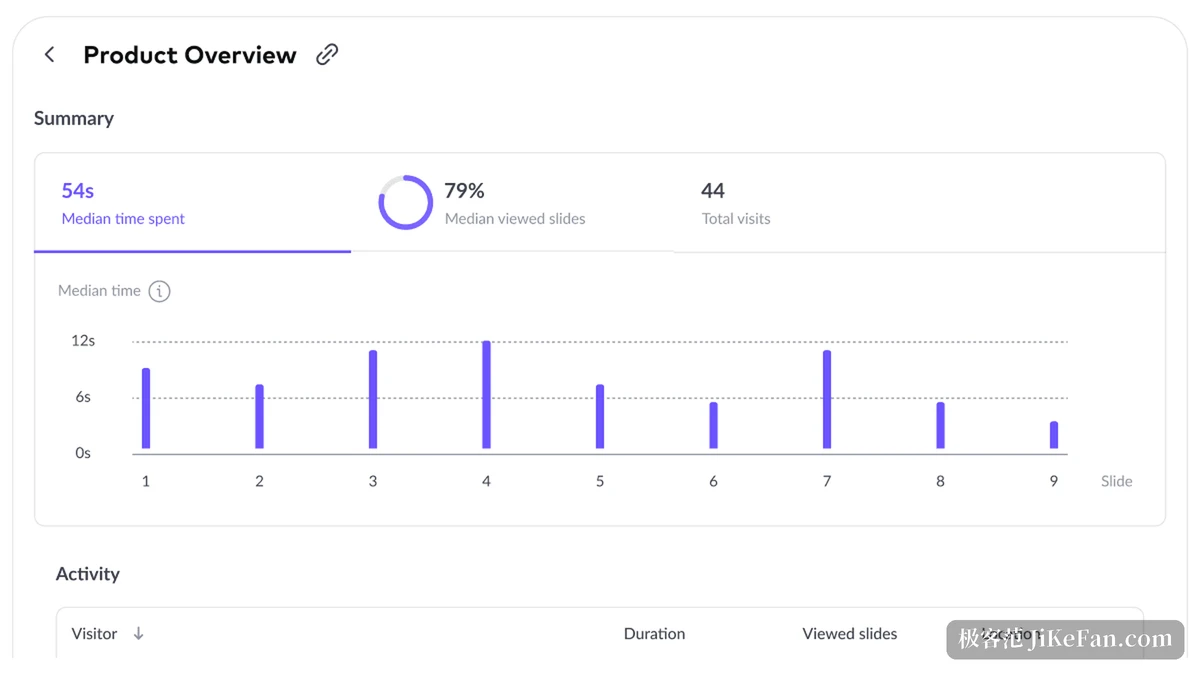
Once a presentation is out, Pitch records the visits: who looked, on what device, for how long, how far they paged, which country they came from, with a switch between total visits and unique visitors. These figures attach to the share link; the Team plan includes 25 advanced links with analytics and the Business plan lifts the count.
There is also a space called Pitch rooms: presentations, files and background information go into a branded room and out through a single link. The client finds what they need inside, and you can see what they did there. That step replaces sending an attachment and waiting with watching where they read to.
Wiring it into other systems
On 12 August 2026 Pitch opened MCP and an API. An outside system can trigger the generation and delivery of a presentation, turning fields from a call record or a customer system into a tailored proposal, or start a delivery from inside its own workflow. With webhooks, a presentation stops being a manual act and becomes one step that can be hung in a process.
Tier | Per month, billed yearly | What it holds |
|---|---|---|
Free | 0 | Unlimited presentations, 100 AI credits once, 2 guests, 1 workspace |
Plus | 10 euros | 500 credits refreshed monthly, custom fonts, video, PPTX without the badge |
Team | 15 euros | 25 advanced analytics links, 3 workspaces, 2 client rooms, 25 guests |
Business | 20 euros | Those limits lifted across the board |
Two things to know before starting
The first is that it is online by nature. Content lives in the cloud, collaboration, analytics and recording all need an account, clients cover Mac, Windows, iOS and Android, and offline only bridges a short gap.
The second is the AI allowance on the free tier. One hundred credits arrive in one go and are not topped up, so anyone using the agent daily will end up on Plus or above. Treating it as the main tool for producing presentations is worth the money; expecting unlimited generation from the free tier will feel thin.
Pitch splits a presentation into drafting, co-editing, delivery and review, and each has something behind it: the agent and Anything Block turn an idea into editable pages, comments and owners pull collaboration into one file, and visit analytics answer whether the client actually looked. A team of eight in Berlin reached four million teams, prices start at zero, and heavy AI use starts at ten euros a month. For treating a presentation as a project to manage, this road is fairly complete.