
Trilium Notes: a note tree you host yourself, scriptable down to the API
Summary
An open source, self-hosted notebook organised as a tree rather than a flat list. Notes can be cloned into several branches, edited in place with tables, diagrams and formulas, scripted with JavaScript, and reached through a REST API. Run the desktop client or your own server.
Recommend- Name
- Trilium Notes
- Version
- 0.102.2
- Pricing
- Free
- Open source
- Open source
- Operating system
- WindowsmacOSLinuxDockerWeb
- Updated
- 2026-10-26 22:00
Choosing a notebook is rarely a choice about features. It is a choice about who holds the file when the service changes its mind.
Why people keep coming back to hosting it themselves
One tool keeps your notes on someone else's server. Another stores them as local files but charges for the sync that makes them useful on a second machine. A third is open and free but looks like it was designed by the database. People cycle between them for years, and the cycling is not indecision; it is an honest attempt to balance three things that rarely sit at the same table: features, privacy and cost.
This one takes a fourth position: open source throughout, hosted wherever you like, with few concessions on capability. You are the user and the custodian at the same time, which is unusual enough to be worth examining on its merits rather than as ideology.
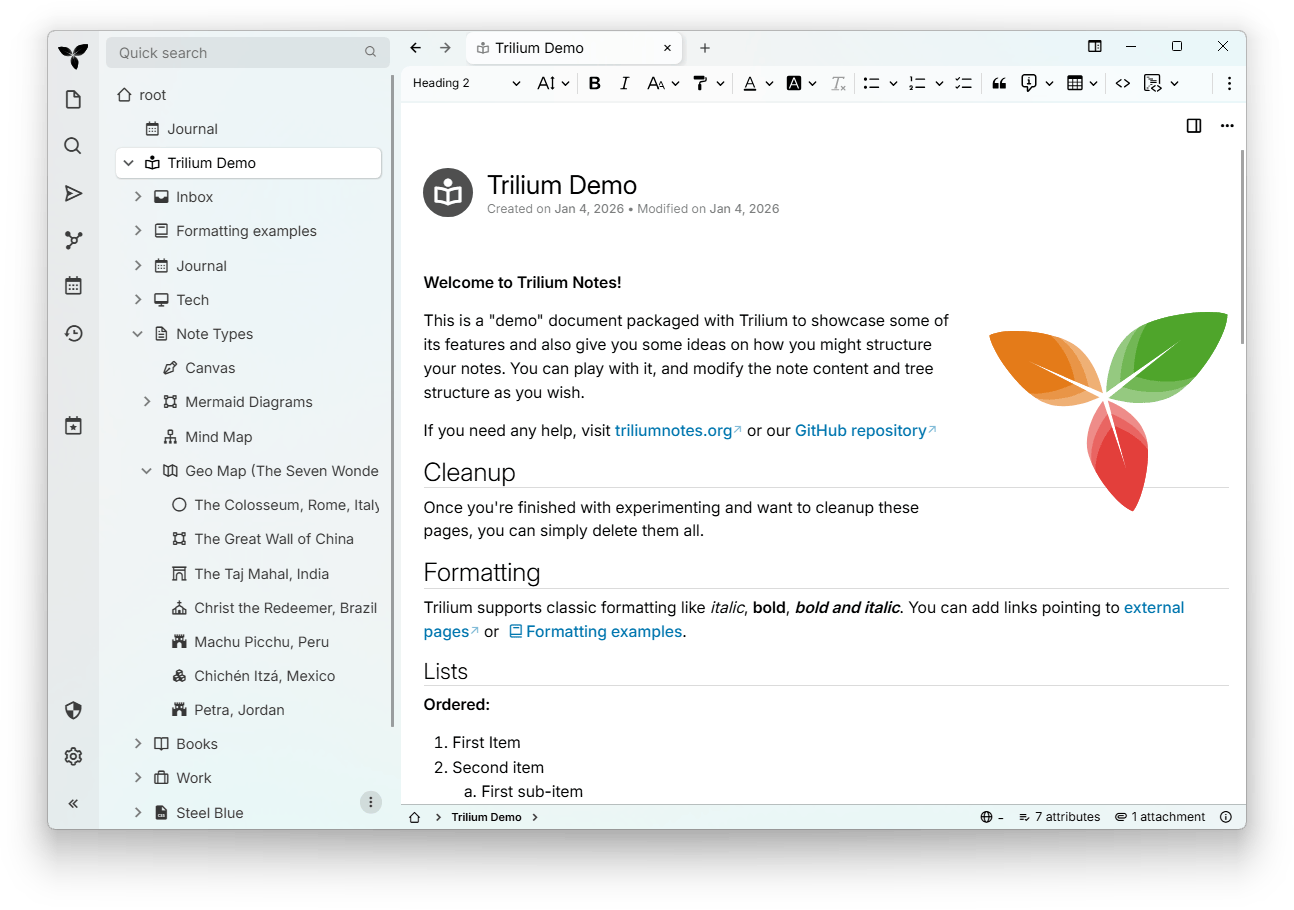
A tree, not a list
Most notebooks give you a flat sequence of documents and, if you are lucky, folders to put them in. Here the whole structure is one tree that extends as far as you need it to. Every node can act as a folder holding children, and can also be a note in its own right — the same arrangement a file manager has always allowed, where a directory contains both subdirectories and files without anyone finding it strange.
The distinctive part is cloning. A single note can appear in several places in the tree at once: a note about container deployment can hang under operations and under the container technology at the same time, and editing either instance updates both, because there is only one note. Traditional folders cannot do this; the nearest equivalent in a filesystem is a hard link, and anyone who has wanted one for their notes will recognise the relief immediately.
More than plain text
The editor is stronger than the plain interface suggests. Tables, images and attachments embed with the formatting visible as you type. Code notes get syntax highlighting, which turns the notebook into a snippet manager with commentary. Diagrams are written in the diagram language directly in the note and rendered where they stand, which covers flowcharts, sequence diagrams and project timelines. Mathematical formulas are written and rendered in place, which is enough for most academic note-taking. A mind map view can be generated from any node as its root. A relation graph draws the connections that links and tags have already established.
Scriptable, and reachable from outside
A JavaScript engine is built in, so a note can contain a script that does work: relabel a batch of notes, export a backup on a schedule, generate a weekly report from a template. For technical users this changes the category of the object — not a closed box you put text into, but a knowledge system you can program.
A complete REST interface sits behind that, so external scripts and tools can create, read and modify notes. The interesting use is not novelty but plumbing: a pipeline can write a changelog into the notebook as part of the release process, which is exactly the kind of thing a closed service cannot offer at any price.
Security choices that make sense
Three of them are worth naming. Individual notes can be encrypted — the one holding passwords, for instance — so that a leaked database still does not disclose it without the passphrase. Full revision history keeps a snapshot of every change, so a bad edit or a deletion is recoverable rather than final. And synchronisation is yours to host, which means the notes never transit a third party at all.
Ways to run it
A desktop application exists for Windows, macOS and Linux, suitable for single-machine use. A container image starts a server with one command and is reached through a browser, which is the shape that suits a home server or a small rented machine kept online around the clock. There is no separate mobile application, but the web interface adapts to a phone browser and remains usable there.
Run the server and the multi-device problem disappears on its own: every device opens the same instance in a browser, and there is nothing further to configure.
The cost of the freedom
Compared with hosted services, nothing here can be shut down under you. Compared with local file notebooks, the sync is included and costs nothing. Compared with the older open source options, the tree and the cloning suit complicated bodies of knowledge far better.
The price is a steeper start. A tree rewards someone who has thought about how their material is shaped; scripts and the API assume some programming. If you are the sort of person who will spend an afternoon building a system that is genuinely yours, the freedom returned is larger than what any commercial notebook offers. If you want to type and be done, this will feel like homework.
It is not the notebook you can use in the first five minutes. It may be the one you are still using in the fifth year, because the structure, the cloning, the scripting and the self-hosting are four decisions pointing the same way: the data is yours, and so is the shape of it.