
Tianruo OCR: drag a box on screen and the text becomes editable, 1.7.0.0
Summary
A Windows tool that captures text from the screen with a hotkey and a dragged box, dropping the result into an editable field. The free edition covers recognition, screenshots, GIF capture and image hosting, the engine can run locally, and table or vertical text recognition belongs to the one time paid edition.
Recommend- Name
- Tianruo OCR
- Version
- 1.7
- Pricing
- Free
- Open source
- Proprietary
- Operating system
- Windows
- Website
- http://ocr.tianruo.net/
- Updated
- 2026-10-12 11:32
Text on a screen that cannot be copied has to be typed back one character at a time.
Drag a box and the text becomes editable
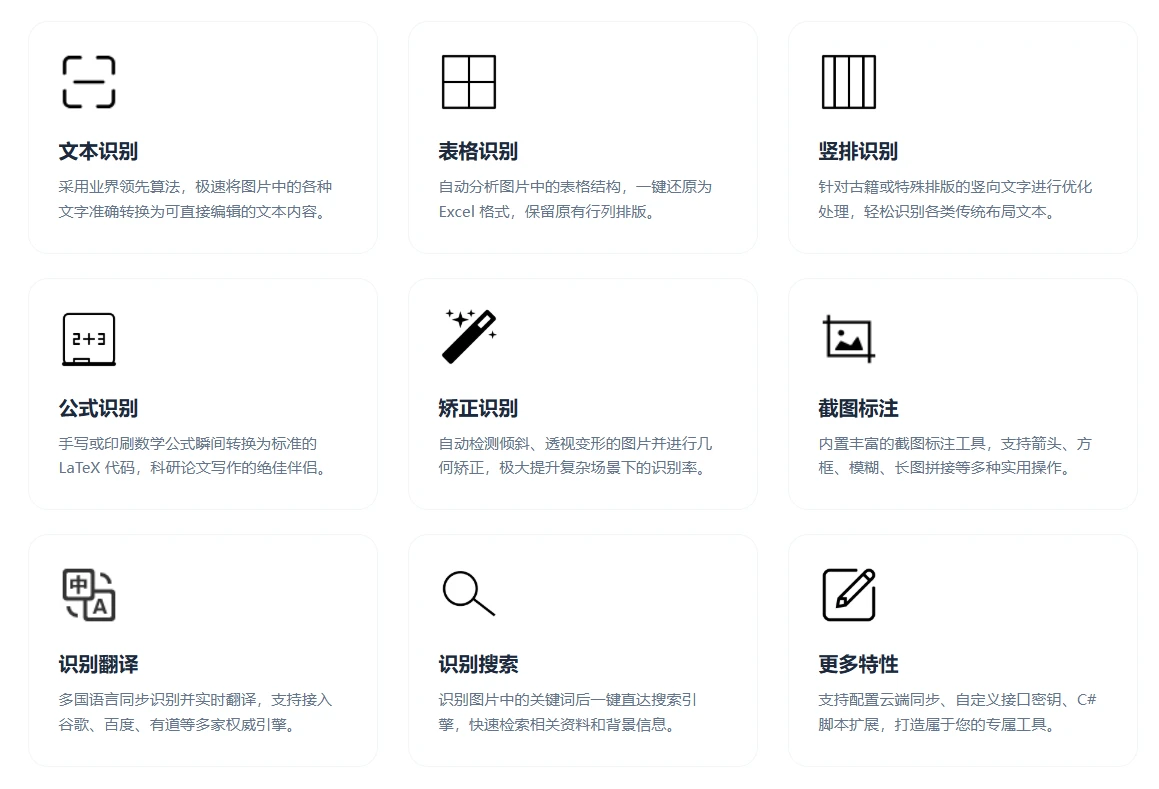
Tianruo OCR is a screenshot text recognition tool for Windows. The site describes the text function as using a leading algorithm to turn the characters in an image into content that can be edited directly. That sentence names the premise: as long as letters live in pixels, moving them elsewhere means retyping, and only after they become text do copying, searching and re-editing become possible.
Using it is light. Press the hotkey, drag a box over any part of the screen, and the result appears in an editable field, ready to be changed or saved like ordinary text. The price page lists the free edition as covering text recognition, screenshots, GIF recording, image hosting upload, screenshot correction and configuration sync. Together those cover a complete path from grabbing to sharing, which is most of what a day actually needs.
The value of that path is in the interruption it removes. A quotation in a video, a serial number in a picture, an error message inside a screenshot: each would otherwise mean opening another application and retyping. One hotkey and one drag replaces that, and the gain compounds across a working day.
Keeping the engine local
Recognition can be done two ways: send the picture to somebody else s server, or compute it locally. This tool supports both. The changelog records that the bundled paddleocr has followed upstream to version 5, and local inference means a screenshot does not have to be uploaded before a result comes back. When the material is internal or the screen contains personal details, that consideration usually outweighs speed.
The interface level is not limited to one route either. The changelog notes a newly added oneocr interface covering text, tables and vertical text. Offering several options inside one program means switching by content: ordinary paragraphs take the general path, while tabular layouts or vertical script take another, and the difference in results is not small.
Having both a local engine and cloud interfaces puts the trade off in the user s hands: bulk work is cheaper locally, and only the genuinely difficult pages need a cloud call on top. That is a more honest arrangement than pretending one engine handles everything equally well.
Item | Official notes |
|---|---|
Version | 1.7.0.0, released 10 April 2026 |
Platform | Windows, later releases are x64 only |
Free edition | recognition, screenshot, GIF capture, image hosting |
Professional | one time purchase at 59 yuan |
Engine | bundled PaddleOCR, following version 5 |
Interfaces | includes oneocr for text, tables and vertical script |
Which jobs need the other edition
The line between the two editions is drawn clearly. The price page says the professional edition unlocks table recognition, vertical text recognition, formula recognition, translation, searching within results, translating results and custom interfaces on top of the free feature set. The front page describes table recognition as analysing the structure of a table in an image and restoring it to Excel format while keeping the original rows and columns. Turning a photographed table into rows that can be calculated is the thing plain capture cannot do, and it is the most concrete reason to pay.
Cloud capability belongs to the paid edition as well. The project says a professional user can apply for dedicated OCR and translation keys from providers such as Baidu, Tencent and Youdao, with the per call fee collected by the cloud provider directly and no margin taken by the software. Local engine and cloud interface side by side leaves the choice with the user.
One detail is easy to miss. Two separate release notes state that future versions will only be updated for x64. Machines still on a 32 bit system will stop at an earlier release, so confirming the system type before starting saves a wasted round trip.
It is worth deciding early which of these you actually need. Most daily capture is served by the free edition, and the paid features earn their price in the specific cases of tables, formulas and translation. Buying for the feature list rather than for a job you have is the usual way a cheap one time purchase still feels unnecessary.
Getting the characters off the screen is what gives the tidying afterwards somewhere to start.
A few suggestions. The free edition is enough for everyday capture; consider upgrading when tables or vertical text appear. Prefer the local engine for sensitive screenshots so nothing has to leave the machine. And if a higher recognition rate is needed, fill in a cloud key you applied for yourself rather than relying on a shared one.