
TagScanner: putting a disorderly music collection back in order
Summary
A small free tag editor for Windows that reads and writes more than twenty audio formats, queries public music databases to fill in missing artists, albums and covers, and cleans up hundreds of files in a single batch.
Recommend- Name
- TagScanner
- Version
- 6.1.21
- Pricing
- Free
- Open source
- Proprietary
- Operating system
- Windows
- Website
- https://www.xdlab.ru/en/
- Updated
- 2026-10-06 20:42
A collection that has been growing for years rarely looks tidy when it is finally opened. Track numbers stand in for titles, the artist field is empty, album names carry a release group or a website address, and the same album appears three times under three spellings. Fixing that by hand is not difficult work, it is simply endless: three or four clicks per file, multiplied by several hundred, with no way to check the result except by scrolling.
TagScanner exists for exactly that job. It is a small Windows application – under five megabytes – that is free for personal, non-commercial use and does nothing except handle audio metadata, which is why it can afford to be thorough about it.
What it covers
More than twenty audio formats can be read and written: the common compressed formats, several lossless ones, and the older container types that still sit in archives. On the tag side it handles the major standards in use today, the various revisions of the ID3 family, the comment blocks used by open-source encoders, and the tagging schemes built into the proprietary and consumer containers. In practice that means the tool does not care where the files came from; if the format is at all common, the fields are editable.
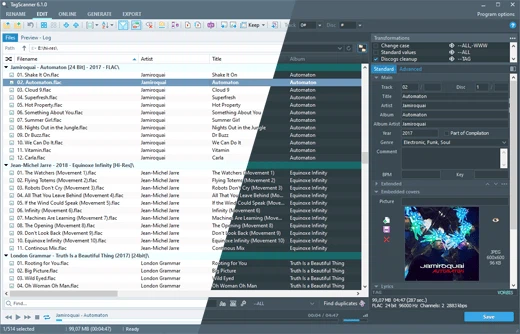
Filling in the blanks from public databases
The feature most people come for is online lookup. Select a batch of files, ask the program to search, and it sends what it knows – usually a partial file name or an existing title – to several public music databases, then returns candidate matches for track title, artist, album, release year and genre. Choosing a match writes all of those fields at once, and can pull down a high-resolution cover image and embed it directly into the file, so the artwork travels with the audio instead of living in a folder that gets separated from it.
Cover art is worth a separate sentence, because it is the part a library looks judged on. The program can fetch an image, resize it to a chosen dimension, and write it into every track of an album in one action. For anyone preparing files for a phone or a car player, where oversized artwork slows browsing down, that single setting removes a lot of manual work.
Reading information back out of file names
Old collections often carry the useful information in the file name rather than in the tags – a pattern of artist, separator, title is extremely common, sometimes with a track number in front. The filename parser works backwards from that: give it the pattern, and it splits each name into fields and writes them into the tags.
The reverse direction is just as useful, and better designed than in most tools. Renaming from tags lets you compose the output name from any combination of fields, in any order, with control over capitalisation, separators and the handling of characters that file systems dislike. Whether the artist or the title comes first, whether everything is upper case or title case, whether spaces become underscores – all of it is configurable, and the preview shows the result before anything is renamed.
The batch mode, which is where the hours are saved
Selecting hundreds of files and editing them as one group is the core of the workflow. Field values can be set across the whole selection, text can be converted between cases, strings can be replaced, and the layout of a field can be reformatted. The examples that come up constantly: capitalising every artist name properly, normalising genre spellings so that one style is not split across four variants, and stripping the leftover web addresses that old ripping tools left inside the comment field.
None of this runs blind. Every operation is previewed in a table showing the current value beside the proposed one, and anything that looks wrong can be excluded before it is applied. For a task where a careless global replace can ruin a library, that preview is not a luxury.
Player, export and the small extras
A built-in player lets you hear a track while its tags are being edited, which sounds trivial until you have mislabelled the wrong song twice. When the work is finished, the tag data can be exported as a web page, a spreadsheet or a plain delimited text file, which is how a collection gets documented or handed to someone else. Playlists can be generated in one action from the current selection.
The interface is plain, the settings are dense, and there is no attempt to be charming. That is the correct trade for this kind of program: it is used for a few concentrated hours once or twice a year, and what matters is that it does not make mistakes.
Who it suits
If a music folder has grown past the point where you know what is in it, and the idea of clicking through it file by file has been postponed for a few years, this is the tool that ends the postponement. The download is small, the learning curve is a single afternoon, and the result is a library that can be searched, sorted and synced instead of merely stored.