
NextChat: a five-megabyte client that holds every model you pay for
Summary
A client of roughly five megabytes puts the models you already pay for into one window, keeps every conversation in the browser, runs on six platforms, and charges nothing itself because the bill goes straight to the provider.
Recommend- Name
- NextChat
- Version
- 2.16.1
- Pricing
- Free
- Open source
- Open source
- Operating system
- WindowsmacOSLinuxiOSAndroidWeb
- Website
- https://nextchat.club
- Updated
- 2026-10-28 22:00
People who keep three assistants open at once know the routine. One browser tab for code, another for long document work, a third for looking things up, and the histories split across three accounts. Comparing how two models answer the same question means copying text back and forth by hand. Each model lives behind its own official page, so the entrances are fragmented, the subscriptions stack up, and nothing talks to anything else. The more normal multi-model use becomes, the more this grates.
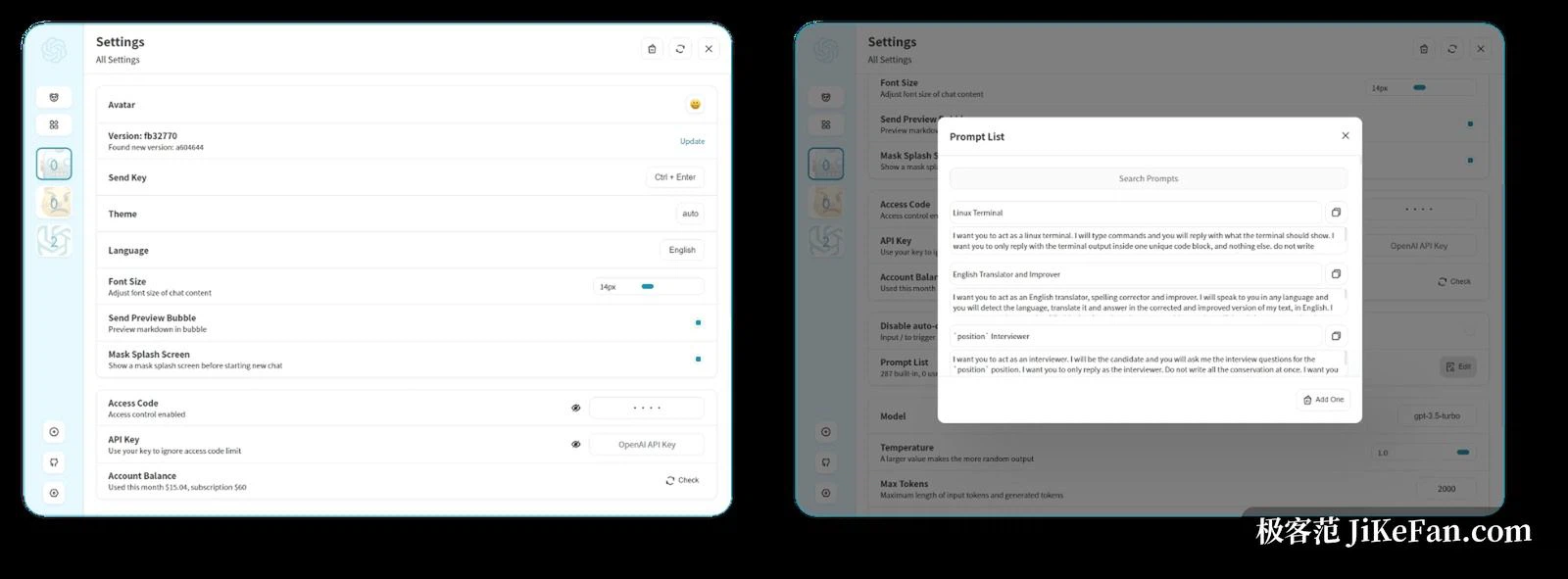
In the spring of 2023, not long after the first assistant had caught public attention, a developer published a project under a longer name with a plain intention: build a nicer conversation interface, so that anyone with their own API key could deploy an assistant that belonged to them. The project later took the shorter name NextChat, and its position shifted from a wrapper around one service to a general client for several providers. Three years on it has collected more than eighty thousand stars on a public code host, making it one of the most watched open conversation front ends.
What role it actually plays
Understanding the thing starts with admitting what it is not. It does not train a model and it does not run one. It is a thin front end. You paste provider keys into a settings panel, and the models those keys unlock appear in a single window; mid-conversation you can switch, ask the same question again, and see the difference in quality immediately. For anyone who compares outputs across models, one window with instant swapping saves more effort than jumping between tabs ever did.
Lightness is the temperament
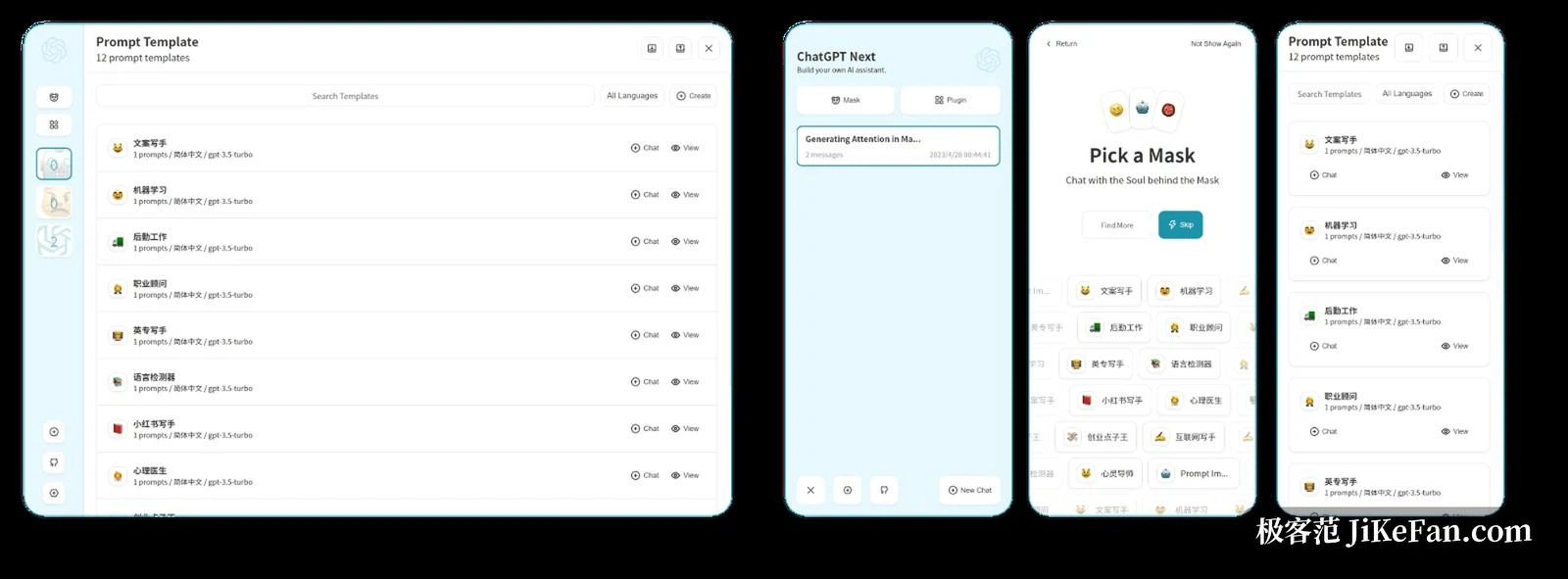
The desktop build sits on a lightweight system shell rather than a bundled browser engine, and the installer comes to roughly five megabytes. The web version ships about a hundred kilobytes before the first screen, so it opens quickly even on a poor connection. All six targets are covered, web, the three desktop systems, and both mobile systems, and on a phone the same experience installs to the home screen as a progressive web app. Set against desktop applications that weigh hundreds of megabytes, this one is nearly invisible on disk.
Privacy is the other place it separates from hosted services. Conversation history stays in browser storage by default, and the key sits in local storage and travels straight to the provider rather than through an intermediary server. For anyone who cares where the data goes, the whole application can be deployed on a server they control, and then nothing leaves the boundary they set.
That autonomy carries its own duty, and it is worth stating plainly: a self-hosted deployment needs an access password configured, otherwise anyone who learns the address can spend your key budget.
Masks, compression and rendering
On features it strikes a decent balance between small and useful. The mask system packs a system prompt, model parameters and an opening line into a reusable role template, and the community has contributed a large library of them, covering everything from code review to copy polishing. Long conversations compress their own history automatically so the token budget is not eaten without notice. Markdown rendering covers formulas, flow charts written in text and syntax highlighting, which makes technical writing comfortable. Recent versions added a separate preview window for generated artefacts, a plugin system and live voice conversation; compile it with tool support switched on and the model can call outside tools mid-conversation, which pushes it from a chat window towards a small platform.
The licence and the honest limits
The project uses the MIT licence, one of the least restrictive terms available: personal use, internal customisation and redistribution of a modified build are all permitted as long as the copyright notice stays. There is no subscription and no account system; model usage is paid to the provider per call, so the bill tracks consumption. For irregular users, bringing your own key and paying by volume usually beats buying a monthly plan for every model.
Its borders should be clear too. It supplies no model capability of its own; every call depends on the keys you configure or on a local back end, so a beginner needs a little patience during setup. The community edition also carries no multi-user permission management, so a team that needs that kind of governance has to evaluate the commercial offering. What this project solves is the question of entrance and experience, not the question of where model capability comes from.
From a wrapper around one service to a client spanning six platforms, the evolution tracks how multi-model use itself moved from fragmentation to aggregation. If you already hold keys for more than one provider, or you want a private conversation entrance running somewhere you control, this is among the most mature answers on the lightweight route.
A tool is worth what it lets you choose, not what it decides for you. What this one does is hand the choice of who does the thinking back to the person holding the question.