
Metaso answers a query with a cited outline instead of a page of links
Summary
No ads, straight to the result: pick one of three depths, search across the web, a document library, academia, images, video or podcasts, and get an answer broken into sections with a source marker on every claim.
Recommend- Name
- Metaso
- Version
- 20260917
- Pricing
- Free
- Open source
- Proprietary
- Operating system
- Web
- Website
- https://metaso.cn/
- Updated
- 2026-10-06 22:45
Searching for material spends more than half its time skipping ads and opening links that turn out to be irrelevant. Metaso turned that complaint into its headline: no ads, straight to the result. The front page fits the slogan, a search box, the feature entries and the filing number onto a single screen.
Three depths, six scopes
Under the box sits a selector with three intensities: concise, in-depth, and deep research, with in-depth chosen by default — checking one fact and building a case can be treated as different jobs. The scope covers the whole web, a document library, academia, images, video and podcasts, so text, pictures and audio arrive through the same door. The academic scope has been the most granular, split into Chinese and English collections with filters for medical databases, national core journal lists and the quartile rankings that research evaluation leans on.
The feature entries sit on the first screen too: a learning mode, video generation, slides, file upload and an API.

The answer arrives as an outline
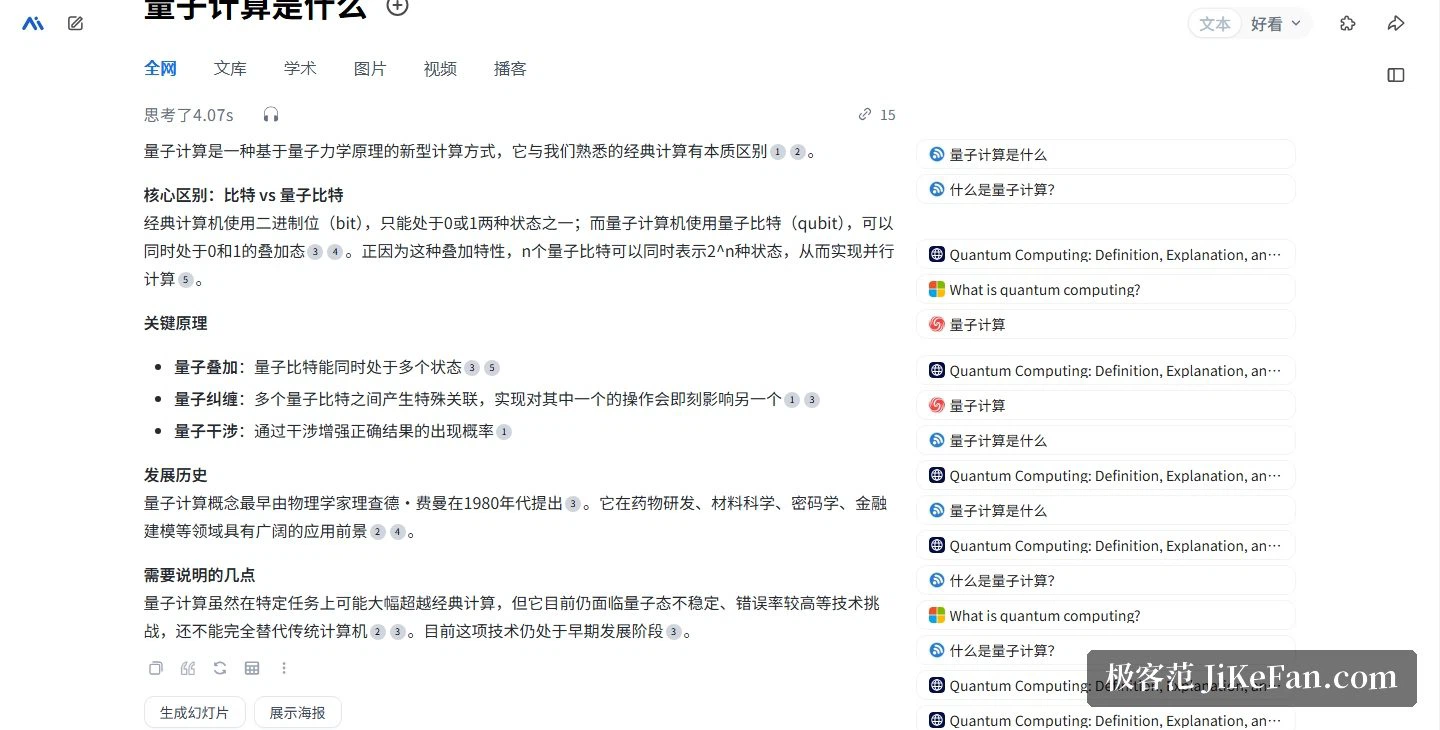
Results are laid out as sections of bullet points. Asked what quantum computing is, the reply split into core differences, key principles and history, with a source marker beside each conclusion and a footer noting that the content is AI-generated and should be checked carefully.
Above the answer the page shows how long it thought — 4.07 seconds in the test — and how many sources were cited, which turns transparency into a number rather than a claim. Three tabs hang beneath the text: sources, mind map, outline, while a sidebar lists the cited pages and matches them to the markers one for one.
Deep research thinks before it searches
The deep path is described as building a framework first, then searching and integrating material, with several lines of follow-up query iterating until the logic closes — a multi-round pursuit rather than a single exchange. Two entries sit under the result box, deep research and an interactive page, so an ordinary search can be upgraded on the spot, and the interactive page presents the answer as something you can click through.
Whatever was found can also become a deliverable: the result page offers buttons to generate slides or a display poster, keeping the route from question to presentation inside the product.
Study, voice and the open door
A separate mode built for learning explains material within a page range you specify, capped at 20 pages, so a handout can be taught page by page. On voice, the banner promises no typing needed and a 0.5-second transcription that comes back organised. For developers there is an API entry beside the other features, and the upload entry turns your own documents into searchable, answerable material, with a private library and public search sharing one box.
Even video generation made the front page: a banner prices it at 0.09 per second and tags the entry as new.

Operator and compliance
The footers tie the family together. The search site carries one registration number and the sister writing product carries the next one up, both under a single filing master number, which makes them the same registered entity. The writing product's footer also lists its generative-service filing and large-model registration, so the compliance record is publicly checkable.

Who it suits
The layout implies three frequent scenes: a researcher using deep research to break a question apart and chase the literature; a student having a handout explained page by page; and anyone facing a presentation who turns a search result into slides or a poster.
Two honest notes. First, the footer states that content is AI-generated and must be checked carefully — the source markers give you a route to verification, but the verifying is still yours. Second, the finer academic filters hide inside an expandable scope panel, so the first session is best spent opening those tabs before trusting them.
When a search result is already a sourced outline, searching stops being about finding a lead and becomes about receiving a half-finished draft.