
Tiangong grew from an AI search box into a task-taking agent workspace
Summary
Search is now one entry in a wider workspace: an all-round assistant takes a described task, picks skills or experts to run it, schedules it, and can be wired into a chat tool so the work happens unattended.
Recommend- Name
- Tiangong
- Version
- 20260917
- Pricing
- Free
- Open source
- Proprietary
- Operating system
- Web
- Website
- https://www.tiangong.cn/
- Updated
- 2026-10-05 18:02
Search for the product's old name and you land on the official site — except the page title now reads super agent, and the interface greets you with an assistant that promises to open a new way of handling tasks in one step. Search is still a first-level entry in the left navigation, sitting beside a knowledge base, a design agent and a video agent, all of it wrapped in a workspace built around tasks.
The footer is where you check you are on the real thing: copyright notice and the filing numbers of the operating company.

Hand the task to the assistant
The main screen offers three entries — new project, scheduled tasks, experts and skills — plus the ability to connect a chat channel and configure the assistant itself. The prompt box asks you to describe the task, type a slash to choose skills and actions, or an at-sign to reference a file, so one field takes instructions, capabilities and material at once. A model-selection option inside the box lets the system match the model to the job.
With scheduled tasks, the assistant runs work at a set time; with a chat channel connected, it takes up residence inside the messaging tools people already use, which is what makes unattended running possible.
Skills cover the usual office output
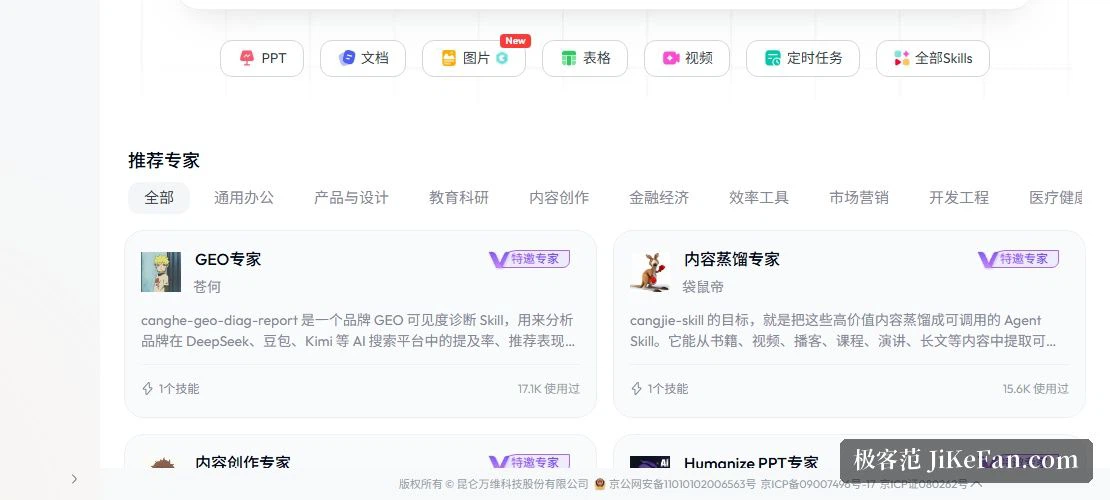
The skills row lines up slides, documents, images, spreadsheets, video, scheduled tasks and a full skill list, with the image skill flagged as new — the catalogue is still growing. Skills can be called directly inside a task or combined by handing the work to an expert below.
An expert market organised by profession
Experts are grouped into nine domains: general office work, product and design, education and research, content creation, finance and economics, efficiency tools, marketing, engineering, and health. The domain tags sit above the cards, because browsing by industry is the intended main path. Each card publishes both its skill count and its usage count — one skill used 17.1K times, ten skills used 17.8K times — so the choice comes with real traffic behind it.
A few invited experts give the flavour: a research-paper expert with 4 skills and 148.4K uses; a design-delivery expert with 3 skills and 181.1K uses; a short-form content expert covering topic selection, headline tuning and drafting, at 18.6K uses.

Three of them are worth spelling out. A brand visibility diagnosis analyses how often a brand is mentioned, recommended and discussed across the major AI search platforms, working through four stages from baseline research to visibility, sentiment, and a score with recommendations, and it can output a full HTML report with competitor analysis or a cloud document. A presentation expert arranges material around how an audience's state shifts, producing either an HTML deck with a script and timings, or a native file where every element stays editable, with generated images and charts alongside. A third distils methodology out of books, videos, podcasts, courses, talks and long articles, turning it into a skill that can be reused, combined and revised.
From search box to task platform
The search entry survives in the navigation and the help centre — the product started as AI search, and what the official pages show now is a platform combining search, creation and agent tasks: whatever a search turns up can be carried into the knowledge base, design or video agents for further work, so a result becomes raw material for the next task.

Who it suits
The layout points at three kinds of people: those who want to escalate a search into a research task; office workers looking for a ready-made AI workflow by profession, since nine domains cover operations, sales, product and research fairly well; and heavier users who want the assistant living inside their messaging tool with tasks running on a schedule.
Two honest notes. First, the site now tells its story through the super-agent framing, so anyone hunting for the plain search box of the early days has to go in through the navigation entry, and what they find will not look like what they remember. Second, the expert market is stocked by third-party invited contributors; the usage figures and skill lists are published, but it is still worth trialling one on your own task at small scale first.
Once a search engine learns to accept tasks, the contest moves from where the answer can be found to who can finish it.