
Monica review: an assistant that sits in the browser sidebar you already have
Summary
It asks for neither a new app nor a new tab. The assistant is a sidebar over whatever page you are reading, select text and it explains, translates or summarises, and the model behind the answer is picked from a dropdown. The pricing is where the interesting part sits.
Recommend- Name
- Monica
- Version
- 20260918
- Open source
- Proprietary
- Operating system
- WebWindowsmacOSiOSAndroid
- Website
- https://monica.im/
- Updated
- 2026-10-06 20:13
Half the tools reviewed in this series so far were account-based, half were desktop programs. Monica sits somewhere odder. It does not ask you to replace your software, and it does not ask you to open a new site; it packs a whole row of AI capability into the browser sidebar. It calls itself an all-in-one AI assistant, with a three-word subtitle: personalised, fast, free. The body copy is more concrete, saying it calls on several frontier models to strengthen chat, search, writing, image generation, video generation and coding, while the surfaces run from a Chrome and Edge extension to phone apps and a desktop app.
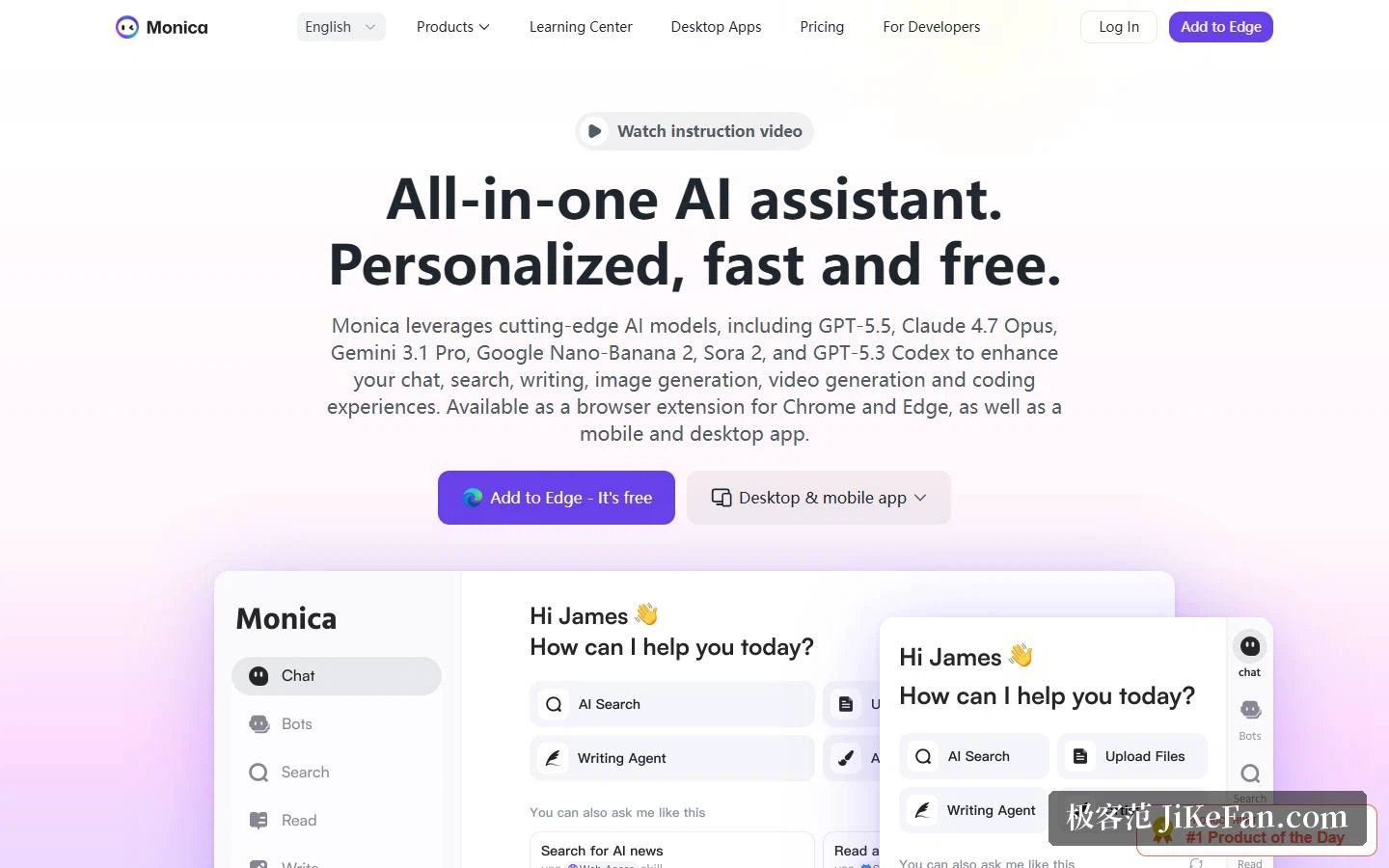
What the entry point looks like
The homepage splits the interaction into two layers. One is the AI sidebar: one click on any page brings up every function without leaving it. The other is a smart toolbar, where selecting a passage lets you ask it to explain, translate or summarise. The homepage compresses this into a line about working where you already work. Alongside sit a writing assistant that drafts or rewrites inside any page, and a page enhancement that reads an email and suggests a reply. Put another way, it behaves as a layer over the workflow you have rather than another product you have to open on purpose.
It trains no models, which is precisely the pitch
The lineup listed on the homepage spans the flagship and lightweight releases of several frontier labs, and the download page shows a different combination again. Further down, the footer sorts a long list by category, one for conversation, one for images, one for video. That explains the route this product takes: it trains nothing itself and instead gathers several frontier models in one place for you to pick. The benefit is direct. One family may suit the tone of a piece of writing, another may be steadier on a long summary, and drawing goes to a model built for images, with the cost of switching being one click in a dropdown.
Eight capabilities and a few concrete people
The homepage groups capability into eight buckets: AI conversation, AI summarising, AI writing, AI search, AI translation, AI drawing, a bot platform and AI PowerUP. The audiences are named just as concretely: founders, analysts, researchers, developers, marketing, customer support. Four sample bots illustrate the idea. A market intelligence guide runs competitor analysis and tracks trends; a strategic thinking partner takes business questions apart; a document analysis bot pulls the essentials out of contracts and reports and flags key clauses; a contextual email assistant extracts the point of a message and drafts a suggested reply. The pattern it is going after is visible: the repetitive part of knowledge work that consists of reading a passage and then writing another one.
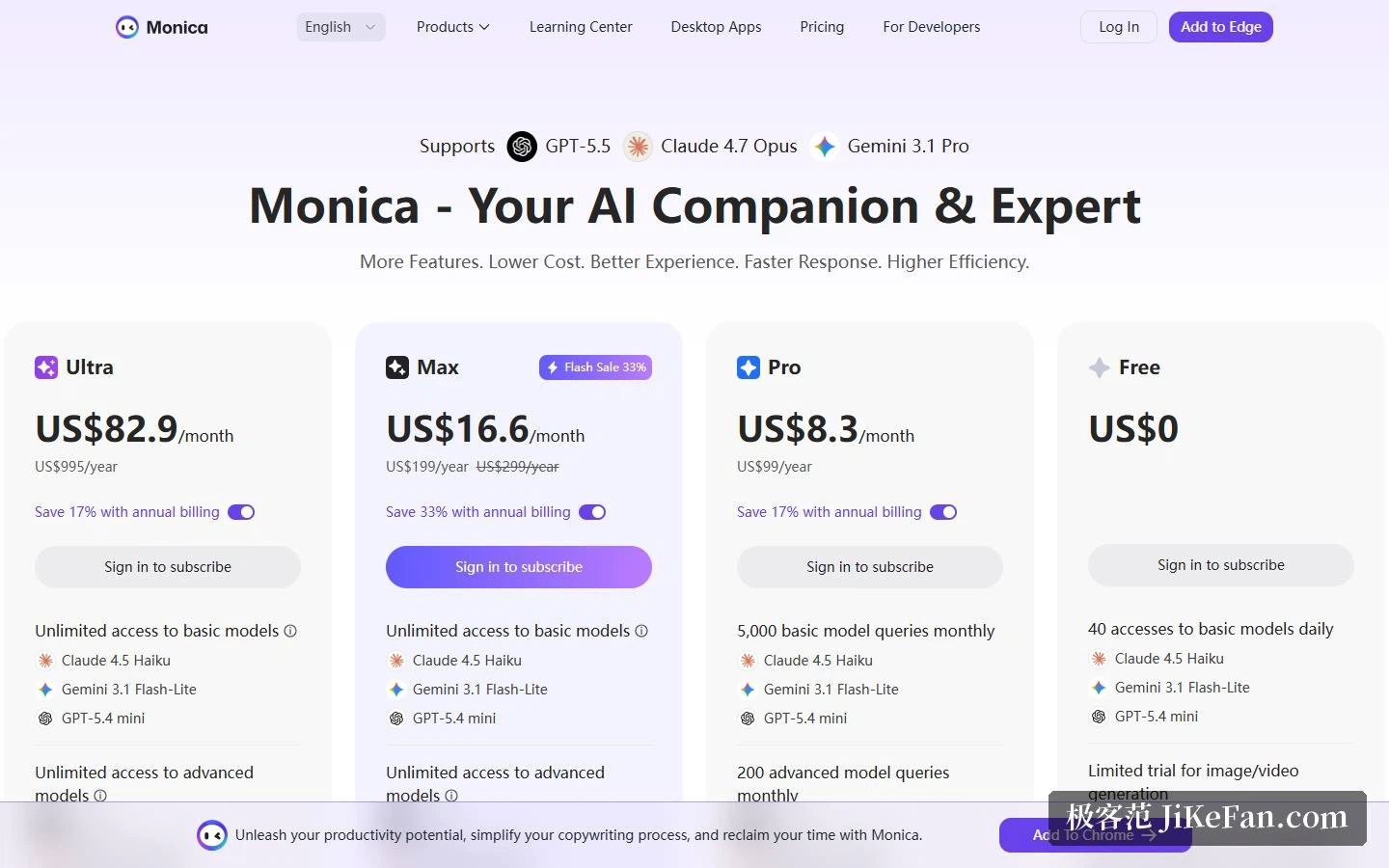
How far the free tier reaches
The four columns on the pricing page are clear. The free tier costs 0 dollars and allows 40 visits to the basic models each day; writing, translation and summarising driven by those models work directly, while image generation, video generation, document chat and the agents get only a limited trial. The device limit is 3. The underlying models are the lightweight releases from three vendors. The free tier is therefore best understood as a sample pack: enough for everyday questions and translation, but the moment you want a drawing, a PDF read or an agent doing work, you meet the trial boundary.
Three subscriptions: quotas and credits are the difference
The three paid tiers can be read side by side. Pro is 8.3 dollars a month or 99 a year, with 5000 basic model queries a month, 200 advanced queries and 1500 advanced credits. Max is 16.6 a month or 199 a year against a list price of 299, unlimited on both model classes, with 4500 advanced credits, marked on the pricing page as a limited-time 33 percent discount. Ultra is 82.9 a month or 995 a year, also unlimited on both classes, with 20000 advanced credits. Annual billing saves 17, 33 and 17 percent respectively.
One detail deserves its own paragraph. Max was previously called Unlimited, and the FAQ states plainly that the tier is still in testing, with the name changed but the benefits unchanged. Ultra was added after the agents shipped, on the reasoning that use cases had grown more complex and expected token consumption had risen, so anyone needing a higher ceiling got another option. The higher tiers also add priority email support, unlimited requests at peak times and twice the response speed. Pro, meanwhile, has a clear job: for steady usage that does not need unlimited model switching, quotas buy a lower monthly price.
Heavy work is billed in credits
A subscription actually buys two things: model quotas and advanced credits. The pricing page is detailed about the second. Four agent functions draw on credits, namely deep research, slide generation, the image studio and browser operation. Image generation, video generation, asset creation, real-time generation, the real-time canvas and smart image tools are billed the same way. So everyday chat runs on quota while the genuinely compute-hungry tasks are charged in credits, and the spread between tiers, 1500, 4500 and 20000, largely decides how much heavy work you can do.
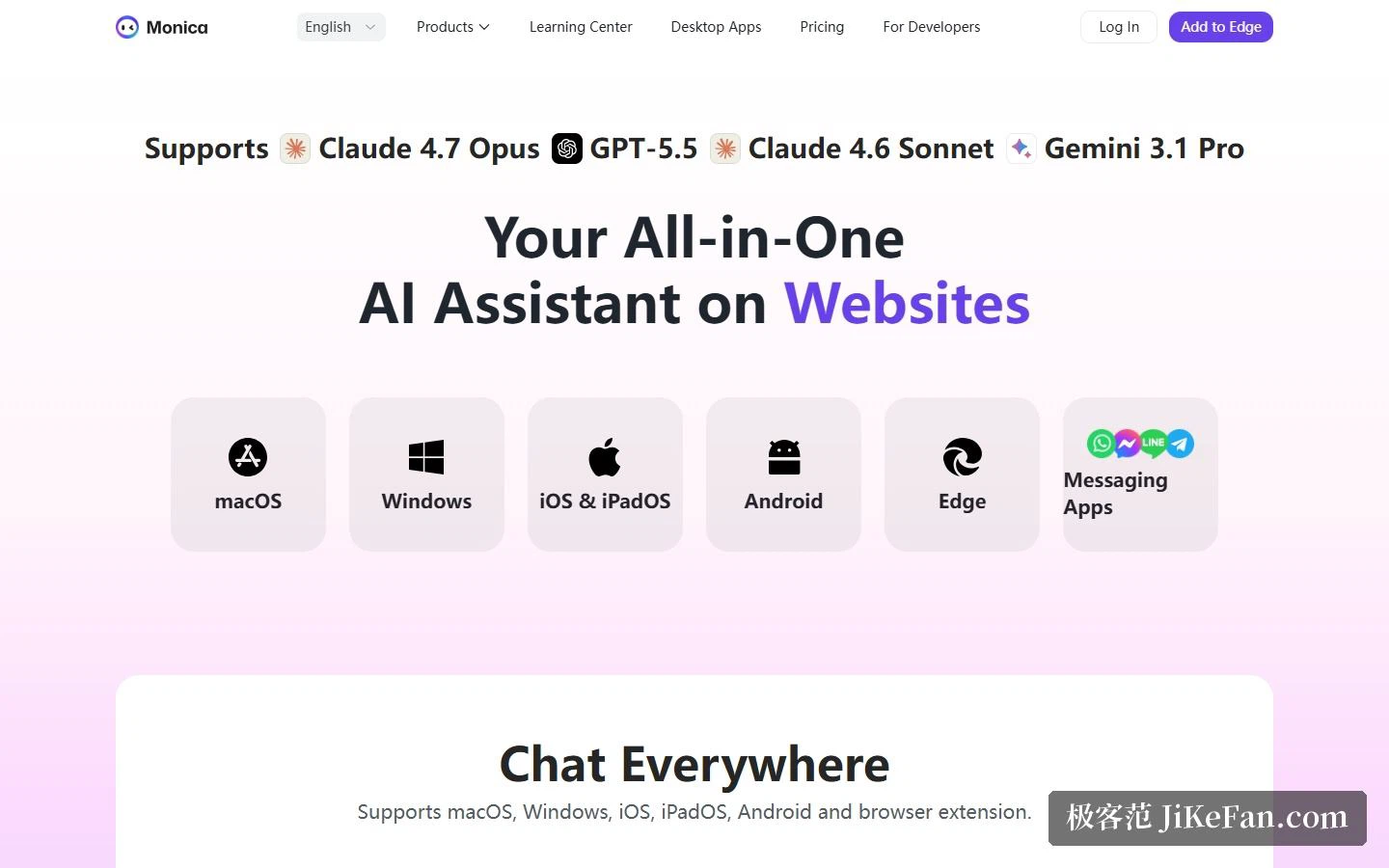
Cross-device got a page of its own
The download page holds an entry each for macOS, Windows, iOS and iPadOS, Android, plus the Edge extension and the messaging app, and its conclusion is a single phrase about talking anywhere. The existence of that page says continuity is a point worth emphasising: on one account, a question half-asked in the sidebar on the office computer can be carried on from the phone. For someone hopping between devices all day, that matters more than one extra feature.
Who it suits, and two things to watch
Three groups fit. Anyone reading a great deal on the web every day can select a passage and ask for an explanation, skipping the copy-paste elsewhere step. Anyone who wants to compare answers across model families finds switching is a dropdown away. And anyone who earns a living by writing gets drafting, rewriting, grammar checking and translation in one sidebar. Conversely, if the need is heavy image work or long research runs, work out the credit consumption before choosing a tier rather than looking at the monthly figure alone.
Two cautions. The first is uneven credit consumption: chat and translation run on quota, while deep research and image or video generation are charged in credits, so frequent use drains them faster than expected; the good news is that the gap between tiers is wide enough to start on Pro and find out. The second is that the account rules are strict. Use is explicitly personal, and while ordinary use of the built-in assistants counts as personal, account sharing, multiple people on one account, or non-personal automation and bulk calls can lead to suspension or restriction. The device limits per tier are 3, 5, 5 and 10, so a team sharing one account will not work.
One piece of background. The footer is signed by a company registered in Singapore with the usual PTE. LTD. suffix, and the site also carries an entry point and a comparison page for a general-purpose agent tool from the same team: one product puts AI onto the browser, the other runs a task to completion.
A good assistant should not make you change how you work. It should not be another site to open on purpose, but one extra strip inside the page you already have open.