
Harpa AI review: it summarises video and answers mail, and bills by the million tokens
Summary
One shortcut calls several frontier models onto any page, and the engine underneath is what turns them into page-aware commands, mail drafts and scheduled automation. The meter runs on tokens, so the tier you pick decides how much work you can hand over.
Recommend- Name
- Harpa AI
- Version
- 5.4
- Open source
- Proprietary
- Operating system
- Web
- Website
- https://harpa.ai/
- Updated
- 2026-10-06 08:37
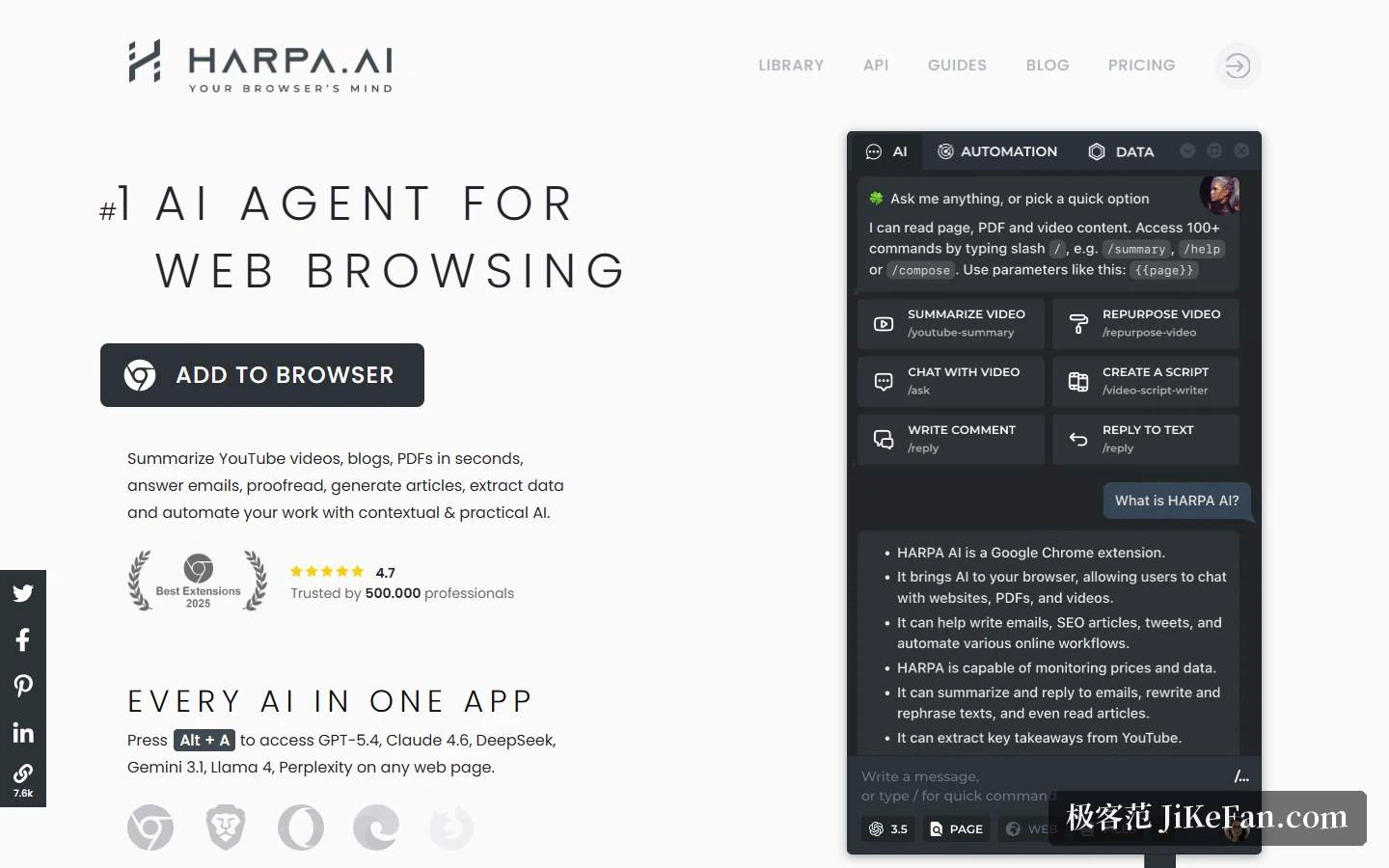
After a few browser assistants, two routes become visible. One puts the weight on asking quickly; the other starts moving towards acting for you. Harpa AI belongs to the second. Its homepage calls itself an AI agent for web browsing, the subtitle compresses model aggregation into one app holding every AI, and beside it hang a 2025 badge from an extension award list, a rating of 4.7, and a line saying 500000 professionals use it.
One shortcut, several models
The doorway is a key combination. Press Alt + A on any page and several frontier models from different providers are called up. The company describes its own engine as a hybrid of browser automation and artificial intelligence, compatible with the major model providers: the models are swappable parts, and the product is the engine that wires them into a web page.
Connections come in layers: sign in with a conversational account, supply an interface key, or use the hosted cloud models. That suits anyone watching cost, since a subscription alone works through the official channel while your own key bills by consumption.
What it actually does
The homepage lists a dense set of abilities. Video summaries pull out the key points and jump to timestamps, and the video can be questioned afterwards. The answer engine returns cited responses beside search results and takes follow-up questions. The mail assistant sorts incoming messages, summarises long threads and drafts replies in your tone. The writer imitates your voice across mail, direct messages, posts, articles and cover letters. Page monitoring checks sites on a schedule and tells you what changed.
Below that runs a longer list: over 100 ready-made commands that read the page they run on, 25 writing frameworks that can carry an article to 25000 words, a two-character prefix that calls commands up with single letters for finishing a draft, checking grammar, rewriting, translating, searching and explaining, an SEO audit with long-tail extraction, price and restock alerts, scraping any site and triggering automation chains, custom agents living in the browser, and wizards for image prompts and language learning. Compressing frequent actions into single letters says something about how seriously the keyboard was taken.
The name is worth a line: the FAQ spells HARPA out as High Availability Robotic Process Automation, positioning it as a virtual assistant joining AI to automation, and in places as digital labour for enterprises.
Privacy: local models, no logging
On privacy the company is unusually specific: local open models are supported, conversations and actions are not logged, the service is aligned with European data protection rules, and any model of your choosing can be attached. The FAQ adds that it runs on the machine itself, does not send or store site data on remote servers, runs no advertising and sells no data, and forwards a prompt transparently to the provider that processes it. Local models are an option here rather than the only path, so the strength of the privacy can be tuned to need.
Pricing: three tiers, metered in million tokens
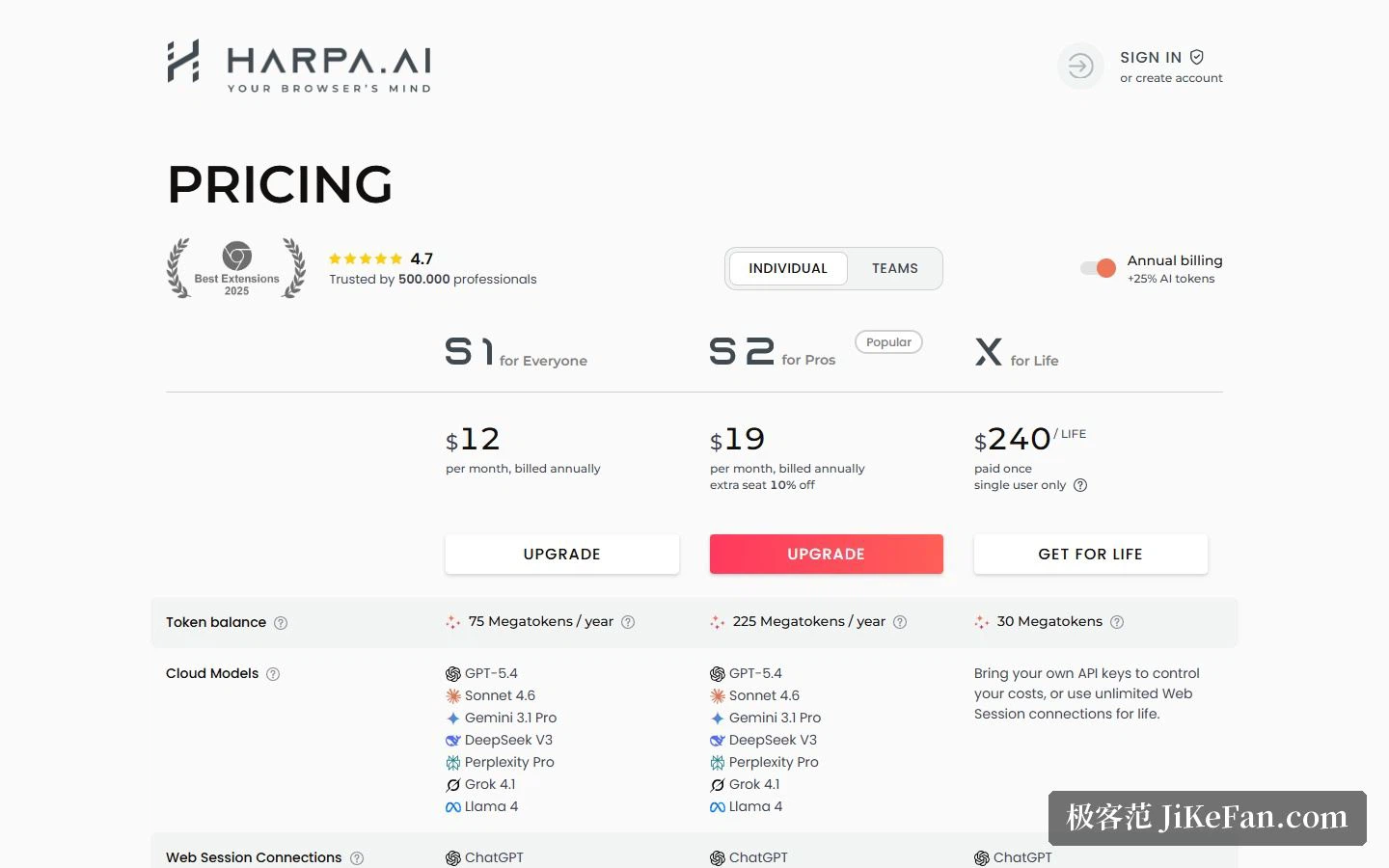
Pricing has three tiers laid out in one table. S1 aims at everyone, 12 dollars a month on annual billing with 75 million tokens a year. S2 aims at heavier users, marked as popular, 19 dollars a month with 225 million tokens a year and a tenth off additional seats. The X tier is a one-off 240 dollars for a lifetime licence, single user, with 30 million tokens. Switching to annual adds a further 25 percent of tokens.
The unit needs explaining. By the company's own account, a million tokens is a million input tokens on an efficient model, roughly 750000 English words of input text; output tokens bill at 3 times the input rate, and premium models consume more on every request. The conversion hints are the useful part: a million tokens is about 100 command runs, video summaries or page-aware questions, or, in chat messages, 300 on a premium model and 3000 on an efficient one. The reason for metering tokens rather than counting actions is stated plainly, since the size of a single query varies enormously, tokens are more transparent, and the user can see what each query consumed.
The functional gap between tiers is narrow. Scheduled commands and advanced automation start at S2. Web session and interface connections exist on all three, as do vision, PDF and file summaries, cross-device history, custom reusable commands, and price and page monitoring. Only the cloud model column splits in two: subscription tiers hand over a row of hosted models, while the lifetime tier leans on your own key or unlimited web sessions. The money mostly buys token allowance and whether automation can run on a schedule.
Free tier and after-sales
The free tier is a demonstration allowance: web session connections reach three mainstream chat services, limited to 10 messages a day, with 100 AI command runs as a ceiling, and preset commands, custom commands and page monitoring all available.
Billing runs through a third-party payment provider, taking major credit and debit cards, a well-known wallet, bank transfer and a prepaid card. Subscriptions can be cancelled, the payment method switched or an invoice requested from the billing page at any time. Two things are worth knowing in advance: no discounts and no refunds, on the stated grounds that every capability has a demonstration period, so try before buying; but if a lifetime purchase is later converted to an annual subscription, its price is credited against the bill, which keeps that upgrade path open.
The automation library and outward interfaces
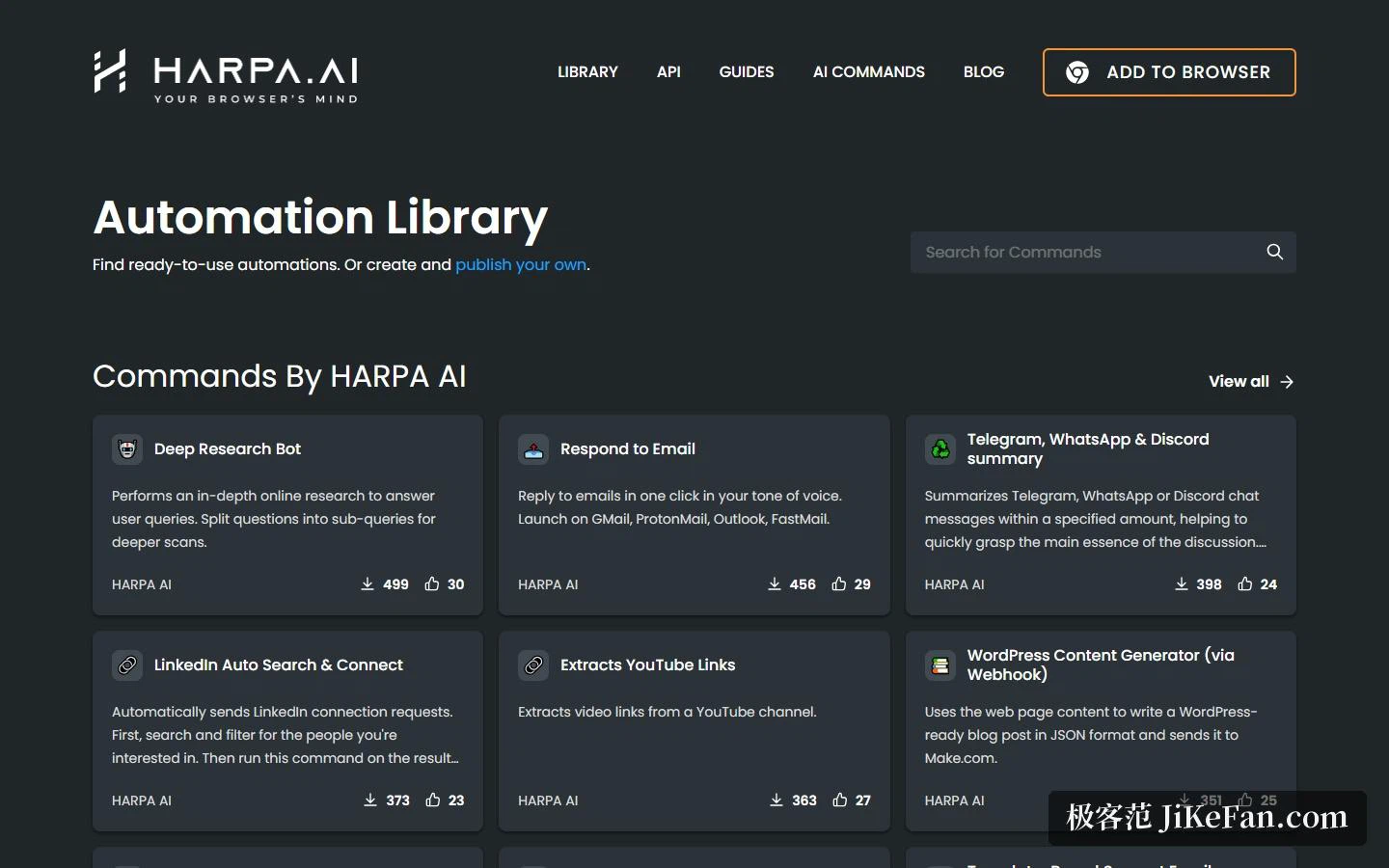
Ready-made commands live in a library. Some are published by the company, such as a deep research bot, a reply in your tone written in a single step, a social digest and a professional-network search-and-connect routine; others are written and shared by community members. Each carries an install count and a like count, sorted by popularity, so anyone unwilling to compose prompts can install one and go.
Teams get a different vocabulary. A space is a workspace that holds commands, S tiers let several members share them, and a space is bought and billed by member count, so what is shared is the commands rather than an account. Outward there is a browser orchestration interface that connects through the common automation platforms or a plain REST call, and the engine runs in nodes, one browser profile per node, with no cap on the number of nodes. For a team that already has automation flows, that route is far more practical than clicking a browser by hand.
Who it suits, and what to watch
Three groups. Anyone reading a lot of long material on the web finds video summaries, page-aware questions and the answer engine a real saving. Content and marketing roles get writing-style imitation, SEO audits and long-form generation. And teams with repetitive browser work can hang scraping, form filling and monitoring onto existing flows through the library and the interface.
Two cautions. Token burn swings wildly with the task: chat messages are cheap, while page-aware questions, video summaries and automation sit in another order of magnitude, so estimate monthly use from the official conversions before choosing a tier if automation runs continuously. And although the product stresses running locally and logging nothing, prompts are still forwarded to the model provider, so with sensitive material you have to decide in advance whose hands the data passes through.
The early browser assistants solved asking quickly, and the next generation started solving acting for you; what decides whether one stays in a workflow is usually the invisible part, where the data goes and how the bill is counted.