
NetEase Filmly: A Phone Player That Turns Cloud Drive Files Into a Library
Summary
NetEase Filmly is a personal media library app for iPhone, iPad and Android that plays video stored in cloud drives, recognises it automatically, builds a poster wall, and leaves local files out of scope.
Recommend- Name
- NetEase Filmly
- Version
- 20240525
- Pricing
- Free
- Open source
- Proprietary
- Website
- https://filmly.163.com/
- Updated
- 2026-10-06 13:45
The storage problem was solved; the watching problem was not
NetEase Filmly is a personal media library app from NetEase for iPhone, iPad and Android, and it exists because of a shift that is easy to miss. People used to keep a collection of films and series on a disk at home, which meant buying a small server, filling it with drives, keeping it running and hoping it never failed at the wrong moment. Cloud drives removed all of that: the file goes up, and it can be watched from anywhere. What the cloud drive did not provide was anything that looks like a collection — a folder of files with technical names is storage, not a library.
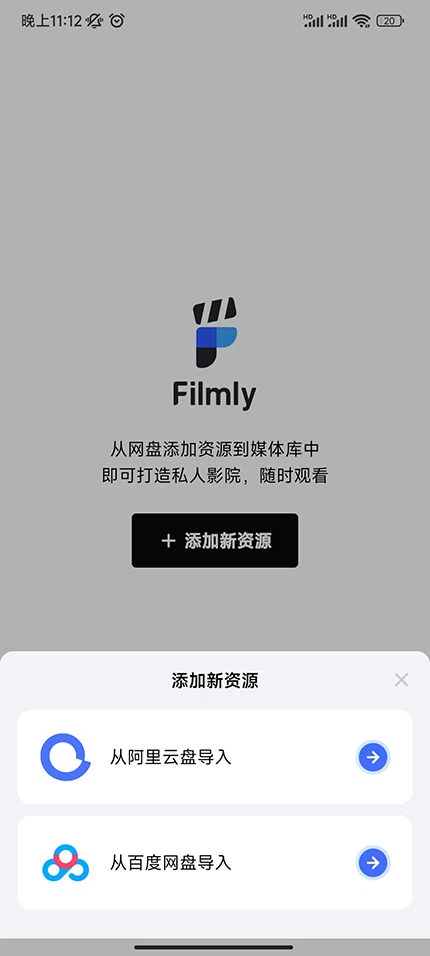
So the app's job is narrow and specific. It reads video stored in cloud drives — Alibaba Cloud Drive and Baidu Cloud Drive — and presents it as a set of titles with covers, descriptions and a playback screen. Storage is somebody else's problem; what the app adds is the part that turns a directory listing into something a person wants to browse.
Scraping is guesswork with a very good hit rate
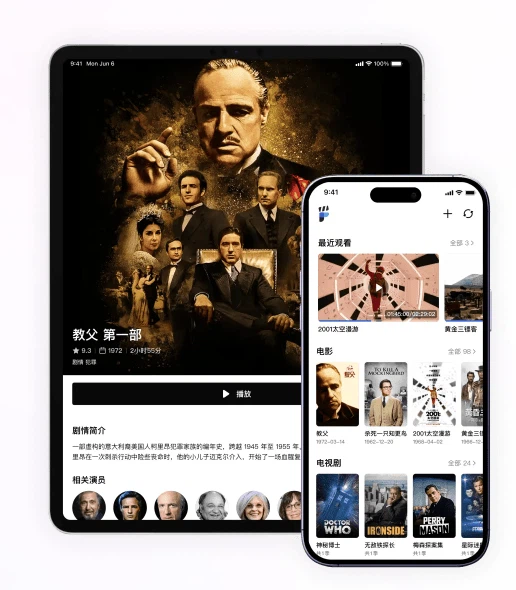
The mechanism behind that transformation is conventionally called scraping: take the file name, extract from it the title and, if present, the year or the episode number, search a public database for a match, and pull back the poster, the synopsis, the cast list. When it works it feels like magic; when it fails it is immediately obvious, because a title becomes a filename again.
It is worth knowing that the whole thing rests on the file name, which means it can be improved from the outside. A file called something like a string of random characters will never be recognised, no matter how good the app is. A file that carries the title and the year in any reasonable form will be matched almost every time. The habit of naming things properly pays off twice: once in the app, and once in every search box that will ever be pointed at that folder.
There is a second, quieter benefit. Because the metadata is fetched rather than typed, the library stays consistent — every title has the same fields, which is what makes sorting and browsing possible at all. A hand-made list of films is almost always inconsistent in exactly the ways that prevent it from being sorted.
The poster wall is not decoration
Turning a list of filenames into a grid of covers changes behaviour, not just appearance. A list is something to search; a wall is something to scan, and scanning is how people decide what to watch when they have not decided in advance. It also makes the size of a collection visible, which is the difference between owning three hundred films and suspecting you own three hundred films.
What a phone player actually has to get right
The controls listed are unglamorous and they are the whole experience on a small screen: a button that forces landscape orientation, because phones are held upright by default and video is not; playback speed, because some things are watched at normal speed and others are not; a jump backwards and forwards by a fixed interval, which is what the hand actually wants when it missed a line; and switching between audio tracks and between subtitles, which is the difference between watching a film and watching a film in a language you can follow.
What is missing is as informative as what is present. There is no online subtitle search, so subtitles have to come with the file. For anyone used to a desktop player that fetches subtitles from a database on demand, this is a real gap; for anyone who already has the files prepared, it is invisible.
The limits are stated, and they are unusually honest
The app plays online video from cloud drives. It does not play local files, and it does not handle other kinds of resource. That is a striking limitation in a media player, and it is also a clear statement of what the product is: not a universal player with a cloud feature bolted on, but a viewer for one specific arrangement of storage. Whether that is acceptable depends entirely on whether the person's files are already in the cloud, which for a growing number of people they are.
The account model deserves the same plainness. There is no sign-in with the company's own account; registration is by phone number, and binding a cloud drive requires a code sent by text message rather than a redirect to the drive's own authorisation screen. That is more friction than the usual single sign-on flow, and it also means the app is holding a verifiable phone number and an access relationship with a storage provider. Whether that trade is worth it is a judgement about convenience against data, and it is better made knowingly than by tapping through a screen.
Two tabs is a design decision worth noticing
The interface has exactly two sections: the library and a personal one. In an era where every application arrives with five tabs and a discovery feed, this is close to an argument. Navigation depth is a cost paid on every single visit, and a media app is visited to do one of two things — find something to watch, or watch it. Anything that does not serve those two actions is a tax on both.
Where it fits
This is for someone whose films and series already live in a cloud drive, who watches on a phone or a tablet rather than a television, and who wants the collection to look like a collection without maintaining a server. It is not for someone with a local library, not for someone who needs subtitle search, and not for someone who wants a single sign-in. The narrowness is not a defect to be apologised for; it is the reason the app is small enough to be pleasant.