
DB Browser for SQLite: A Spreadsheet for a Database That Is Just a File
Summary
DB Browser for SQLite is an open-source graphical tool for SQLite files: browse and edit records like a spreadsheet, change the schema, run SQL with live results, import and export CSV, and encrypt with SQLCipher.
Recommend- Name
- DB Browser for SQLite
- Version
- 3.48
- Pricing
- Free
- Open source
- Open source
- Website
- https://sqlitebrowser.org/
- Updated
- 2026-10-06 17:49
A database that is a single file changes everything
DB Browser for SQLite is an open-source, graphical tool for working with SQLite databases, available on Windows, macOS and Linux, and the design of the tool follows directly from the design of the thing it opens. SQLite is not a server. There is no process to connect to, no user account, no port, no daemon running quietly in the background; a database is one file sitting in a folder, and the program you point at it has full responsibility for both the structure and the contents.
That property is why SQLite ends up inside so many applications — phones, browsers, note apps, desktop software of every kind — and why a tool for inspecting it is genuinely useful rather than merely convenient. When something goes wrong in an application that keeps its state in a local file, this is where the state can be looked at. When a project needs a small amount of structured data and no server, this is where the file gets shaped.
The spreadsheet metaphor is doing real work
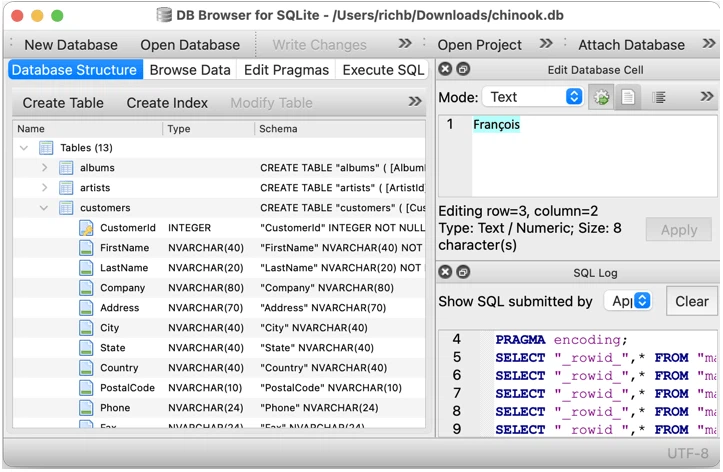
Records are shown in a grid and edited in place, in the manner of a spreadsheet, and that is more than a friendly gesture toward people who do not know SQL. A grid makes the shape of the data visible: how many rows there are, which columns are almost always empty, which values repeat in a way that suggests a missing table. Most schema mistakes are not made by people who cannot write a query; they are made by people who never looked at the data.
The same grid is also the place where a certain kind of damage occurs. Editing cells directly is fast, and it is easy to forget that a value in a grid is a row in a table that something else may depend on. Browsing, sorting and searching before changing anything — looking at what is actually there rather than at what the schema says should be there — is the habit that keeps a direct editor from becoming a direct accident.
Changing a schema is never as simple as it looks
Creating tables, defining and altering their columns, deleting them, and managing indexes is offered as a set of ordinary operations, and the important thing to understand is that underneath, they are not ordinary at all. Relational engines vary in how much they can alter in place, and SQLite's approach to many schema changes is essentially to build a new table, copy the data across, drop the old one and rename the new one. A graphical tool hides that sequence, which is helpful, and also means the copy is happening on real data with nobody watching.
Indexes deserve the same respect for a different reason. An index is a promise about how queries will be answered, and adding one to a large table takes time and space while adding nothing visible; removing one is invisible until a query becomes slow three weeks later. A tool that makes both operations a click has made them cheap to perform and no cheaper to think about.
An SQL editor with results that arrive immediately
Writing a query and seeing its result in the same window is the shortest possible feedback loop, and it changes how people learn SQL. The old arrangement — write a statement in one place, run it in another, read an error, guess — turns a syntax mistake into a mystery. Here the statement and its consequence sit next to each other, which is how the language is actually absorbed: not by memorising grammar, but by seeing what a clause does to a result set.
It is also the honest way to work. A query that runs without error but returns nothing, or returns four thousand rows where one was expected, teaches more in five seconds than a page of documentation. The tool's value is not that it writes the query for you; it is that it never makes you wait to find out you were wrong.
CSV in, CSV and SQL out
Importing from CSV and exporting to CSV or to a script of SQL statements is the least glamorous feature on the list and the one most likely to be used on a bad day. It is also where the sharp edges are. A CSV file has no types: everything in it is text, and whether a column of digits becomes a number or stays a string is a decision made at import time that will be quietly wrong later. Encodings cause the same class of problem, and a date format that is ambiguous in the source file will be resolved by guessing.
Exporting to SQL script is the underrated half. It turns a database into a text file that can be reviewed, versioned and replayed, which is the difference between a binary blob that nobody can inspect and a change that can be discussed. For anyone keeping a small application's seed data in version control, that export is the whole reason the tool is installed.
Encryption is a promise with a sharp edge
Being able to add, change or remove SQLCipher encryption on a database file is a serious capability, and it comes with the property that makes encryption worth having: without the passphrase, the file is not a database, it is noise. That is the point, and it is also the risk. There is no recovery path, no support line and no reset; a forgotten passphrase is equivalent to a deleted file, and the deletion is more final because there is nothing to undelete.
The practical consequence is procedural rather than technical: encryption is best applied when the passphrase is being stored somewhere else at the same time, and best tested on a copy before it is applied to the only version that exists.
A project with a history is a project with a reputation
The tool began as a companion to another database browser, written by an individual developer, and became an independent project through several renamings and years of community contributions. That origin is worth mentioning because it explains a quality that is hard to fake: the feature set reflects what people actually needed while working with these files, rather than what a product plan imagined they might want. Open source here is not a licence label; it is the reason the tool has outlasted several of the applications whose data it is used to inspect.
Where it fits
It fits the developer who needs to see what an application actually wrote, the analyst who has been handed a file and needs to understand its contents before trusting them, the classroom where SQL is being taught and a visible result matters, and the offline machine where a local database is the only data there is. It is not a server administration console, it is not built for many concurrent writers, and it does not pretend to be a replacement for the engine's own command line when precision matters. For the file in the folder, it is close to ideal.