
Mirawork 0.31.1: a Desktop Agent That Finishes the Job and Hands Over the File
Summary
Mirawork is an AI office agent that runs on your own machine and delivers editable Word, Excel, PPT or PDF files instead of chat replies; version 0.31.1 adds completion alerts and file previews.
Recommend- Name
- Mirawork
- Version
- 0.31.1
- Open source
- Proprietary
- Operating system
- WindowsmacOSLinux
- Website
- https://mirawork.com
- Updated
- 2026-11-03 20:20
Mirawork is a desktop agent for office work, with clients for Windows, macOS and Linux and no web or phone version. What separates it from a chat window is the output: instead of an answer, it hands over a file that can still be edited. Version 0.31.1 adds little in the way of capability and spends its changes on the waiting and the handover.
A chat box returns answers; a desk needs a finished file
The break in AI-assisted work is rarely the thinking. It comes after: the reasoning is clear after a few rounds, and the deck for the meeting, the sheet for finance and the report for the manager still have to be laid out from scratch. Mirawork aims at that gap by not stopping at the conversation.
It works on your own machine
According to the vendor, the core runs locally: documents you open, read and edit, and the conversation about them, stay on the machine by default, and only the minimum information needed for a task travels when a web search is required. For people handling contracts, statements and internal material, that claim carries more weight than a feature list. Paid use runs on a membership subscription and usage-based billing, with the tiers listed on the product page.
From one sentence to a file you can still change
The work runs in three steps: establish what has to be finished, which material is at hand, what the task strictly requires and what form the deliverable takes; then discuss the same task continuously, so a later remark such as showing it to management with revenue and regional results in focus does not mean retelling the background; then turn the discussion into real operations, checking while executing, and hand over a result that can be used further.
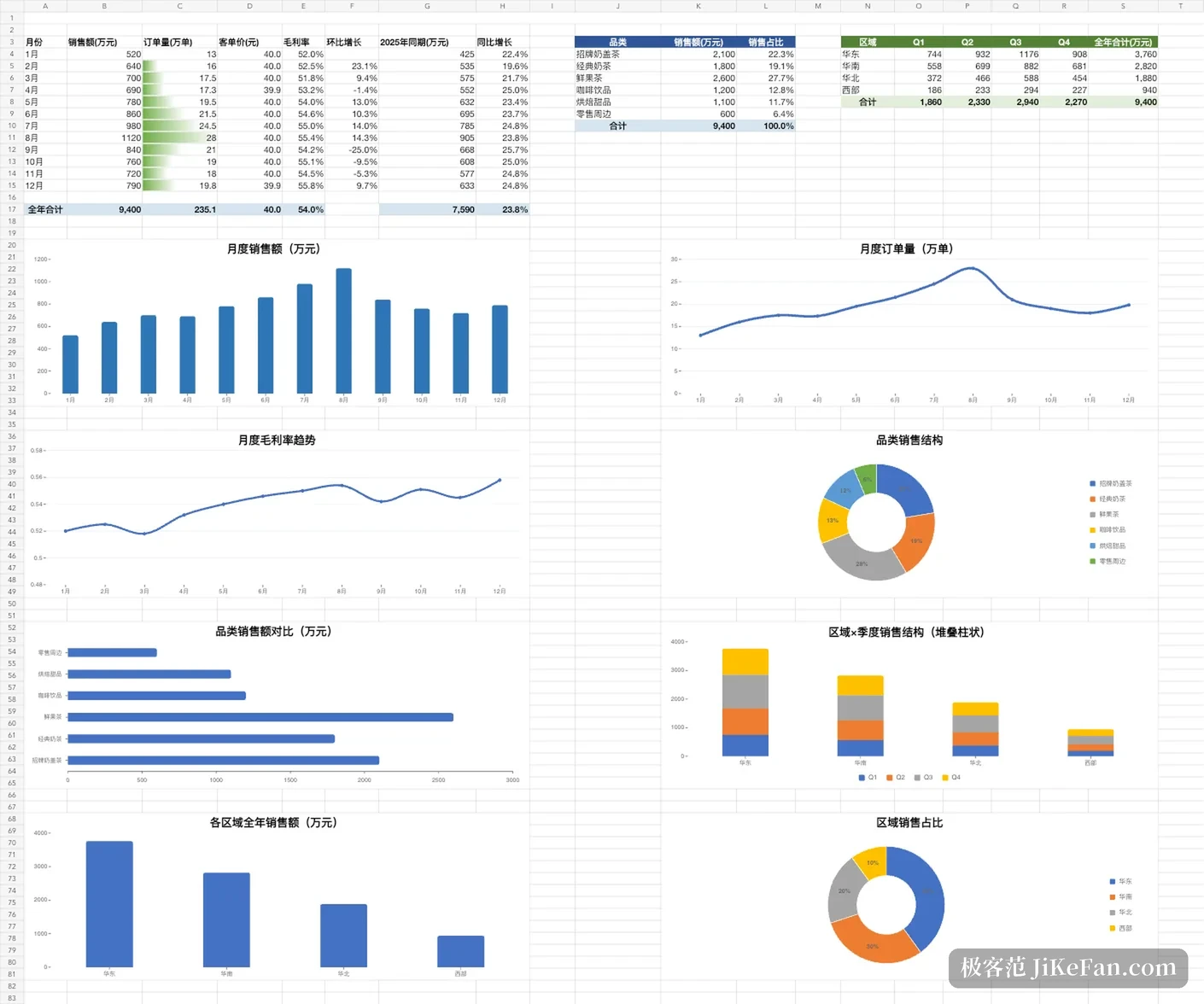
The output covers Word documents, Excel sheets, PPT decks, PDF and pages that open directly in a browser. The samples published by the vendor include three quarterly tables merged into one annual business overview, a brand positioning exercise carried through to an investor deck, and a year of accounts turned into an operating diagnosis, with data checks, structural breaks and chart layout inside one file rather than spread across several replies.
A second family of tasks is tidying: gathering material scattered across folders and comparing it until the contradictions show, or pulling a handful of fields out of scanned documents and meeting notes into one table that can be filtered and calculated. That work needs no cleverness and takes the most hours, which is exactly where an agent earns its place.
0.31.1 works on the waiting
Released on 2 November, 0.31.1 adds no large capability and concentrates on waiting and handover. The most useful part is the completion alert: a long task no longer needs a window watched, a notification arrives when it finishes, opens straight onto the result, and can be directed to a named person. The general settings page was consolidated, with language, notifications, permission policy and the security sandbox in one place, and a prompt for system notification permission was added, so a feature is not left switched on without authorisation.
File handling changed in smaller ways: links in the body carry a type icon so a sheet is distinguishable from a document at a glance and a single click previews it; the context menu offers open-with, reveal-in-place and save-a-copy. On performance, stutter with many images in a session was addressed specifically, repeated work in streamed replies was trimmed, and the two frequent cases, multi-image input and consecutive generation, run more smoothly.

Credits, with a free tier to start
A free edition handles basic documents and simple searches. Paid use splits into Lite, Pro and Max, distinguished by a monthly credit allowance, with search depth, the number of parallel tasks and the count of built-in skills as the other differences; annual payment is discounted and extra credits can be bought separately. Registration brings a credit grant and a daily check-in adds more, which is enough for light daily work. Deep research and large-file analysis are what actually consume credits, and one complex analysis can cost as much as dozens of simple jobs, so it helps to know that before starting.

It is not everything
Programming, image work and search are parts of the office chain rather than specialities, so it does not replace a development environment or a design application. There is no cloud collaboration either; a team editing one document together still needs another route. The right use is the work where the goal is clear but the layout and the shuffling of files are not wanted: weekly reports, summaries, first drafts of presentations, and scattered material turned into something readable. That is enough.