
ONLYOFFICE 10: 50 New Features, 35 Security Fixes, and AI Inside Every Editor
Summary
ONLYOFFICE 10 is a free, open-source office suite that puts an AI assistant inside each of its four editors, splits collaboration into four modular apps, and ships 35 security fixes.
Recommend- Name
- ONLYOFFICE
- Version
- 10
- Open source
- Open source
- Operating system
- WindowsmacOSLinuxWeb
- Website
- https://www.onlyoffice.com
- Updated
- 2026-11-03 20:16
ONLYOFFICE 10 is a free, open-source office suite for Windows, macOS, Linux and the browser. The release adds 50 new features, but the changes worth reading about are structural: an AI assistant lives inside each of the four editors instead of floating in a side panel, the collaboration space is split into four apps you can enable one at a time, and a security pass closes 35 vulnerabilities. The desktop build stays ad-free and works offline.
The assistant sits inside the editor
Most office software that added AI over the past year did it the same way: open a sidebar, copy the text out, wait, paste the answer back. Here the chat tab sits next to the file, inside the editor. Because it reads the open document, the first instruction returns an answer about that file rather than a generic block of text. One-off jobs go through quick actions, such as shifting the tone of a paragraph, while a long-running task can be left with the assistant, which reacts as the document changes. Prompts you reuse are stored in the chat for later.
The document editor generates summaries, rewrites or shortens paragraphs, translates on the page, proofreads and marks key passages, builds a table of contents, suggests headings and lays the page out. The spreadsheet editor writes formulas and explains how they calculate, looks for trends in a data set, produces forecasts, builds pivot tables, cleans inconsistent entries, flags outliers and fills missing values. The presentation editor grows an outline from one sentence, then adds narrative order and speaker notes. The PDF editor answers questions about the file, summarises it, drafts an email from its content and blacks out passages that should not travel.
Where the model runs is a choice rather than part of the deal. Cloud accounts use the vendor's connected AI services; a server deployment can point at any model, including one on your own hardware, so confidential documents never leave the infrastructure you control.
Four apps instead of one bundle
The bigger structural change splits what used to be a single collaboration space into four applications that can be enabled separately: AI Agents, Forms, Rooms and Files, all under the AGPL v3 licence. AI Agents, with MCP server support, runs searches, maintains a personal knowledge base and takes on tasks that need several steps of reasoning. Forms collects data and analyses the replies with AI. Rooms carries the collaboration work, including virtual data rooms with fine-grained permissions. Files handles storage, search, tags and access rights.
For whoever installs it, the point is blunt: you install what you need. The cloud edition turns everything on by default; a server install takes one command, after which modules switch on or off as required, and adding a capability later does not mean replacing the system.
The PDF editor handles content, not just pages
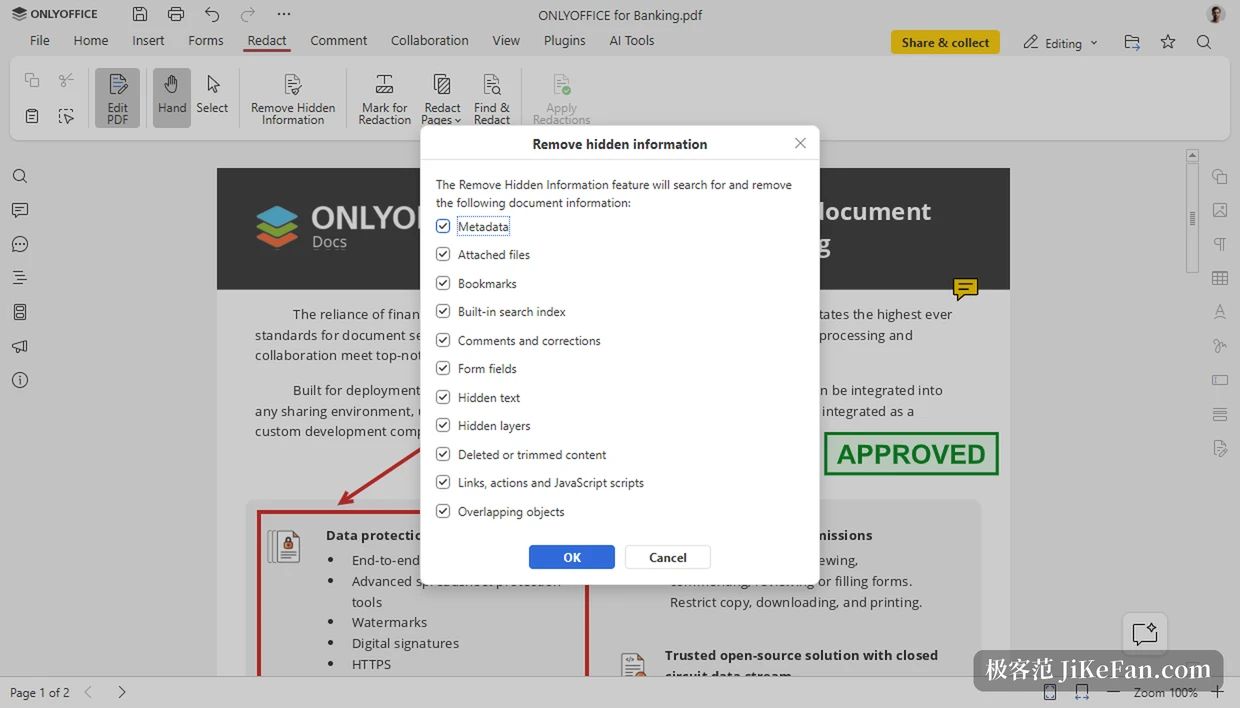
PDF has always been awkward: readable, but any real change meant a round trip through a converter. Version 10 adds tools that shorten that trip. Redaction wipes metadata and hidden information along with the visible text, so a shared file does not carry traces it should not. The annotation panel exposes border, background and opacity settings. When text is edited, table structure is detected automatically instead of being redrawn by hand. Signatures can be inserted from the annotation tab, and one stored in a form field can be reused.
None of this is showy. Each item removes a few irritating minutes from a routine task, which is the kind of fix that shows up in daily use rather than in a feature list.
Collaboration and presentation polish
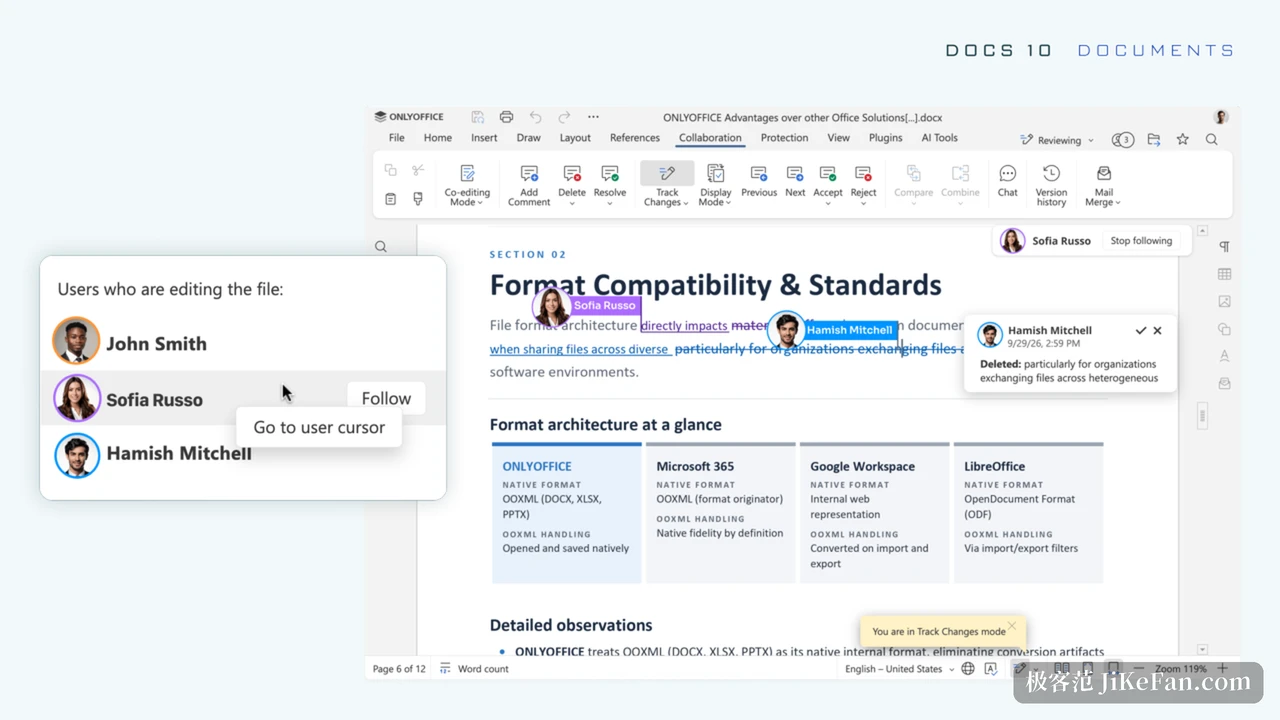
In the document editor, collaborators can follow another person's cursor in real time, so nobody has to guess where a co-author is working. A keep-with-next option holds related content on one page, which removes one class of rework in long documents. Rendering for right-to-left scripts was corrected, and graphic formulas and inline objects no longer drift out of place.
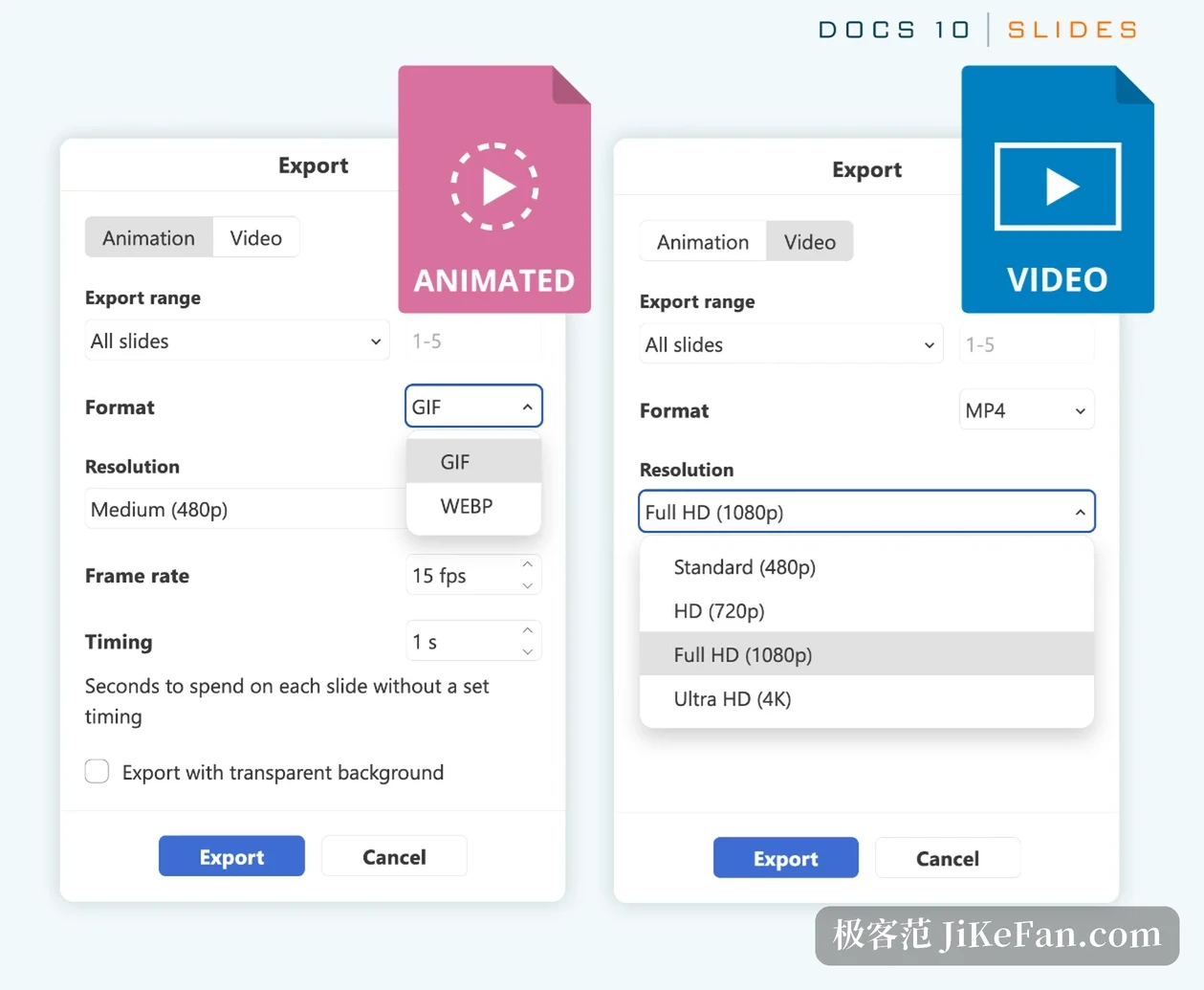
Presentations gain outline, notes, handout master and reading views. Print settings extend to handout page numbers and comments, slides export directly to GIF or video, and each transition can keep its own default duration.
Spreadsheets and charts
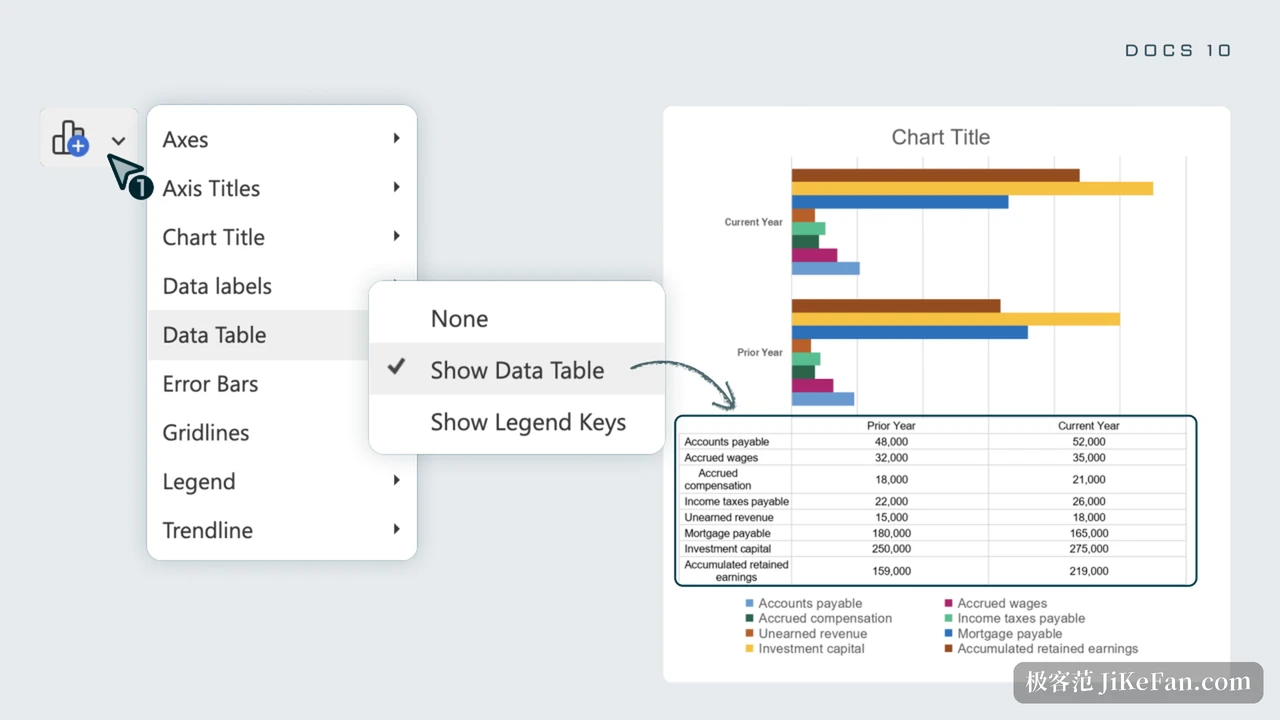
The spreadsheet received work below the surface. Styles are stored apart from data, array formulas over whole columns and rows run faster, and functions such as SUMIF and COUNTIFS were optimised. The formula bar highlights the range being edited, copy and cut draw a moving dashed border, function constants get hints while typing and cell values autocomplete. Sheets can be saved as xls, and background images can be read and written. Charts gain a data table element that places the numbers beneath the plot, so rows and columns line up with the shapes above.
Elsewhere in the suite, the ofd format is supported, SVG images convert into editable shapes, and the plugin manager was rebuilt so categories are easier to switch between.
Security takes up most of the changelog
Fifty new features make the headline; the numbers that matter sit in the fix list. More than 1000 issues were resolved, 35 of them security vulnerabilities, and a separate note from the vendor covers 40 security fixes. The work reaches document conversion, PDF processing and the macro sandbox, and extends to SSRF, path traversal and authorisation bypass.
Several defaults changed, and those will outlast any feature. JWT protection is on by default; an empty secret now causes tokens to be rejected instead of signed; the conversion and document builder interfaces no longer accept tokens taken from editor configuration; downloads verify file integrity unless told otherwise; WOPI hosts must be explicitly allowed by IP filter rules. A new deployment starts from a higher baseline without anyone having to remember to tighten it.
AI became a setting too. It can be switched off in a single editor's configuration, or removed from the plugin list at server level, where AI agent requests can also be refused per client tier. The desktop editors ship a new start window with redesigned template and cloud sections, and the mobile apps add an AI assistant, with AI autofill for forms.
ONLYOFFICE 10 is not a cosmetic release. It moves AI from an add-on into the editor, turns the suite into modules that combine as needed, and answers the hardest question an open-source office tool faces, using 35 vulnerability fixes and safer defaults: why should anyone trust it with work files. The source code is public on GitHub, and the desktop edition stays free, ad-free and offline, which for individuals and small teams who want their documents on their own terms counts for more than another handful of buttons.