
StarPie 2: Hold the Right Button, Flick, and the Radial Menu Appears
Summary
StarPie is a free, open-source mouse utility for Windows 10 and 11: hold the right button and flick outwards to get a radial menu, and version 2 moves every action into its own plugin with a theme studio alongside.
Recommend- Name
- StarPie
- Version
- 2
- Pricing
- Free
- Open source
- Open source
- Operating system
- Windows
- Updated
- 2026-11-03 20:21
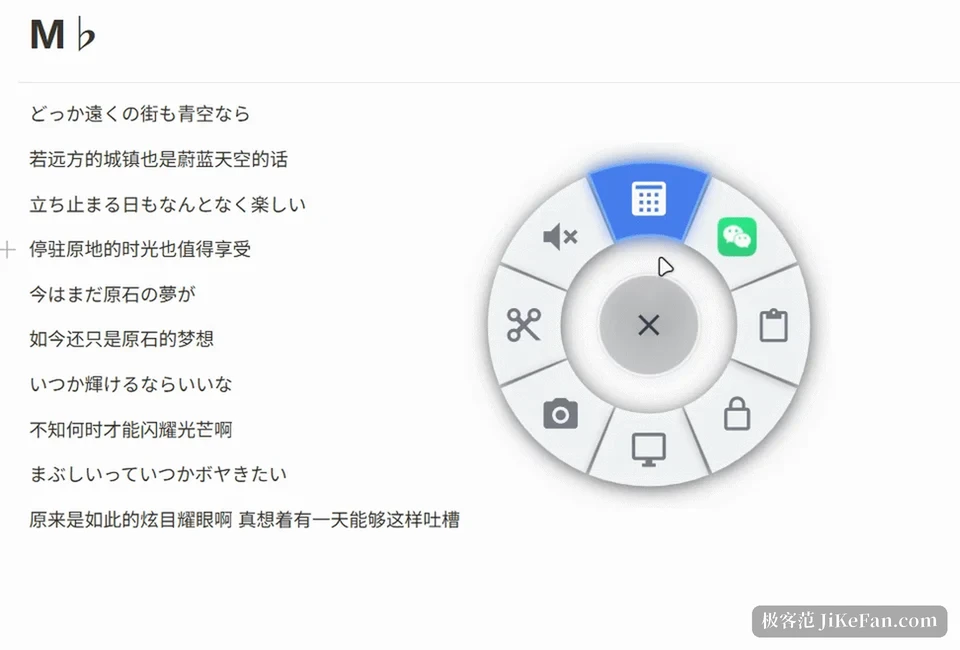
StarPie is a free, open-source mouse utility for Windows 10 and 11 that turns the right button into a radial menu. Hold it, flick outwards, and a fan of sectors appears beside the cursor; release over one and its action runs. A normal right click still opens the system menu, which is the detail that decides whether a tool like this can live in the background without becoming an annoyance. Version 2 keeps the interaction and replaces the structure underneath.
What one wheel can hold
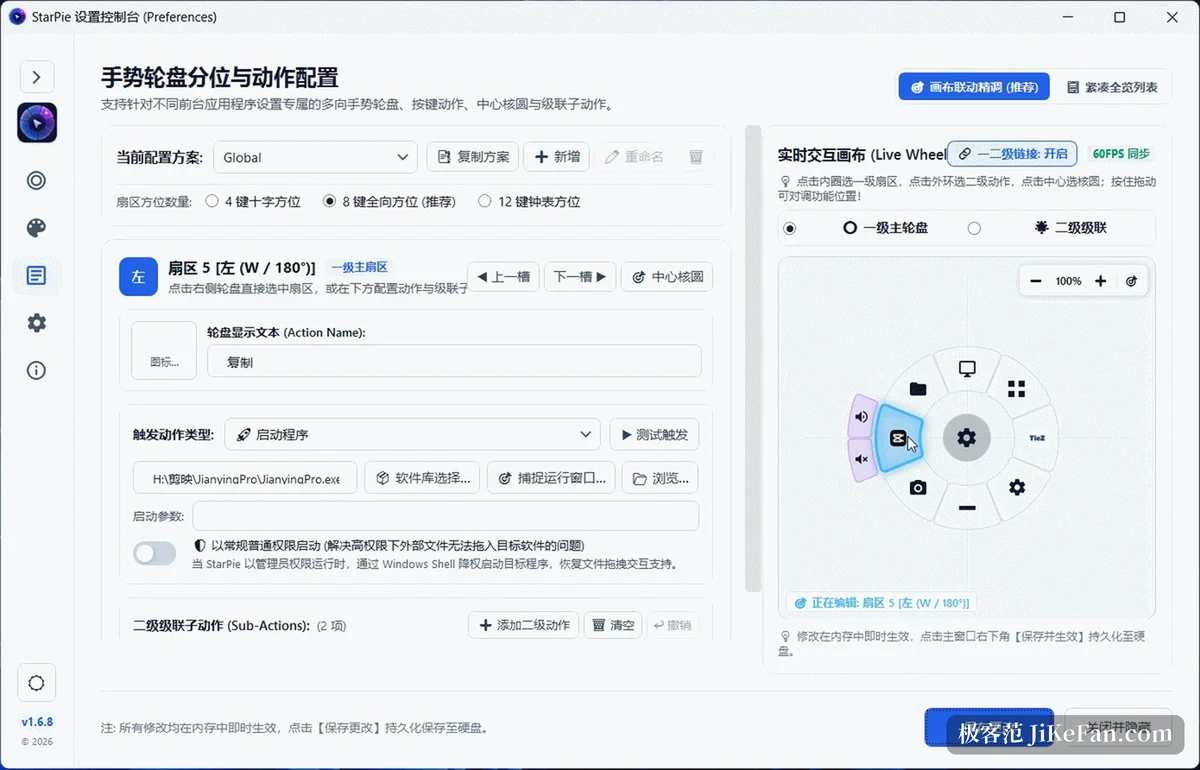
The wheel splits into 4, 8 or 12 sectors. Fewer sectors are easier to hit without looking, more of them hold a whole workflow. The core circle in the middle can carry an action of its own, the screenshot or copy used most often, for instance. A finer layer sits underneath: any sector can carry one to four sub-actions, the outer ring expands with an elastic animation when the cursor pauses inside a sector, and sliding further out reaches the second level directly. Colour and type size can be set per level or synced into one scheme with a click. Flinging past the rim, rather than pulling back to the centre, puts the wheel into a translucent cancelled state where releasing triggers nothing, and the distance for that fling is adjustable on a slider.
Actions are more than shortcuts
The wheel accepts more than one expects: a recorded key combination, launching a program, opening a URL or a folder, running a command, selecting a screen region for local OCR, and a set of window operations including switching, tiling, moving across monitors, keeping on top and adjusting opacity, plus lock screen, volume and virtual desktops. The logic of an action and the icon it shows are decoupled, so one action can use a built-in vector icon, a program icon or an imported picture, and is not tied to its type.
Trajectory gestures are a second channel with their own trigger key, running in parallel with the wheel: up to three segments across eight directions, drawn with a translucent trail and marked start and release points. A click that never passes the drag threshold replays as an ordinary click, so everyday feel is not lost to the install.
Version 2 replaces the skeleton
Released on 17 October, the 2 release closes the beta line, and the change is the plugin system. The built-in actions moved into separate plugins, the main package no longer carries the official ones, and they are installed and enabled by the user from the plugin page. Plugins are in-process .NET DLLs, and the install screen lists ID, version, author, target framework, architecture, hash and signature state along with the capabilities the plugin declares. A new plugin arrives installed but disabled and loads only after being ticked. One that fails to load or throws repeatedly is isolated without affecting the host, and two consecutive startup failures put the app into a safe mode that disables the suspect temporarily.
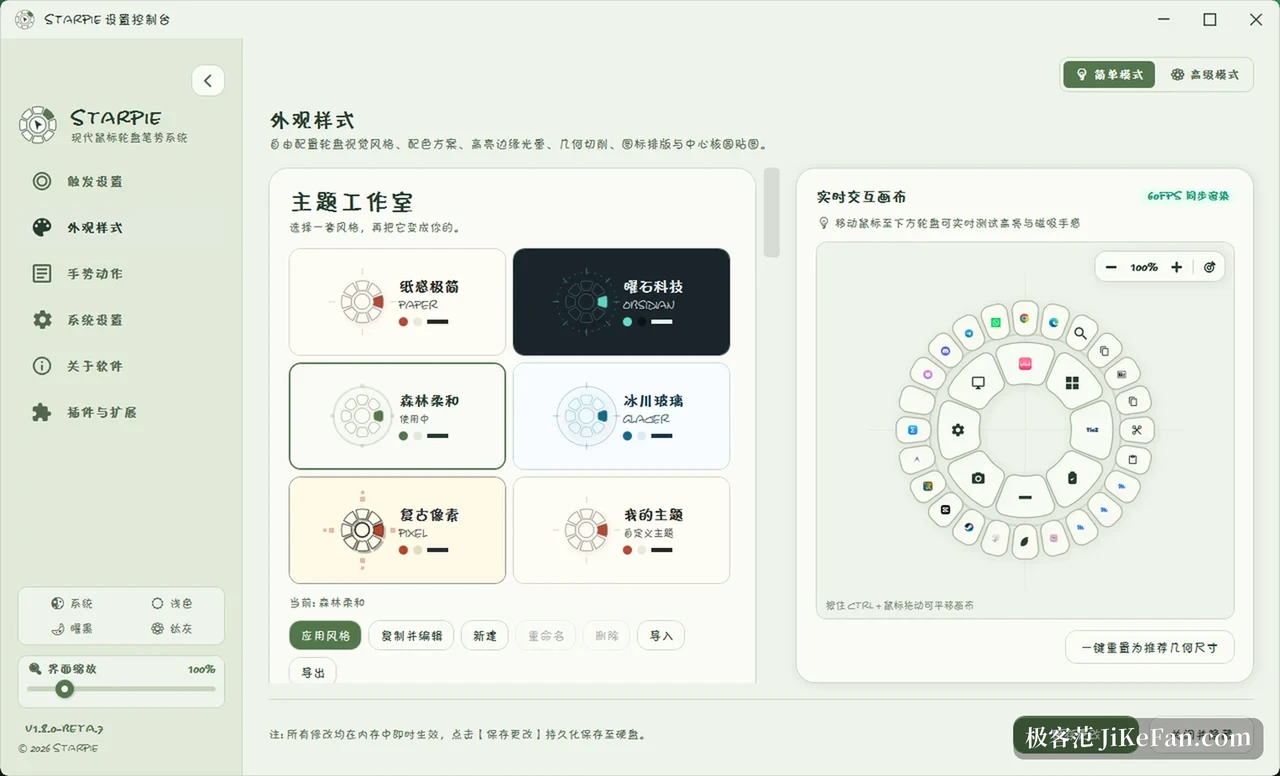
A theme studio arrives with it, offering five styles, paper minimal, obsidian tech, forest soft, glacier glass and retro pixel. Colours, fonts, corner radius and wheel material can be copied out and changed, with live preview and theme files to import and export. Action editing gained context navigation for cascading edits, copy and paste, list sorting and undo, sectors can be swapped, and dragging a first-level action offers a choice of taking its sub-actions along.
Small fixes that change the feel
Rebinding a per-application profile from one program to another used to fail silently and now works: the first falls back to the global profile, the second hits its own, and comma-separated program names are matched. Font scaling in the text-only mode of the 12-sector wheel was repaired, and the settings preview now computes type size and line breaks with the same algorithm as the real wheel window. A parent sector lock was added to the sub-wheel, so crossing a first-level angle boundary inside the second level no longer switches away, and the lock releases only on returning past the debounce threshold.
Focus handling for the target window, quick release and target re-checking for queued actions were hardened, lowering the chance of firing into the wrong window, and sticky wheel placement at screen edges and under high DPI was corrected. Native search no longer depends on an external index tool; applications are pre-indexed and filtered by category, which starts faster and drags fewer other processes along.
Light is the design premise
The whole thing is native C# with WPF, with no browser engine inside, and the idle memory target sits between 15 and 30 MB. Gestures are heard through a low-level mouse hook, and configuration lives in one local json file that can be copied to another machine. The client is open source under MIT, the official plugins sit in a separate repository that is equally public. The installer does not yet carry a code-signing certificate, so Windows may warn about an unknown publisher; the vendor suggests checking the hash published on the same page, a detail worth more in the release notes than buried in a FAQ.
It suits people who repeat the same few actions dozens of times a day and do not want to memorise a pile of shortcuts for them. The cost is setup time: how to divide the sectors, what hangs off each second level, which programs need their own profile, all of that has to be thought through once. Afterwards the thing sinks into muscle memory and stops needing to be remembered.