
Macs Fan Control: take the fan curve back from the system
Summary
Idle machine, humming fan, warm palm rest after twenty minutes of editing: the built-in settings panel offers nothing to intervene with. Macs Fan Control shows every sensor reading in one window and lets you hold a speed or write a temperature rule.
Recommend- Name
- Macs Fan Control
- Version
- 20260922
- Pricing
- Free
- Open source
- Proprietary
- Operating system
- macOSWindows
- Updated
- 2026-10-07 17:45
When the fan will not settle
Almost every long-term Mac owner has met the scene. The machine is doing nothing in particular, one browser tab and a mail client, and the fan keeps humming as if a build were running. Or you attach an external display to cut a clip, and within twenty minutes the palm rest is warm enough to notice. The built-in settings panel offers almost nothing to intervene with: no fan curve to edit, no target speed, no list of which component is actually hot right now.
Macs Fan Control fills that gap and stops there. Open it and every temperature sensor reports its live reading in one window, the processor, the graphics chip, the power supply and the drives, all in one place. That single view changes the conversation, because you can finally see whether the fan is loud for a reason or loud out of habit. From there the decision belongs to you: hold the fan at a speed you choose, or write a rule and let the temperature run the show.
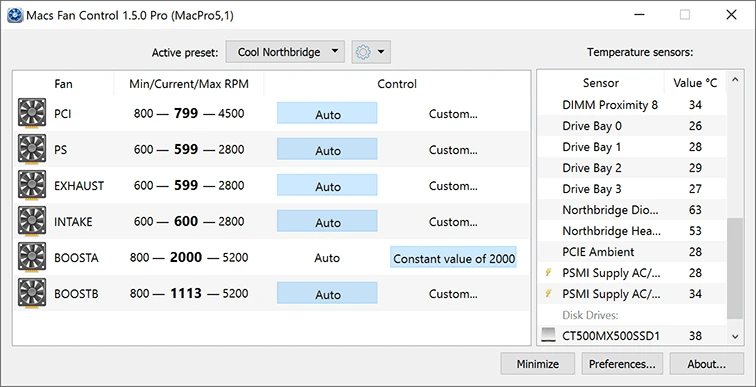
Two modes, and they suit different people
Constant mode is for the person who says, without embarrassment, that they want it quiet. You pin the fan to a low value, and under light load the wind noise drops away immediately. The price is explicit: nothing is watching the temperature for you, so you keep an eye on the readout yourself. For a machine that mostly writes text and answers mail, that trade is easy to accept, and it is the closest thing to a single switch that this category of tool offers.
Sensor rule mode is the lower-effort choice and the one most people should probably start with. You name one sensor, the one near the processor for instance, set a threshold, and the fan stays at a quiet baseline until that reading crosses the line. Above it, speed climbs; below it, the machine is silent again. Cooling and noise balance themselves without your attention, and the rule keeps working while you forget the program exists, which is the highest compliment a background utility can earn.
Both modes exist because the alternative is worse. Without either, the firmware decides everything, and firmware is tuned for the worst case: a hot room, a dusty intake, a user who never looks at a temperature. Your machine is usually not in the worst case, but it is treated as if it were, and that is where the noise comes from.
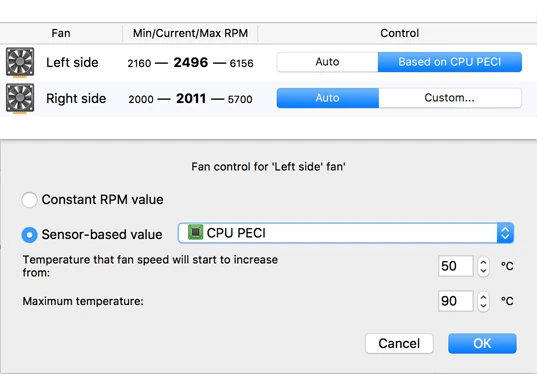
The program does one small thing, but it touches something you feel every day: it moves cooling from a decision the system makes to a decision you make. Quiet and cool are not opposites to be traded by someone else.
Coverage, and where the tool ends
Hardware coverage is the real strength here. Older machines with Intel processors and newer ones with in-house silicon are both handled, and notebooks released in recent years have been adapted as they appeared. Users who run Windows on a Mac through the dual-boot route get a matching build as well, so the same control is available on both sides of the machine. It is free to use and updated often, which for a utility that touches hardware is not a small thing.
The honest limit is worth stating plainly: this program manages fans, it does not raise the ceiling of the cooling system. If the fan is already at full speed and the machine is still too hot, the answer is physical. Clear the dust out of the intake, replace the thermal paste on an older machine, stop stacking the laptop on a blanket. Software can only move the curve within the range the hardware allows.
For daily use, read the sensors for a few days before setting any threshold. Every model has its own temperature temperament, and a rule copied from a forum thread written for a different chassis will either keep the fan busy for no reason or let the machine run hotter than it needs to. Long high-load sessions deserve a little headroom rather than the lowest speed that still sounds acceptable. Give the cooling some margin, and the noise only appears when the work actually demands it.