
Just Color Picker 6.2: Read the Colour of Any Pixel on Screen
Summary
Just Color Picker is a small free tool that reports the colour under the pointer as HTML, RGB, HEX, HSB and HSL, with a magnifier, average sampling and a colour table for keeping the values you use often.
Recommend- Name
- Just Color Picker
- Version
- 6.2
- Pricing
- Free
- Open source
- Proprietary
- Updated
- 2026-10-04 17:12
A tool for one number that is hard to guess
Just Color Picker is a small, free program that answers a question with no obvious way to answer it: what colour is that, exactly. The version described here is 6.2. It runs quietly, and once it is running there is nothing to press — the pointer is moved over the pixel in question and the value appears.
The question sounds trivial and is not. Human eyes are good at comparing two colours and bad at naming one: a shade that looks like the same grey on two monitors can differ by a few percent, and no amount of looking will settle it. A picker turns that into a number, which can then be pasted into a stylesheet, a design file or a message to a colleague without further discussion.
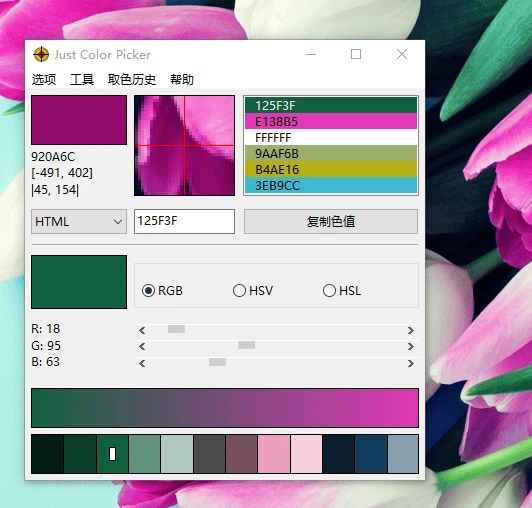
Five ways to say the same colour
The value is reported in five notations at once: HTML, RGB, HEX, HSB (also written HSV) and HSL. That is not redundancy, because the five answer different questions.
HEX and HTML are the notations a web page wants: the same number written with a hash or with a name, ready to be pasted into a style rule. RGB is the notation a screen wants — three channels, each with its own intensity — and it is the one to use when a value has to be adjusted channel by channel.
HSB and HSL are the notations a person wants. Describing a colour by hue, saturation and brightness matches the way the decision is actually made: keep the hue, take the saturation down, bring the lightness up. Anyone who has tried to make a lighter version of a colour by editing three RGB numbers knows how differently those two descriptions behave.
The magnifier, and why precision needs help
The pointer is not a precise instrument. A pixel is small, an anti-aliased edge is a gradient, and the difference between the colour of a border and the colour one pixel inside it is exactly the difference that matters. The magnifier exists for that: it enlarges the area around the pointer at several strengths — three times, nine times, fifteen times — so the target can be seen before it is sampled, and the pointer can be nudged with the keyboard instead of the hand.
Average sampling belongs to the same problem. A photograph or a textured surface has no single colour; it has a distribution. Sampling an average over a small area gives the colour a person would name if asked, which is usually the one that needs to go into the design.
The colour table, which is the part that saves time
Picking a colour once is easy. Picking the same colour again next week, exactly, is where time is lost. The colour table keeps the samples that have been taken, so a palette assembled from a screenshot or a physical object survives the session and can be reused without going back to the source.
Where it fits
Just Color Picker is aimed at the people who need this several times an hour: interface design, web design, anything where a colour has to match something that already exists on screen. It is not a palette generator and it is not an image editor; it reads what is already there and writes it down in the notation the next tool will accept. For that job, being small is not a limitation but the reason it can stay open all day.