
f.lux: let the screen colour follow the sun
Version 4.141
Summary
f.lux is the tool that started this category: give it a location and the screen follows a sunrise and sunset curve, standard colour at noon, gently warm after dusk and deeper late at night, with finer control, time based curves and per-application exemptions.
Recommend- Name
- f.lux
- Version
- 4.141
- Pricing
- Free
- Open source
- Proprietary
- Operating system
- WindowsmacOSLinuxAndroidiOS
- Website
- https://justgetflux.com/
- Updated
- 2026-10-06 22:33
The colour of a screen should follow the sun
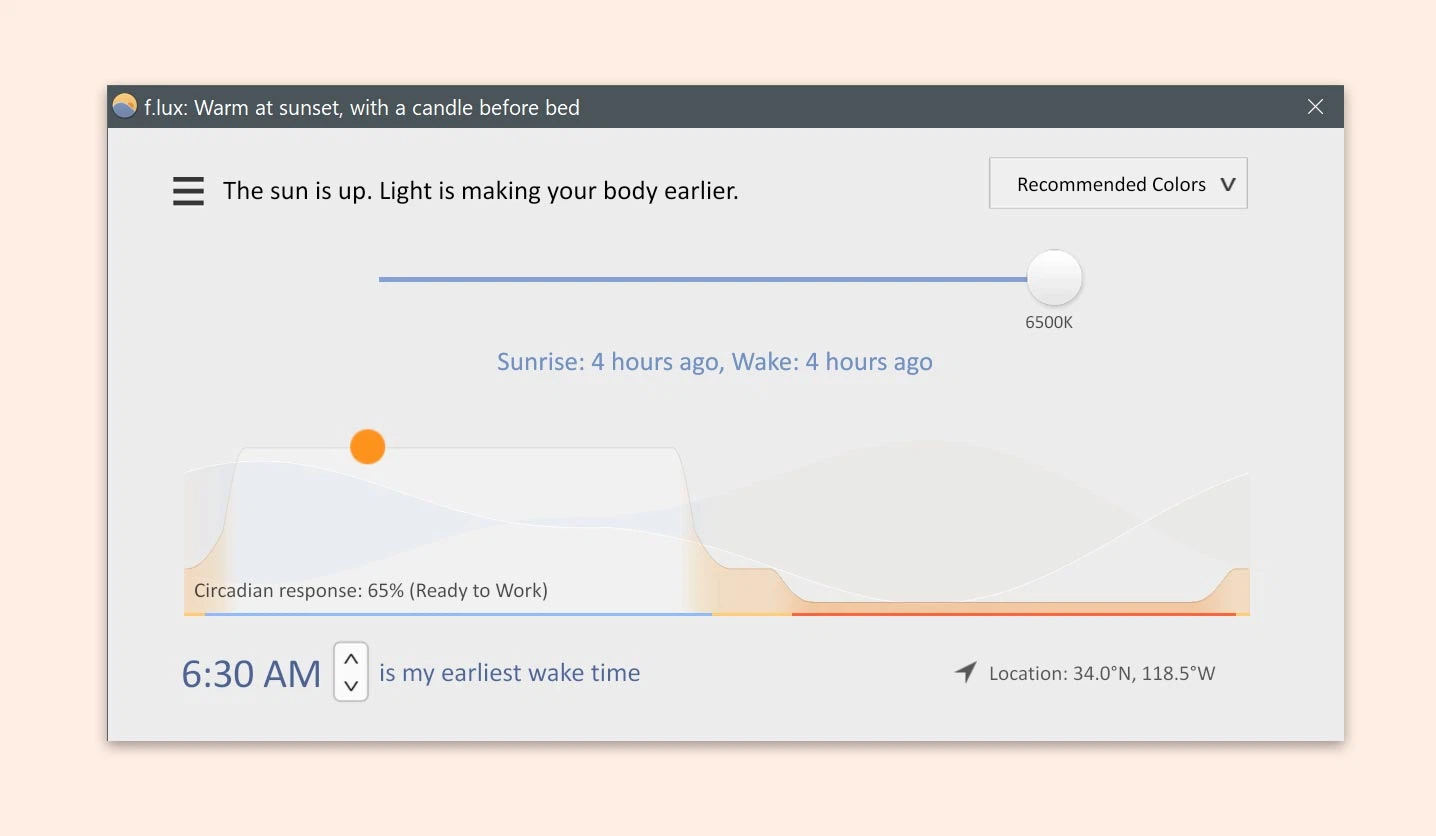
A screen looks comfortable in daylight because it was designed for a daylight room. Late at night the same screen is a fluorescent tube a forearm away: sleepiness retreats, eyes get tired, and the last hour before bed is spent under a light that says noon. f.lux was the program that automated the obvious correction. Give it a location and it walks the screen through a sunrise and sunset curve all day: standard colour at midday so work is not disturbed, a quiet turn towards warm after sunset, a deeper warm range late at night, and no manual intervention at any point.
Fine control is why it has lasted
The night mode built into operating systems offers a few fixed levels of warmth. f.lux lets the slider run from barely warm to something close to candlelight, and it lets a day be split into periods with a curve of its own: a little warmth during the overtime hours, a deep warm range before sleep, each part minding its own business. A specific application can be exempted, and a pause of half an hour is one click away for the moment when a photo needs judging or a video needs grading. The transitions are slow enough that the change is almost imperceptible, which is the whole trick: you should not notice the colour arriving.
The unglamorous work behind a version number
Version 4.141 fixed behaviour in two situations that matter to anyone who works seriously: remote desktop sessions and multi-monitor setups. Neither is exciting, and both are exactly what separates a tool that is maintained from one that has been abandoned. That kind of maintenance is the quiet reason a program can stay relevant for more than a decade while the operating systems around it grow their own partial versions of the same feature.
What it does not do
Two limits are worth stating plainly. Deep warmth necessarily moves colour accuracy, so design work that depends on exact colour should use the pause switch rather than trusting the screen. And the program adjusts colour temperature, not brightness: in a brightly lit room the effect is modest, and a sensible lamp still does more for tired eyes than any filter. Understanding both keeps the expectations honest.
Why the best version of this tool is invisible
The measure of a comfort tool is how rarely it is thought about. If you notice the filter, it is either too strong or arriving too fast. If you forget it exists and the screen simply stops feeling like a light source at midnight, it has done its job. That is a strange goal for software, to be forgotten, and it is the right one here.
Is the built-in version enough
Every major system now ships some form of night warmth, so the honest question is whether a separate program still earns its place. The built-in versions usually give three or four fixed levels and one switch-on time. That covers the person who wants the screen a little warmer in the evening and nothing beyond it. It does not cover the person who wants a slow curve through the afternoon, a deeper range after midnight, and an exemption for the one application where colour has to stay true. The gap is narrow and specific, and it is exactly the gap this program fills.
When to switch it off
Any work that depends on what a colour actually is should happen with the filter suspended: retouching a photograph, grading a clip, matching a brand colour, checking a proof before it goes to print. Half an hour of pause covers most of those tasks and the program resumes on its own afterwards, which is a better arrangement than quitting it and forgetting to start it again.
Curves beat switches
A single on and off time creates an event: the screen changes and you notice. A curve creates no event at all, because each minute is only marginally warmer than the one before it. That difference is why the automatic mode is worth the five minutes of setup, and why a manual toggle tends to be used less and less until it is never used.
What f.lux does is small: it makes the screen behave like a desk lamp at night instead of like the noon sun. Small enough that you forget it is there, which is the best state a comfort tool can reach.