
ISLC 1.0.4.8: clearing the Windows standby memory list on a threshold
Summary
A free utility that manages the Windows standby memory list by a threshold you set, watching in the background and clearing when the list grows past it. The aim is fewer stutters and a quicker response. Current version 1.0.4.8.
Recommend- Name
- Intelligent Standby List Cleaner
- Version
- 1.0.4.8
- Pricing
- Free
- Open source
- Proprietary
- Operating system
- Windows
- Updated
- 2026-10-16 22:07
A memory statistic that looks alarming is often a cache doing exactly its job.
What the standby list actually is
Windows keeps a list of memory pages that have been released by their owner but not yet overwritten. They are cache in the plain sense: if the same data is asked for again, it comes back at memory speed instead of disk speed. Task managers often report this as memory in use, which is where the alarm comes from, because a machine with sixteen gigabytes showing two gigabytes free is usually a machine with fourteen gigabytes of useful cache.
That is why the utility is not a substitute for more memory. Clearing the list does not free anything for applications; it discards cache that was about to be useful, and the next access pays for the loss. The honest description of what a cleaner does is: it trades read performance for a larger reported free figure.
There is a narrower case where that trade pays. Some workloads allocate large contiguous blocks, and a fragmented standby list can slow them while the system trims it. Games and virtual machines report this as a stutter. The threshold approach exists for that case: leave the cache alone while it is small, act when it has grown large enough to be a problem.
How the threshold logic works
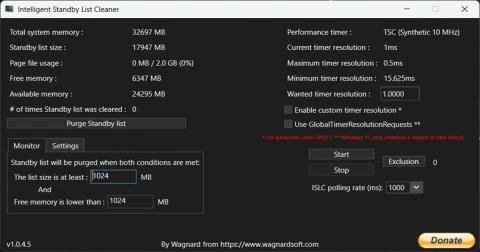
Two numbers define the behaviour: a size at which the list should be considered full, and a target to reduce it to. Between those, the program does nothing. When the free figure drops below the configured floor, it clears down to the target and then goes quiet again.
That structure matters more than the cleaning itself. A tool that clears on every timer tick turns a cache into a liability and can make a machine slower than leaving it alone. Threshold plus hysteresis is the difference between a maintenance action and a permanent handicap.
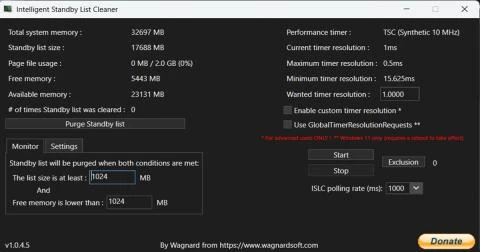
The program sits in the notification area and watches continuously, which means the effect is not something you schedule but something that happens in the background. Version 1.0.4.8 keeps the same shape: a small window of numbers, a couple of buttons, and a log.
When it helps, when it does not
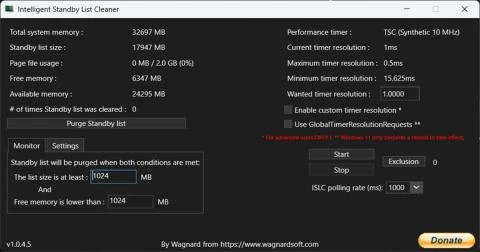
It helps on machines where stutter correlates with a large standby list, which is a specific symptom rather than a general complaint. The way to find out is to watch the list size while the stutter happens; if the two coincide, the tool has something to do. If they do not, the cause is elsewhere and cleaning will not touch it.
It does not help with memory pressure caused by too many running programs. In that case the answer is fewer programs or more memory, and a cleaner will simply shuffle the problem. It also does not help on a server, where the cache is the point.
Item
Official information
Current version
1.0.4.8
Cost
Free
Platform
Windows
Approach
Threshold based, monitored in the background
Works on
The standby memory list
Aim
Fewer stutters, quicker response
Cleaning cache is not the same as adding memory, and confusing the two is how machines get slower after being tuned.
Practical notes: set the threshold from observed behaviour rather than from a number found online, since the right value depends on installed memory and workload; log the list size for a week before enabling automatic cleaning, otherwise there is no baseline to judge the change against; and if nothing improves, turn it off rather than adding a second cleaner alongside it.