
Etar Calendar: an open Android calendar that works offline
Summary
Etar is a calendar for Android published under GPL-3.0 and kept by a community. It has no account system and no cloud of its own; it reads the system calendar database, shows what is already synced in a Material Design interface, and can also hold calendars that exist only on the device.
- Name
- Etar Calendar
- Version
- 1.0.57
- Pricing
- Free
- Open source
- Open source
- Operating system
- Android
- Updated
- 2026-10-06 18:32
A front end for the calendar the system already has
Etar is an open calendar application for Android, published under the GPL-3.0 and hosted on a public code platform, kept by a community rather than a company. What it does is deliberately restrained. It does not build an account system of its own and it does not run a cloud service; it reads the calendar database that Android already maintains and presents the events that are synced there in an interface built on Material Design. There is no advertising and no collection of data.
That choice decides what kind of application this is. A calendar that owns your data has to persuade you to move it; a calendar that merely reads what the system already holds asks nothing of you and can be uninstalled without consequence. For a tool opened several times a day, that is a reasonable position to take.
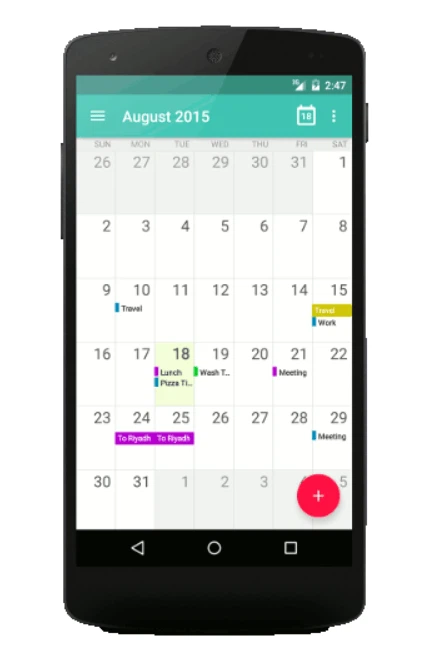
Four ways of looking at the same month
The views are four. The month view is for seeing the whole thing at once and finding the gaps; the week and day views are for arranging actual meetings and tasks; the agenda view lays what is coming into a list in time order, so that one glance answers the question of what happens next. Overlapping events are staggered in recent versions instead of hiding one behind another, and the first day of the week can be set, so nobody has to live with a default that starts on the wrong day.
Four views sound like a small feature and are not. A month answers "where is there room", a day answers "what does this afternoon look like", and an agenda answers "what is next" — different questions that a single scrolling list cannot serve at once.
Sync belongs to the system, offline belongs to you
Synchronisation is handled by Android itself. As long as an account has been set up in the system settings — a public calendar service, a corporate mail system, a self-hosted CalDAV server — Etar will display what appears there. Turned the other way, if you would rather keep a schedule off the network, the application can create offline calendars that exist only on the phone or on a storage card, and adding, changing or deleting entries needs no connection at all.
Events can also leave by file: an ICS file can be shared with someone else, imported from a card or exported back to one, which is the least dramatic and most reliable way to move a calendar to a new phone. Nothing is lost because nothing was ever held hostage.
Small details and the current version
The appearance comes in a light and a dark theme, the interface is translated into many languages, and an agenda widget can sit on the home screen. Recent versions began using the system framework for file access, which reduced the dependence on permission to reach external storage and stopped the application from overriding the user's own settings for calendar sync — both small corrections that a reader may never notice and would certainly miss if they were undone.
As of September 2026 the current version is 1.0.57, released in August, whose main changes were the staggered display of overlapping events and the custom first day of the week. A version number that small usually means a project is finished rather than abandoned, and this one behaves accordingly.
For anyone who finds the built-in calendar plain and the third-party ones heavy, Etar is the right size: open, free of advertising, and uninterested in your data, while the synchronisation is no smaller than before. It cannot offer a calendar that spans platforms through its own cloud; for keeping the schedule on one phone in order, it is enough.