
Docker Desktop: the container engine that comes with a control panel
Version 20260923
Summary
It works on my machine is an engineering problem, and containers are the standard answer. Docker Desktop puts that answer on every development machine with a graphical panel next to the command line.
Recommend- Name
- Docker Desktop
- Version
- 20260923
- Pricing
- Free
- Open source
- Proprietary
- Operating system
- WindowsmacOSLinux
- Updated
- 2026-10-07 20:19
The engineering answer to it works on my machine
Environment drift is the oldest tax on collaboration. A service runs on the machine where it was written, fails on the colleague's laptop because a library is a version behind, and fails differently on the server because a locale or a path separator is not what the developer assumed. Debugging that is not programming; it is archaeology, and it eats days that nobody bills for.
Containers are the accepted answer, and Docker Desktop is that answer packaged for a desktop machine: a complete engine behind a small application, usable from the command line as well as from a graphical panel. The two paths matter more than they sound. The command line is what goes into scripts and documentation, and the panel is what makes the same environment legible to a colleague who is not going to memorise flags on their first week.
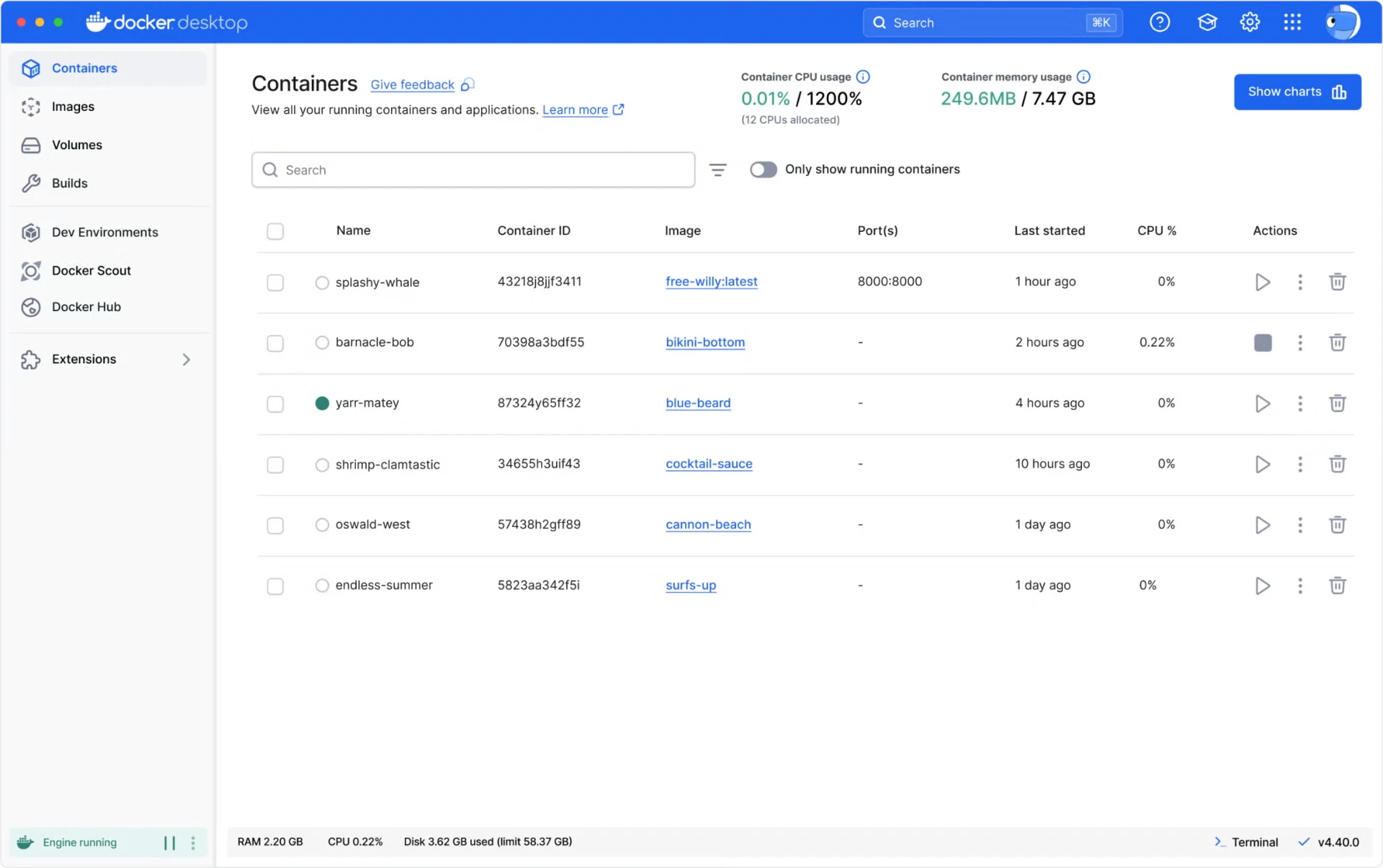
The panel does the boring parts
Pulling an image, starting and stopping containers, reading logs, checking which container is quietly consuming four gigabytes of memory: all of it is one click away, and the answer is visible rather than inferred from three commands and a grep. Resource usage is shown per container, which turns the vague feeling that the machine is slow into a specific number attached to a specific name.
Orchestration is a switch inside the same settings, so a compose file describing five services and their network can be brought up on a laptop and behave the way it will behave in staging. Rehearsing a multi-container application locally, before it reaches a shared environment, is the difference between finding a mistake in a minute and finding it after a deploy.
Consistency is the product
The value is concentrated in one word. The same container description behaves the same on a colleague's Mac, on a Windows machine and on the server, which is what removes drift at the root rather than patching it per machine. Native clients cover the three desktop platforms, and the graphical layer means a team does not need every member to be fluent in the command line before contributing.
It is free for personal use, for education and for small teams, with subscription licensing as an organisation grows, and the rules are published plainly enough to check before a company crosses the line. Releases are frequent and security updates follow quickly, which is what you want from something that sits at the base of the whole workbench.
One habit worth forming early: keep the description files next to the code they describe, so the environment and the application version travel together. A container that starts correctly because a flag was typed by hand is a container that will not start for anyone else.
Docker Desktop turns the environment from folklore into a deliverable: the development machine and production differ by one description file. Consistency is not luck, it is engineering.
Keeping it healthy
Prune images on a schedule, because disk usage grows faster than anyone expects: every rebuild leaves a layer behind, and a year of experiments can quietly become tens of gigabytes. Allocate CPU and memory deliberately against the host's actual capacity, since a container engine configured to take everything will make the rest of the working day unpleasant, and the machine is also where the email and the browser live.
Read the licence terms before a team grows into them, not after. The tool being good and the rules being clear are separate facts, and respecting the second one is part of using the first one well.