
KDiff3 1.12.5 compares three files at once, an open source merge tool under the GPL
Summary
KDiff3 1.12.5 is out with three way merging, character level highlighting and a built-in conflict editor, licensed GPL-2.0-or-later and running on Windows, macOS and Linux.
Recommend- Name
- KDiff3
- Version
- 1.12.5
- Pricing
- Free
- Open source
- Open source
- Operating system
- WindowsmacOSLinux
- Website
- https://apps.kde.org/kdiff3/
- Updated
- 2026-10-21 15:48
Comparing two files is daily work; comparing three at once is where KDiff3 lives. It does not merely say where things differ, it lets you join three sets of changes into one file in the same window.
The version sits at 1.12.5
By the release record on the KDE applications site, KDiff3 stands at 1.12.5, dated 20 July 2026. Looking back, 1.12.4 came on 16 February 2026 and 1.12.3 on 10 May 2025, and the 1.12 series ran down from 1.12.0 with several 1.11.x and 1.10.x before it.
Release | Date |
|---|---|
1.12.5 | 20 July 2026 |
1.12.4 | 16 February 2026 |
1.12.3 | 10 May 2025 |
That rhythm says maintenance project: two or three point releases a year, no jumps in major version, no feature marketing. For a tool in use since the 2000s, the rhythm is itself the signal, since it has settled enough not to need new features to justify existing.
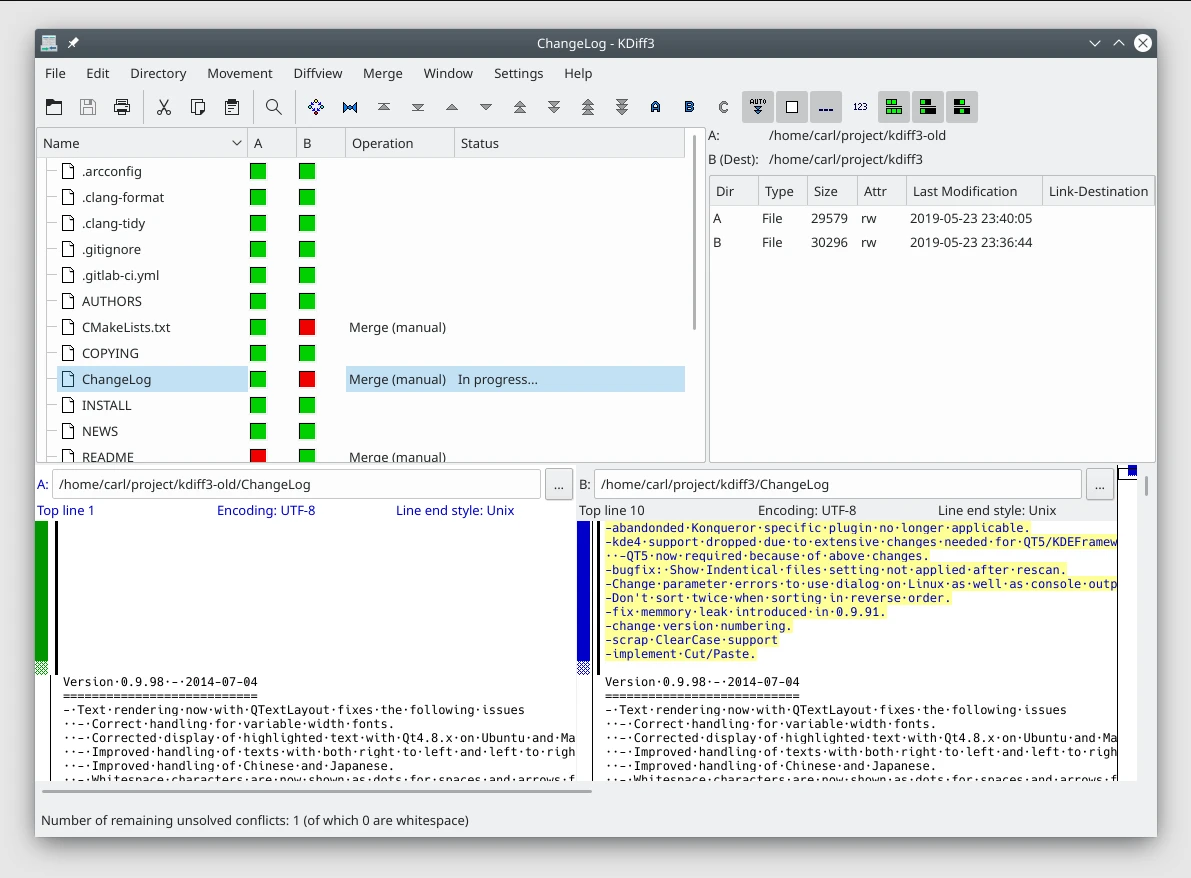
What three way merging actually solves
Two way comparison answers where these two files differ. Three way merging answers a different question: once two people have each edited the same original file, how are both sets of changes joined without one overwriting the other.
The official description is comparing and merging two or three text files or folders. The three part form is an original file plus the edited versions from each side, and the tool lays all three out and marks which lines only A changed, which only B changed, and which both touched. Only the lines both touched are raised as conflicts for a person to decide. The arithmetic is direct: two way comparison means reading line by line, and three way merging means reading the few marked places.
It works at both file and folder granularity. In folder mode the comparison is the whole directory tree, and the state of each child file rolls up into a list, with modified, added and missing all marked.
Character by character, not only line by line
The official description puts an exclamation mark on this ability: it shows the differences line by line and character by character. Line comparison is the industry baseline; character comparison is not. The difference shows plainly on long lines, where a configuration item of several hundred characters or minified code gets nothing more than this line changed from a line view, while a character view marks the few characters that moved.
That ability is worth real money when reviewing a code change. Rename a variable from userName to user_name and the line view highlights the whole line while the character view highlights the middle stretch.
Conflicts are settled inside the editor
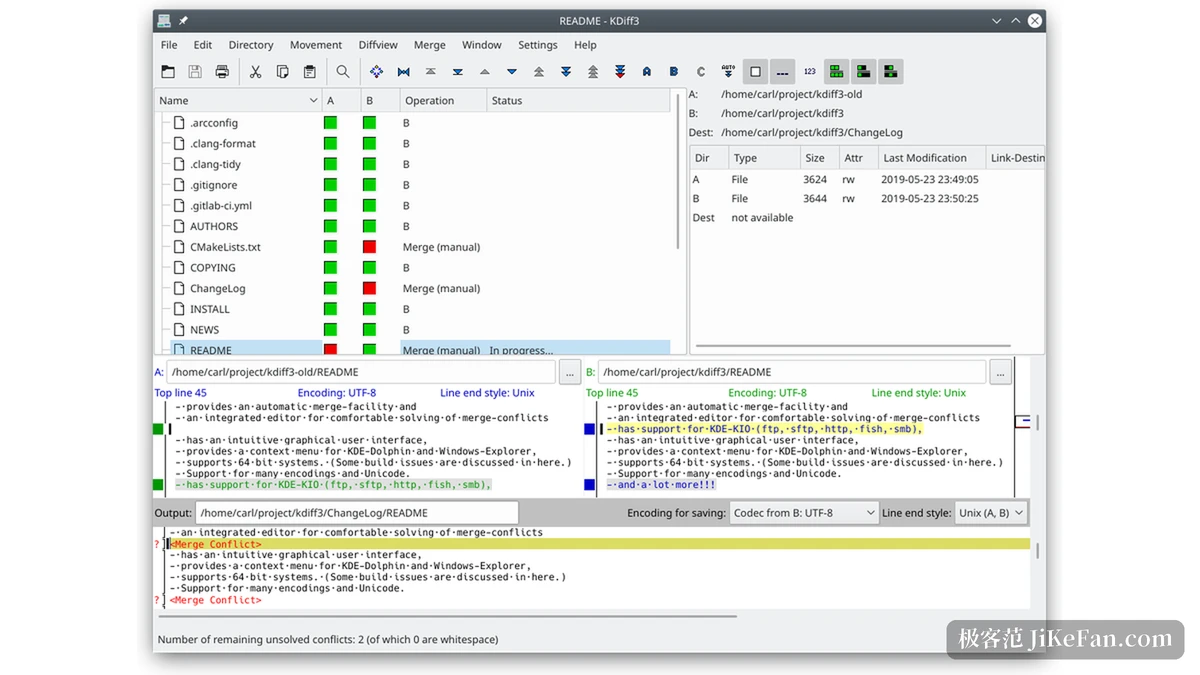
The usual complaint about comparison tools is finding the difference but having to go elsewhere to fix it. KDiff3 carries a merge editor: conflicting lines appear in the output area as markers, and the choice of keeping one side, keeping both or rewriting by hand happens in place. The Output panel at the bottom of the screenshot is exactly that.
More practical is the status line at the bottom of the window: the number of unresolved conflicts, with a note in brackets of how many are pure whitespace differences. What people fear most while merging is losing count halfway, and that number turns it into a progress figure to check against.
Whitespace and comments can hide
Indentation rewritten by an editor, a trailing space added, comments reshuffled by a formatter: none of those differences means anything, and all of them drown what actually needs reading. KDiff3 offers highlighting and hiding for whitespace and comment differences, shown when wanted and folded away when not.
That helps most when taking over someone else s code or after one large formatting pass. The count of differences drops from hundreds to a dozen, and what remains is what needs judgement.
Encoding and line endings deserve their own view
The official page states support for Unicode, UTF-8 and other file encodings. In the interface the top right of each text pane shows the encoding and line ending style it detected, and the screenshot carries Encoding: UTF-8 and Line end style: Unix.
Listing those two separately is not decoration. The most common false difference in cross-platform work is the line break: the same file is CRLF on Windows and LF on Linux, and a line comparison turns the whole file red. Put the line ending style in plain view and the problem locates itself at the break rather than the content.
KIO and version control keywords
It offers network transparent access through KIO, so a remote resource entered in KIO address form is compared directly, without pulling the file down first. For anyone regularly holding a server configuration against a local copy, that saves the download and the cleanup.
Another ability that gets overlooked is support for version control keywords and historical merging. In files carrying keywords such as Revision or Date, a comparison between repositories expands the keywords to different values, and KDiff3 can neutralise those expansions so they are not taken for real edits.
More than one way to install
The KDE applications site offers three entrances: on Linux through an application store supporting AppStream such as Discover, or through the distribution s own package manager; the general route across distributions is Flatpak, with a Flathub entry given on the page; and Windows and macOS have installers listed separately for ARM and Intel.
The project also publishes nightly packages through the KDE CDN, positioned for testing, and the page labels them as unstable. Only people following the development branch need those. The licence is GPL-2.0-or-later, source and bug tracking sit on KDE s GitLab, the manual is on the KDE documentation site, and there is an official forum.
When it saves the most work
For the daily case of comparing two files, any tool will do and there is no reason to install this one. It earns its place in three situations: a merge on top of two sets of edits, locating exactly which characters changed inside a long line, and switching back and forth between file and folder granularity.
Where the workflow is Git, wiring it in as the external merge tool is common practice, since three way merging is the natural shape of resolving a Git conflict and this tool takes three inputs natively.
The value of KDiff3 is not a long feature list. It is that the whole question of how three files join stays in one window: read the differences, judge the conflicts, edit the content, check the remainder, without stepping out once.