
AudioScript turns system sound into live captions
Summary
AudioScript 0.7.1 listens to what the machine plays and turns it into bilingual captions, running recognition and translation locally with no network.
Recommend- Name
- AudioScript
- Version
- 0.7.1
- Pricing
- Free
- Open source
- Open source
- Operating system
- WindowsmacOSLinux
- Updated
- 2026-11-14 23:00
AudioScript 0.7.1 is an open-source subtitle utility for Windows, macOS and Linux. It does not listen to a microphone; it listens to whatever the machine is already playing, runs speech recognition and Chinese-English translation on the spot, and lays the source line above its translation in a floating caption. Nothing in that chain needs a network, and the audio never leaves the computer.
Foreign audio stalls at the listening step
The most common accident with an English podcast is losing focus for three seconds and coming back with no idea where the speaker has got to, which means dragging the progress bar back fifteen seconds. Unsubtitled foreign video behaves the same way: one sentence slips past, and you pause, rewind, listen again. In an online meeting, the moment the other side speeds up, you spend the whole turn translating in your head and your own work stops. All three have the same shape. What jams is not comprehension, but the short stretch of time in which sound has to become text.
AudioScript works on exactly that stretch. It turns the speech inside a foreign podcast, video or meeting into text as it happens, translates it sentence by sentence, and pins the result to the screen in a floating window. Recognition and translation both run on this machine, and the audio goes nowhere.
Sound comes straight from the system
Capturing system audio used to be a chore. You installed a virtual sound card driver, built a multi-output route in the audio settings so that sound reached the speakers and the virtual device at once, and then had to remember to switch back; forget it and the computer went silent. AudioScript takes another path. On macOS it calls Core Audio Process Tap, on Windows WASAPI loopback, both of them facilities the operating system already provides, and both of them still pick up sound while you wear headphones.
Three sources are offered: the system, the microphone, or the two mixed, with the system as the default. Mixed mode exists for online meetings, where the other side arrives through the system output and your own voice through the microphone, and the two get transcribed together. AudioScript can also capture only the applications you name, four at most, which lets you leave a music player out of a meeting.
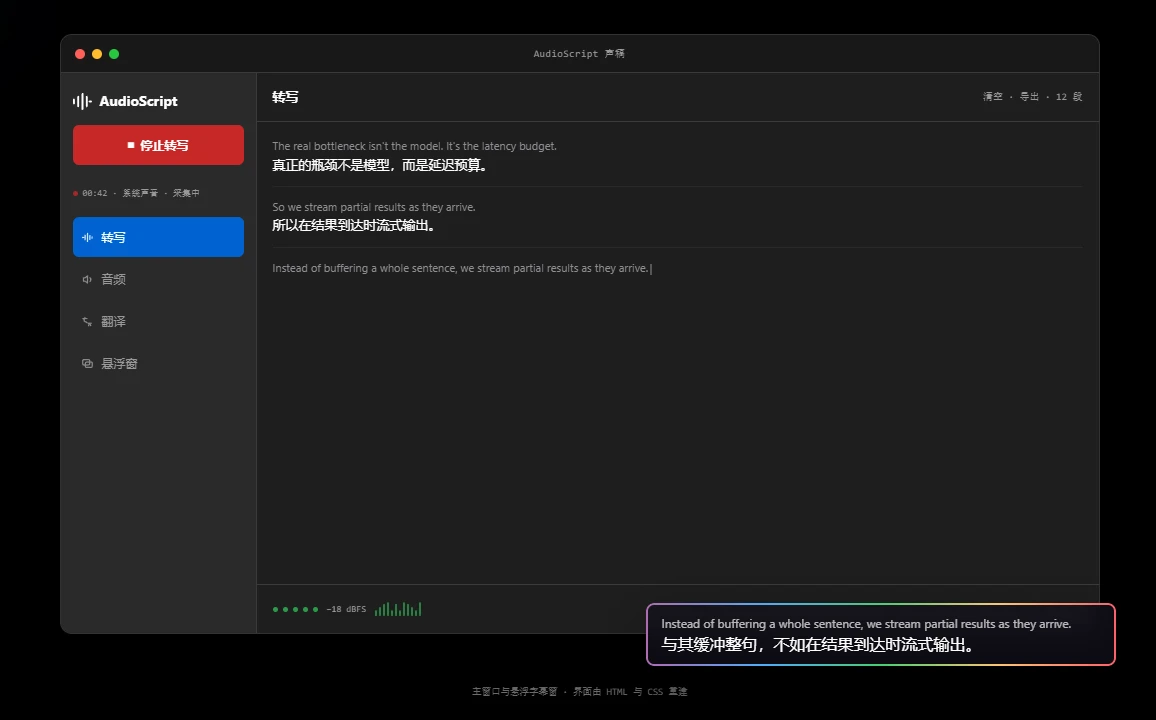
Half a sentence shows up, the line settles at its end
The project notes put the point plainly: the bottleneck is not the model but the latency budget. So AudioScript does not wait for a whole sentence. Recognition results flush as they arrive, half a sentence appears first, and the wording is fixed at the sentence end. The caption chases the voice instead of jumping out once a paragraph has been heard. Silero VAD finds the natural pauses for splitting; when people mix the two languages heavily you can switch to the X-ASR model, which returns punctuation and capitalisation.
Four things the floating window lets you turn
The caption window keeps a fixed two-row shape, source above and translation below, the same sentence kept together. Type runs from 10 to 48 pixels with 22 as the default, background opacity starts at sixty percent, six lines show at a time, and the flowing border sits on by default. Only the background turns transparent; the letters never do, so pulling the background down to almost nothing still leaves the text readable.
Once locked, the window lets the mouse pass straight through and never takes focus, so a click where the caption sits lands on the player underneath. On macOS AudioScript also manages something ordinary always-on-top cannot: it lifts the window above the screen saver level, which keeps the caption visible when another application opens a full-screen video or a full-screen meeting.
The models travel inside the package
Recognition uses streaming inference through sherpa-onnx, translation runs OPUS-MT on CTranslate2. The Chinese-English recognition model takes 58MB and the translation model about 164MB, and both ship inside the installer, so the first launch needs no download. The price is a large package, somewhere around two hundred megabytes; what you get for it is that AudioScript works the moment it opens, with no waiting for a pile of models to arrive.
The first transcription loads the models once, which the project puts at 1.25 to 2.2 seconds, after which output streams. One sentence translates in 70 to 77 milliseconds, measured on a release build with an M-series chip and beam set to 1; an older machine runs slower. More languages arrive as extra models: Nemotron and Qwen3-ASR on the recognition side, LMT-60 and NLLB-200 on the translation side, the last of them non-commercial only.
- Licence
- MIT, source public, built with Tauri 2, Rust and React
- Version
- 0.7.1, released 12 November 2026
- Platforms
- macOS 14.2 or later on Apple silicon, Windows 10 or later, Ubuntu 24
- Bundled models
- 58MB for recognition, about 164MB for Chinese-English translation, shipped in the installer
Limits to know before you start
AudioScript handles English and Chinese only, and you choose the direction yourself. There is no automatic language detection: pick English to Chinese for a podcast, Chinese to English when you speak to a colleague abroad, and a wrong choice stays yours to notice. On platforms, macOS needs 14.2 or later on Apple silicon and the project ships no Intel build; Windows 10 and later counts as first-class support, though an exclusive full-screen game will cover the caption; Linux counts as second-class, and the window is not guaranteed to stay on top under GNOME Wayland.
Transcripts export as Markdown with timestamps on the settled paragraphs, source and translation kept in pairs. The tray icon stays resident, closing the window does not quit, and single-instance and start-at-login sit alongside, so it belongs to the class of tools you set up once. It suits people who listen to foreign podcasts, watch foreign films without subtitles, or sit in cross-language meetings, and anyone who would like a bilingual transcript to keep.