
Hex 3.3.0: dictation that stays on your machine
Summary
Hex 3.3.0 is a local dictation tool for macOS, Windows and Linux: hold a key, speak, release, and the text lands at the caret without a round trip to a server.
Recommend- Name
- Hex
- Version
- 3.3
- Pricing
- Free
- Open source
- Open source
- Operating system
- macOSWindowsLinux
- Website
- https://anoma.ly/hex
- Updated
- 2026-11-10 23:00
Hex is a local dictation tool that runs on macOS, Windows and Linux, version 3.3.0, open-sourced under the MIT licence by Anomaly, the team behind OpenCode, and written mainly in Rust. Its interaction compresses into three moves: hold the hotkey, speak, release. Transcription happens on the machine, and the text is pasted straight into whatever field has focus. No dialog appears, and nothing is parked in the clipboard for you to paste by hand. The first run downloads a speech model, and after that everyday dictation needs no network at all.
The gap it closes is not accuracy. It is the upload, the wait and the confirmation that used to sit between finishing a sentence and seeing it written. Cutting those out is the point of the thing. What remains is one key held down, and text arriving where the cursor already was.
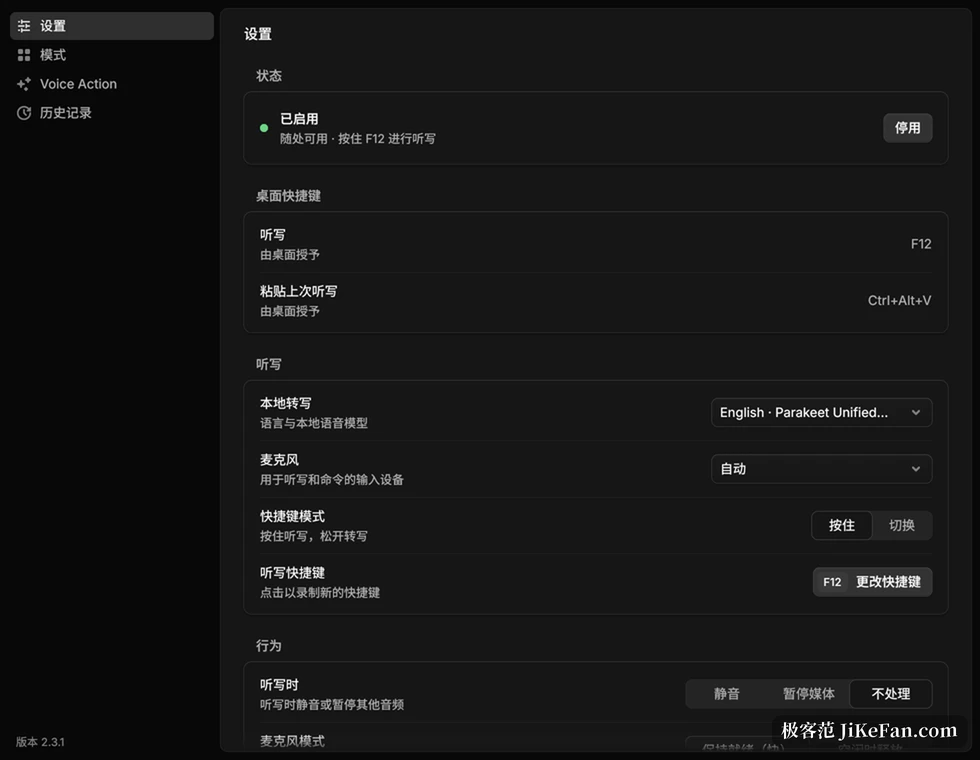
Release the key and the words are already there
Early dictation worked record-then-compute: the app accumulated audio for as long as you spoke and only started working after you let go. Since version 2.3 Hex decodes while you speak, so releasing the key only has to finish the last fragment. The project's own numbers: a two-minute dictation fell from 0.9 seconds to 0.1 on an RTX 5070 Ti, and from 2.8 seconds to 0.1 on a MacBook Air M4. That gap decides whether the tool is something you try occasionally or something that lets your hands leave the keyboard.
A few details show where the trade-offs sit. A tap shorter than 300 milliseconds is not counted as a dictation. Double-tapping the hotkey starts a continuous recording, and pressing it again ends that. The previous result can be pasted once more. Escape does not cancel, because words already spoken are always delivered.
A catalogue priced in languages and cost
The local transcription settings lay the candidate models side by side, and each card shows size, supported language count and measured speed, so the price of every choice is visible. Parakeet Unified English targets English streaming at about 731MB, claims 163 times real time and reports a 1.60 percent error rate in the project's own tests. Whisper large-v3-turbo covers more than a hundred languages at 886MB, and it accepts your own vocabulary. Cohere Transcribe knows fourteen languages, takes 2.4GB and returns a 1.27 percent error rate. For Chinese there are two lighter options, Qwen3-ASR 0.6B and SenseVoice Small.
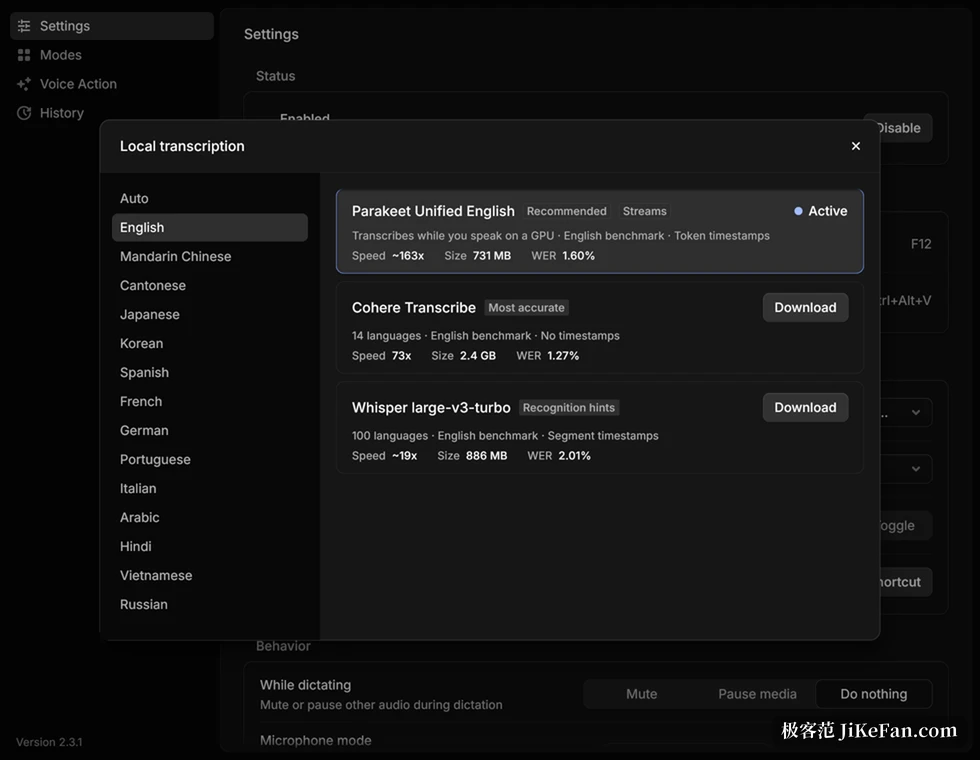
Models outside the catalogue work as well: import a GGUF file, or reuse a weight set already sitting in the local Hugging Face cache. When the chosen model does not support the current language, Hex says so plainly, switching to English rather than silently returning a page of wrong characters. Each model also remembers the language it was last used with.
Change the app, change the rules
The real trouble with voice input starts after transcription. The same word has to be understood in a chat window, written as a command in a terminal, and kept inside code style in an editor comment. Hex handles that with modes: bind a rule set to a foreground app or a website and it applies on switching, a global mode catches the rest, and chat and terminal each carry their own.
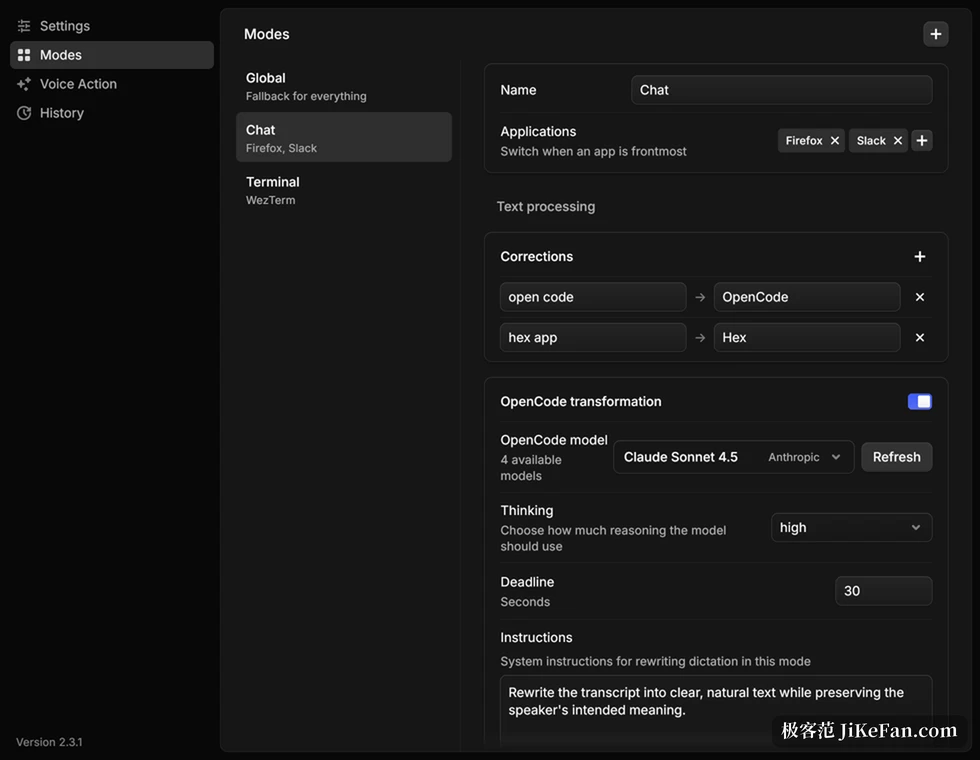
The most useful part of a mode is the correction list, which pins open code to OpenCode and spells the names that are always misheard. It does not only replace after the fact; it feeds the model as recognition bias.
On top of that sits an optional OpenCode rewrite: the front app name, the current domain and the transcript go to whatever model you configured, and a smoother passage comes back. Hex will not start OpenCode for you, and if it is not running you get one line of warning. When a rewrite fails, the local transcript and the corrections already applied are kept.
After the meeting, the text is already on two tracks
Two things in the experimental area deserve a mention. Meeting notes notice when you are in a call inside Zoom, Google Meet, Teams or Slack, and a small capsule asks first, so nothing records until you accept. While recording, system audio and your own microphone go to separate tracks, which makes the transcript read as a conversation instead of a guess about who said what.
When it ends you can export Markdown, and on a Mac a local model can add a title and a summary. The other one is annotation: hold the same key while screen recording and draw on the picture as you talk, with keyframes, strokes and transcript landing in the clipboard together. Both still sit in the experimental area, which means their shape will change.
The openings left for agents
Half the value of Hex 3.3.0 is not in the interface. The command line starts a dictation, switches models, searches history by time or app and adds vocabulary entries, with output as JSON or Markdown. A read-only MCP endpoint exposes history and meeting notes to an external coding agent. A local HTTP interface and a TypeScript SDK round it out. With personal transform rules written as code, spoken material flows into your own pipeline instead of waiting in a text box.
The edges, stated plainly
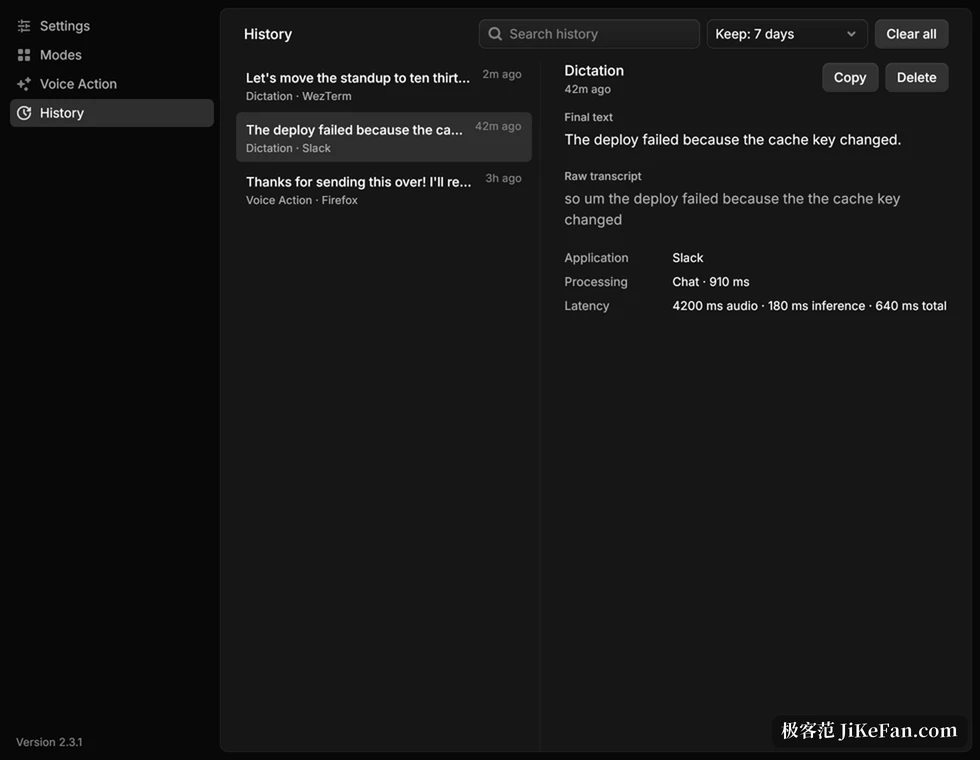
Privacy deserves precision. Hex does not keep dictation audio by default, but text that was pasted successfully is retained, seven days by default, and once it passes ten thousand entries or 16MiB the oldest go first. Keeping nothing is an option, and one click clears everything. Diagnostic logs may contain transcripts and foreground app names, but they are not uploaded. Text only leaves the machine when a rewrite is enabled, and then it goes to the provider you configured.
The platform requirements are firm. macOS means Apple silicon only, system 15 or newer. Windows and Linux are still beta; the Windows x64 build needs a processor from after 2013 with AVX2, and GPU inference needs a Vulkan 1.2 driver, otherwise it falls back to a slow CPU path.
On Linux the global hotkey and paste depend on the desktop environment supporting the relevant protocol, and some Wayland compositors need the command bound by hand. The repository does not accept outside contributions either: issues go to the team's own agents, and the code is open but reads more like something to study than something to change.
The value of Hex 3.3.0 is not the length of its feature list. It turns speaking into a local service that can be called at any time: one hotkey for people, one command and one MCP call for programs. Anyone who pushes a lot of text into a computer every day and does not want to hand their voice to a server has a few hundred megabytes worth spending; anyone who wants it to work without thinking still has to climb the steps of models, modes and permissions.
- Version
- 3.3.0, MIT licence, source on GitHub.
- Platforms
- macOS on Apple silicon, 15 or newer; Windows and Linux in beta.
- Models
- 700MB to 2.4GB depending on the choice; first run downloads one.
- Network
- Not needed for dictation after the model is in place.