
CopyQ keeps every clipboard entry in tabs
Summary
CopyQ 3.11.41 is an open-source clipboard manager that keeps a searchable history in tabs, lets entries be edited in place, and stays offline by default.
Recommend- Name
- CopyQ
- Version
- 3.11.41
- Pricing
- Free
- Open source
- Open source
- Operating system
- WindowsmacOSLinux
- Website
- https://hluk.github.io/CopyQ/
- Updated
- 2026-11-14 23:00
CopyQ is an open-source clipboard manager that runs on Windows, macOS and Linux. What it does is plain enough once said: the moment the copy command fires, the content goes into the system clipboard and also into a history that can be leafed through. The version number has reached 3.11.41, the pace of releases is unhurried and each change is small, but the tool has walked this path for years.
The system clipboard honours only the current item. A new one overwrites the old, the old is gone, and there is no undo for that.
What trouble it removes, stated plainly
Copy and paste are the two most used actions of any day, and the only ones with no remedy afterwards. A command copied a moment ago, a screenshot just taken, a code from three minutes back: copy anything else in between and the earlier one is gone for good, leaving a return to the source to find it again. The cost of switching windows looks like a couple of seconds, and over a day it eats a noticeable amount of attention.
CopyQ keeps a ledger instead. It lives in the tray, the copying happens as before, and the content drops into a history list that survives a restart. To get something back, Ctrl+Q calls up the main window, a selection and Enter put the content back on the clipboard and paste it into the active window, with no trip back to the source.
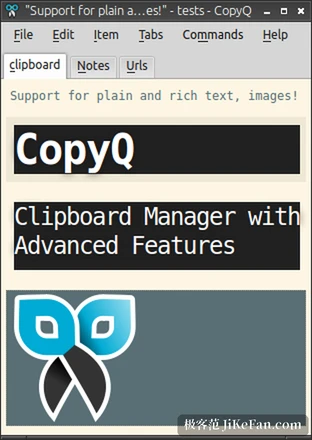
Once entries pile up, search instead of scrolling
With several hundred entries in the history, scrolling down is not a method. CopyQ offers a find window, called up with F3 by default, where a keyword filters to the entries containing it; a command copied minutes ago and a link saved days ago come through the same door. This layer gets the most use from developers: digging out a command copied earlier, a configuration parameter, the exact wording of an error message, all faster than looking them up again.
Beyond filtering there are pins and ordering. Frequent entries can be pinned to the top, or they will eventually be pushed several screens down by something temporary.
Tabs are where it differs from a plain clipboard tool
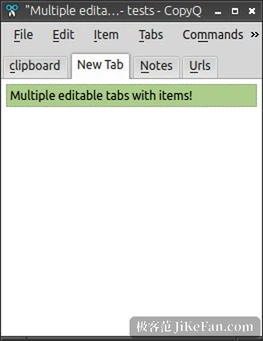
By default there is one history list, and over months the important things drown in the transient ones. CopyQ allows several tabs, splitting content by purpose: a page of common commands, a page of project material, a page of saved links, with items dragged into the right tab after copying. That single move turns a temporary buffer into a light reference library, and the search space shrinks by one layer before the search even starts.
What is stored can be edited
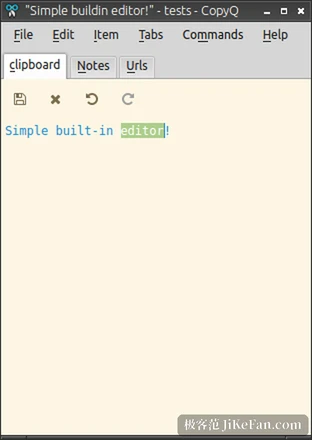
History entries are editable in place, so a correction does not need a second copy. A command copied with a port number in it, later needing a different port, gets the digits changed on the entry; a block of template text gets its variables replaced before pasting. Beyond text, images are kept too: a screenshot that has entered the clipboard survives closing the screenshot tool and can be pulled out of the history when needed.
Entries also keep their original formatting. An HTML fragment pasted into a rich-text editor keeps its styling, and the same fragment pasted into a plain-text field does not drag a heap of stray markup along.
The command and script layer
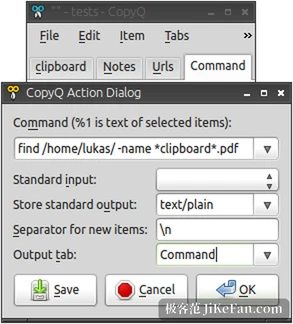
Once the tool is familiar, the command system is what opens the gap. An action can be bound to a kind of content: a copied address files itself into a particular tab, a copied run of digits converts into another unit, a keyword appearing on the clipboard triggers a script. Scripts may be written in Python, Bash or PowerShell, can call other programs on the system, and can write the result back to the clipboard.
None of this is required; the tool works without a single script. It does set the ceiling, though: the same copy action, given a suitable command, can finish a chain of conversions that would otherwise be done by hand.
Where the data lives, and whether it goes online
CopyQ is licensed under GPL-3.0, the source is public and auditable, the history sits on the local machine by default, and there is no network access and no telemetry. This matters more for a clipboard tool than for most: what passes through a clipboard tends to be passwords, private messages, documents not yet published, and putting those on somebody else's server is a poor trade. Export and synchronisation schemes exist for moving between devices, but they are optional rather than the default behaviour.
After launch it sits in the tray, takes little memory, and the shortcuts can be reassigned. The main window, the find window and the command manager each have a default combination, and a few days of use turn them into muscle memory.
Who should install it
Anyone copying more than a few dozen times a day will feel the difference, particularly in three kinds of work: writing code, writing documents, and organising material. Developers keep commands and configuration fragments in it, writers keep source material and links, designers keep screenshots and colour values. The uses differ; the underlying need is the same, whether the thing from a moment ago can still be found.
Anyone who copies a paragraph now and then, and has never felt the clipboard to be too small, will probably forget it is installed, and nothing is lost by that. A tool is worth what its intensity of use makes it worth, and there is no point forcing it.