
CCT keeps AI coding quotas on a thin taskbar strip
Summary
CCT is a free Windows taskbar gadget showing what is left of a Claude Code or Codex allowance, when it resets and which account is live, in three clicks.
Recommend- Name
- CCT
- Version
- 0.4.6
- Pricing
- Free
- Open source
- Open source
- Operating system
- Windows
- Updated
- 2026-11-14 23:00
CCT is an open-source taskbar tool for Windows 10 and 11. It puts the remaining allowance, the reset time and the signed-in account of two coding assistants, Claude Code and Codex, onto the taskbar, and switching accounts takes three clicks. The whole thing is one executable under a single megabyte.
Before a long run starts, look at what is left
People who work with a coding assistant often hold two accounts at once, one their own and one from the employer. A five-hour window and a weekly allowance stack on top of each other, and hitting the line halfway through means the waiting up to that point was wasted. Checking the figure means opening a web page or typing a command in a terminal, and after enough repetitions you stop bothering.
CCT moves that check onto the taskbar, a narrow strip along the screen edge, visible without lifting your eyes from the work.
One strip, a few sets of numbers
Each service gets its own progress group on the strip, showing how much of the five-hour window and of the weekly allowance is gone, with the exact reset time on hover. Quota counts per account, not per client, so usage from the command line, the desktop app and the web adds up together and the number you see is what actually remains.

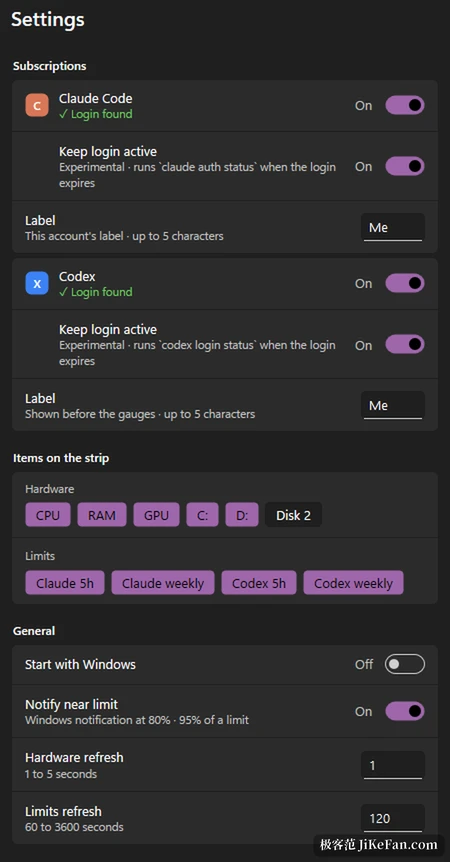
Ahead of the progress sits a short label of five characters at most, which can read P and W, or Me and Work, coloured to match each service. Every saved Claude account carries a label of its own, so which one is live is obvious at a glance. A right click opens the account menu with the saved list, each entry showing its address, plan and last usage.
Three clicks to switch, without signing out
Right click the strip, open the account menu, pick one. That is the whole motion, three clicks, with no signing out and back in, no restart of the editor; Claude Code picks up the new sign-in on its next request.
The project writes its own boundary into the rules: CCT never switches by itself, never swaps in another account when the allowance tops out, and never spreads load across accounts. Every change waits for your own click. It also saves paid plan sign-ins only, and shared accounts or resold access fall outside what it supports.
The few things settings lets you change
CCT does not cram everything into the default view. What the strip shows, and how often it refreshes, stay with you.
- Strip items
- Processor, memory, graphics and each disk, plus the five-hour and weekly allowance for both services, ticked one by one.
- Allowance alert
- A system notification between eighty and ninety-five percent used.
- Refresh rhythm
- Hardware every one to five seconds, allowance every sixty to three thousand six hundred seconds, one hundred and twenty by default.
- Start with Windows
- Off by default, turned on when the strip should stay resident.
A block of hardware readings comes along with it, letting processor, memory, graphics and each disk sit beside the strip. One glance before a heavy run tells you whether the machine is already at full stretch, which keeps all the waiting from being blamed on the model.
One executable, a little over six hundred kilobytes
It is written in Rust straight against Win32 and Direct2D, with no embedded browser, no runtime and no installer, so a double click starts it. It sits in about 15MB of memory and needs no administrator rights. The 0.4.2 release changed redrawing to happen only on change, which cut idle processor use by roughly forty percent. For something that hangs on screen all day, that is worth more than a few extra features.
On privacy it holds a hard line. The project declares zero telemetry and the author receives no data from your machine. CCT does not refresh tokens itself; it reuses the sign-ins that the two command line tools already store, and keeps the saved credentials encrypted through the Windows data protection interface, bound to the current user.
For now it covers Windows only
CCT supports Windows 11 and 10 only. On Windows 10, when the left side has no room, the strip moves next to the system tray, and which side it takes is a setting. A macOS menu bar version sits in the plan, and Linux has seen no movement. Usage figures come from the same unpublished interface the official command line tool talks to, so an interface change can leave CCT without numbers; it then shows an error rather than a wrong figure that looks healthy.
Version 0.4.6 arrived on 13 November 2026 under the MIT licence, written by Pablo Chiaro Rosa. CCT is not an official product of Anthropic or OpenAI, and the two names remain the trademarks of their owners. Treat it as a set of gauges: it lays out state that used to hide inside a command, changes no allowance and gets around no limit.