
Multi Commander puts two panes in one window
Summary
Multi Commander 16.6 is a free Windows file manager with two panes, saved selections, batch renaming, and archives opened without unpacking anything first.
Recommend- Name
- Multi Commander
- Version
- 16.6.0.3238
- Pricing
- Free
- Open source
- Proprietary
- Operating system
- Windows
- Website
- http://multicommander.com/
- Updated
- 2026-11-14 23:00
Moving a library of files is rarely hard because of the copying. The annoyance comes from switching windows: find the source folder on the left, switch right to find the destination, pick the files, then come back to the left to check what has not moved yet. Multi Commander 16.6 folds that into a single window. One pane on the left, one on the right, each with its own tabs; drag across and the copy happens, while both paths, the free space and the number of selected items stay visible at once. It is a free file manager for Windows, developed in Sweden, maintained since around 2010, and offered as both an installer and a portable build, each in 32 and 64 bits.
The line at the top of the site reads file manager for professionals, and the explanation underneath is plain: two panes side by side, making daily work with files faster.
Two panes, two sets of keyboard habits
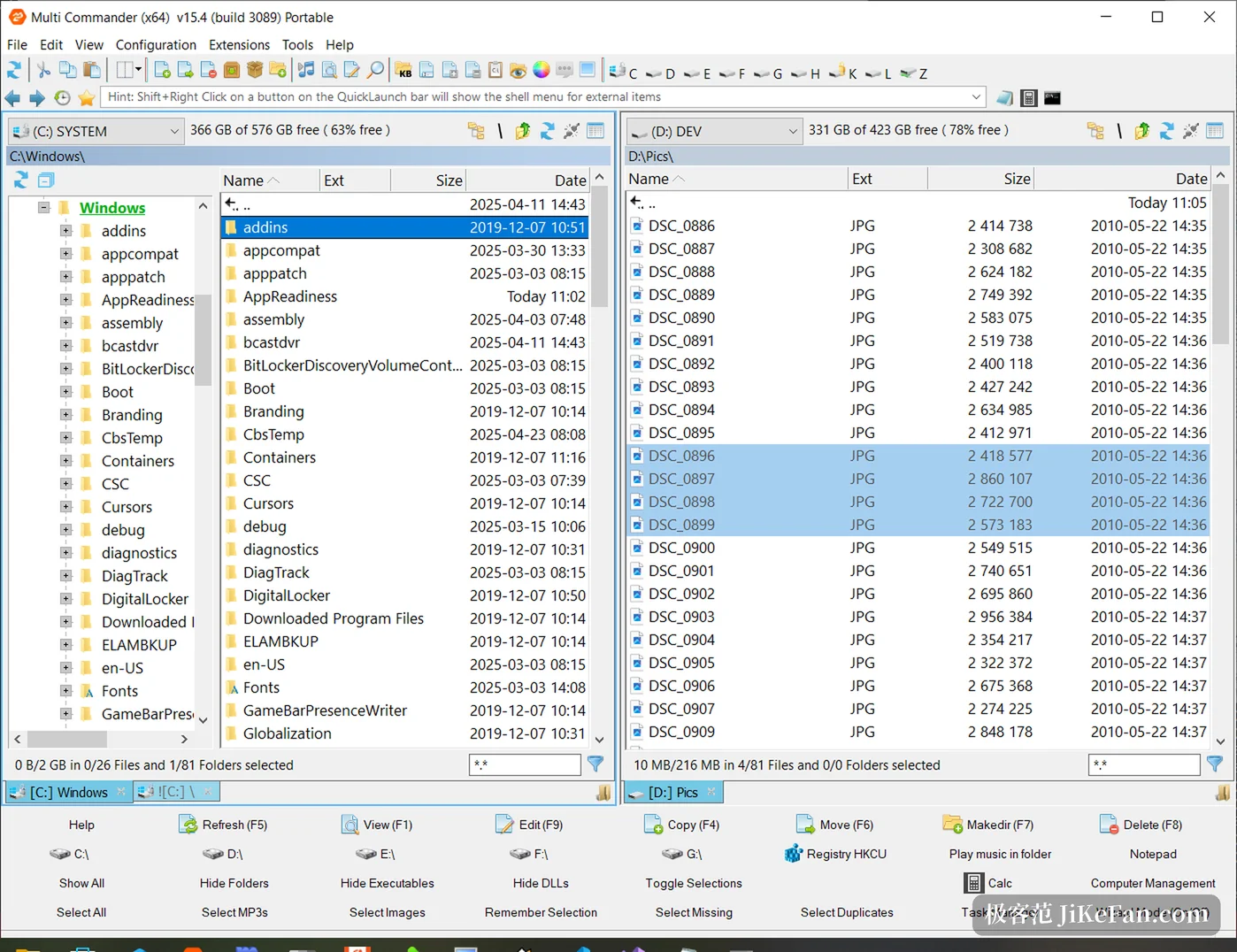
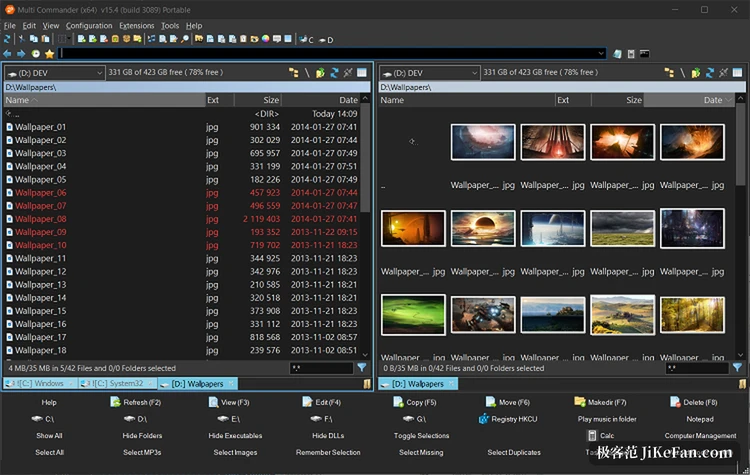
The upper part of the window holds a toolbar and a row of clickable breadcrumbs; below sit the two panes, each with its own tab bar, drive selector and space meter at the top. The left pane can expand a directory tree, while the right pane switches between details, list and thumbnails, so text on one side and picture previews on the other can be read in the same operation, which is where a single pane loses.
Keyboard schemes come in two flavours. Anyone raised on function keys can keep the default set, F5 to copy, F6 to move, F7 to create a directory, F8 to delete, with a matching row of buttons parked along the bottom. Anyone raised on the shortcuts of the system file manager can switch to those instead. The commands go further than the buttons: a collapsible command line sits at the bottom, and typing an internal command beats walking through menus.
Selecting files has been thought through
Selection is where the gap opens. Wildcards select or deselect a whole class of files at once; the current selection can be stored in memory or in a file and fetched back later; the selection used by the last copy or move can be restored directly, so another batch of the same kind needs no second pass with the mouse. The two panes can also be compared, pulling out files that exist only on the left, only on the right, or that are newer, which during a migration removes the chore of checking one by one.
Search has a window of its own, and its results work as a list: a selection made there can go straight into a copy, a rename or an archive.
Archives, the registry and remote hosts in the same tree
The file system layer reaches wide. Beyond local disks and network shares, an archive opens without being unpacked, so files inside can be browsed and picked out individually. The registry appears as a tree to walk through, with keys edited without opening another tool. FTP and SSH-based transfers live in the panes as well, a server directory beside a local one, where dragging does the transfer. Phones and tablets show up as directories once connected.
Packing and unpacking cover the common formats, both with filters: take only one class of file, or let each subdirectory produce its own archive.
Batch renaming is the most hidden part
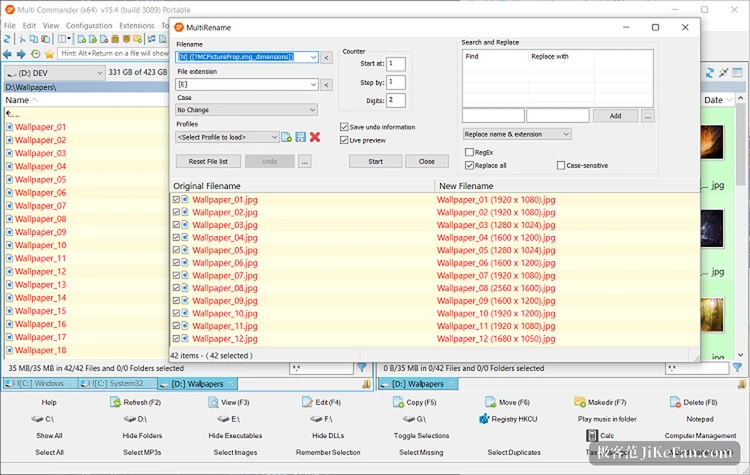
Renaming gets a window of its own, rules on the left and a live preview on the right. A rule is assembled from three pieces: a mask, a counter and a find-and-replace. The mask inserts the original name, the extension, the date or the dimensions; the counter handles the starting value, the step and the number of digits; the replacement accepts regular expressions. Useful combinations save as profiles and return with one click, and the preview table lines up old names against new ones, so a mistake shows up immediately instead of after the fact. Adding a resolution suffix to a batch of photos, or numbering a season of episodes consistently, takes minutes here and a long evening by hand.
16.6 is a repair release, and it repairs what bites
Published on 13 November as build 3238, it carries more than seventy changes over the previous release, and the vendor describes it as stability first. The listed items are no new features: the image viewer refused to open some JPG files, dragging files in from other programs occasionally failed, and verification of the source during a move gained a switch that can be turned off. That last one targets the copy-then-delete style of moving, where verification guarantees the data arrived intact but slows things down badly on large files or network drives, so the choice goes back to the user. The remaining twenty-odd items are crashes and intermittent faults, which the vendor calls rare crashes. For a tool that stays open all day, a release like this is worth more than a new button.
Who it suits, and who it does not
The learning cost is real. Toolbar, button panels, shortcuts, scripts and plugins each have their own settings, and a first launch feels crowded; the documentation is long, and whoever reads it can shape the program around their habits, while whoever does not may close it within ten minutes. The scripting engine and the plugin interface exist for people who enjoy that sort of thing, and they turn a repetitive tidying routine into one command. It also runs on Windows only, so a cross-platform need finds no answer here.
What it is for
Put Multi Commander 16.6 back into an ordinary day and it handles the physical labour of many files, deep folders and repeated moves: two panes remove the window switching, stored selections and pane comparison remove the checking, batch renaming removes the individual clicks, and archives and remote directories stop demanding a second program. None of these abilities is new on its own. Having them in one window, all reachable from the keyboard, is why people keep it installed. Free, portable, no advertising, and half a day spent on configuration pays back over the following years.