
Zen: blocking ads and trackers across the whole system, not only in the browser
Summary
An open-source privacy tool that filters advertising and tracking requests for every application on the machine through a local proxy, rather than working as a browser extension. MIT licence, no telemetry, no account.
Recommend- Name
- Zen
- Version
- 0.25.1
- Pricing
- Free
- Open source
- Open source
- Operating system
- WindowsmacOSLinux
- Website
- https://zenprivacy.net
- Updated
- 2026-10-26 22:00
A browser extension can stop a web page. It cannot stop an application
Ad blocking became normal years ago, but almost all of it lives in one place: the browser. Install an extension and the web pages you visit arrive free of banners. Open a music player, an e-book reader or a chat client, and the advertising is back – a banner across the top, a promoted entry in a list, a tracking request quietly sent to a server somewhere. An extension has no way to reach any of it, because none of those programs are a browser.
Zen approaches the problem from a different layer. It is not an extension at all but an advertising and privacy tool that sits at the level of the operating system. The mechanism is straightforward once stated: a proxy server is started on the local machine, and every outgoing web request from every program is routed through it. Requests are matched against a set of filter rules, and anything identified as advertising, tracking or malicious traffic is blocked before it leaves. One rule set covers every browser on the machine and every connected desktop application at the same time, with nothing to install per program.
The project is open source under the MIT licence, developed and maintained by a small independent team. There is no data collection, no telemetry and no account system – which is the minimum one should ask of software that sees all of a machine's traffic, and here it is stated as a design rule. The installer is small, and while running in the background the resource cost is close to unnoticeable.
Filter rules that work without configuration
Several preconfigured filter groups ship with the program. An advertising group is built on the mainstream public rule sets that ad blockers have been refining for years. A privacy group blocks the tracking domains used by the large advertising and social platforms. A security group blocks domains already known to distribute malicious content. On top of those sits a set of regional filters covering thirty-six countries and languages, so that locally-targeted advertising and locally-operated trackers are covered as well as the international ones.
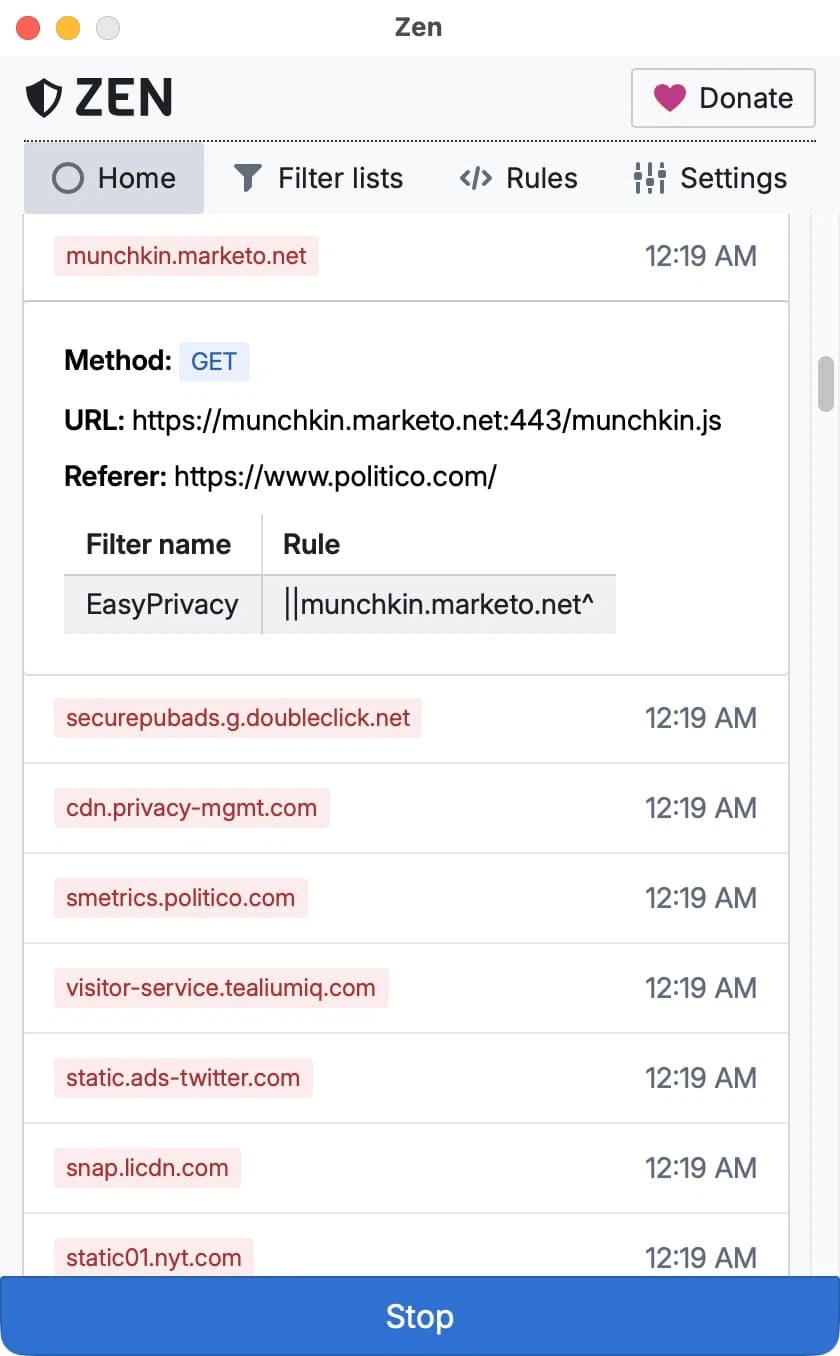
For most people the default configuration is enough, and that is the point of shipping it preconfigured. Advanced users can add their own rules, and the program accepts all the mainstream filter formats, including Adblock-style rules, hosts files and DNS blocklists, so existing blocklists can be reused rather than rebuilt. Every blocked request can be watched in the main window in real time, with a clear indication of which application sent it and which rule caught it – which turns the filter from a black box into something you can audit.
Beyond advertising: privacy at the system level
Advertising is only the visible part of the problem. While a page is being read, dozens of companies are quietly recording what was opened, how long it stayed open, where the reading stopped, what was clicked. Those fragments are assembled into a detailed profile covering interests, political leanings, income level and habits. Zen blocks such requests before they leave the machine, which means the profile never gets built in the first place.
The technical detail worth understanding is the certificate. To inspect encrypted traffic the program installs a local root certificate, and this is the part that makes people uneasy. Here it is generated locally and never leaves the device; all filtering happens on the machine itself, and no third-party server sees the traffic. That is a meaningful difference from tools that route everything through a company's infrastructure.
There is also a question of resolution. Blocking at the domain level stops a whole server, which is effective but blunt. Because this filter works on full requests, it can act on a specific URL path and on individual request parameters, leaving the rest of the same domain untouched. That is what makes it usable for applications where blocking an entire domain would break the program.
Zen is still a relatively young project, but it addresses something a browser extension structurally cannot: the advertising and tracking inside desktop applications. Open source under a permissive licence, processed locally, no data collected – for anyone tired of banners appearing in every program they open, one installation silences the lot.