
Kaspersky Standard: a security suite for five platforms, with anti-phishing and a firewall
Summary
A multi-platform security subscription for personal use that puts virus, malware and ransomware protection in the same licence as system performance tools, covering five desktop and mobile systems. A 30-day trial has replaced the old long-running free edition.
- Name
- Kaspersky Standard
- Version
- 20261011
- Pricing
- Paid
- Open source
- Proprietary
- Operating system
- WindowsmacOSAndroidiOSLinux
- Updated
- 2026-10-12 10:53
The real job of security software is to stop most risks before the user ever notices them.
Two layers inside one subscription
Kaspersky Standard is the entry subscription in the company s personal product line. The official summary says it provides protection against viruses, malware and ransomware, and also includes performance tools that keep a device fast and responsive, clean up unwanted software and keep applications updated. In other words, this tier does not only intercept threats; it also takes over the routine upkeep of the machine.
Taken apart, the protection layer has more inside it. The official page uses a subheading to note that the standard tier includes advanced security features, and lists anti-phishing and firewall among them. Anti-phishing deals with deceptive entry points dressed up as ordinary pages, while the firewall governs what goes in and out over the network. For most people these two sit closer to daily life than an abstract detection rate, because they match situations that actually come up while browsing.
Worth noting is what this tier is not. It sits at the bottom of a ladder, so capabilities that belong to higher tiers, such as parental controls or VPN traffic allowances, are not part of it. Reading the product line from the bottom up is the honest way to buy it: the question is not which tier is best, but which two or three capabilities a household will genuinely use.
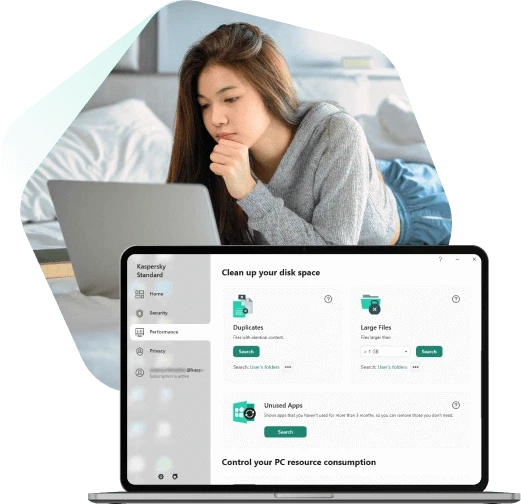
Payment protection for transaction scenarios
The standard tier carries online payment protection, meant to guard shopping and transfers. The payment step is usually where people want reassurance, and this feature extends the scope from whether a device is clean to whether the information being typed can be intercepted, which counts among the functions most often mentioned on the consumer side.
Coverage is another trait of this tier. The compatibility section lists the supported systems one by one: Windows, macOS, Android, iOS and Linux. One subscription can land on desktops and mobile devices, so several machines in a household can each be installed without separate purchases. Among the system requirements, the Windows side states support from Windows 7 SP1 through Windows 11.
Item | Official notes |
|---|---|
Core protection | viruses, malware and ransomware |
Network | anti-phishing and a firewall built in |
Transactions | online payment and transfer scenarios |
Upkeep | performance tools, unwanted software cleanup, app updates |
Platforms | Windows, macOS, Android, iOS and Linux |
How it is tried and how it is licensed
The way in today differs from the past. The trial page states that the full capability of the standard tier can be experienced through a 30 day trial, which means the long-running free edition is no longer part of this line; a user can spend a full month with it and then decide whether to subscribe.
A 30 day money-back guarantee follows a purchase. The company puts trial, purchase and refund together into a comparatively relaxed path. Licensing is by subscription, priced by device count and year, and the program updates itself in the background along with the service, so the site does not publish a separate program version number; features and signature databases are maintained through the subscription.
The trade-off of a subscription is different from the model of a few years ago: the yearly chore of swapping version numbers disappears, and a recurring cost takes its place. Whether that is worth it depends on how many devices are in hand and whether unified management across platforms is something the household actually wants.
One practical note belongs here, and it applies to security products more than to most software. Availability, licensing terms and local requirements differ by country, so a purchase decision for a company should be checked against the rules where the devices are used rather than against the marketing page alone.
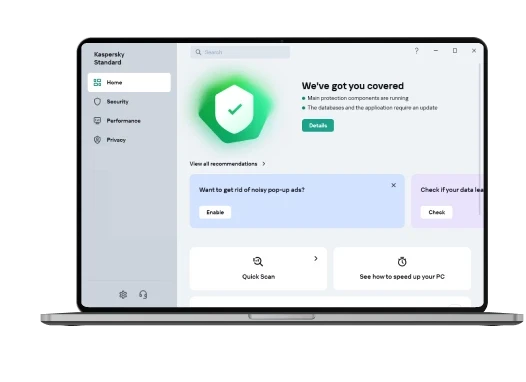
Handing a device to a service maintained over years buys one thing: not having to wonder every day whether it is still standing guard.
A few suggestions. Use the full 30 day trial first, and watch how much resource it takes on this machine and whether its prompts suit you. For a household with several devices, count the mobile ones into the licence before comparing costs. If online banking and payments are frequent, make sure the relevant protection is switched on.