
WakaTime: coding time analytics through open source editor plugins
Summary
WakaTime is a coding analytics tool for developers. Open source editor plugins record time spent coding and how AI is used, then build shareable charts by project and language. The free plan keeps one week of dashboard history.
Recommend- Name
- WakaTime
- Version
- 2.27.4
- Open source
- Proprietary
- Operating system
- WindowsmacOSLinuxWeb
- Website
- https://wakatime.com/
- Updated
- 2026-10-16 22:52
Finish a day of coding and then try to say where the time went: patching tests, or chasing one interface over and over; most of the effort going into new features, or into reading logic someone else left behind. WakaTime records quietly inside the editor and turns the record into charts you can read.
Why coding time is worth recording
Perception and reality often disagree. Some people believe they spend the day writing code and find, once counted, that most of it went to reading and debugging. Others assume a particular module took a great deal of effort, while the figures show it was a small slice. Such gaps are hard to spot without records, because nobody has a reliable feel for where their attention actually goes.
The point of recording is not to police anyone but to make habits visible. Once questions like how many hours did I write this week, which language dominated, and which project swallowed most of it have concrete numbers behind them, adjusting a schedule, allocating effort and estimating a delivery all get a basis.
How the data is collected
It works through official plugins installed into an editor or IDE. The plugin runs in the background, records activity from file edits and from the time actually spent in the editor, and reports it to the account. The plugin code is published openly, and the catalogue covers more than a hundred editors, IDEs and terminal environments, with entries running from the main editors through graphics tools, database clients and office suites. If a tool has no plugin yet, a desktop program that sits in the system tray can take over the recording instead.
What gets counted is active coding time, not the time an application happens to be open. The documentation says the plugin only counts when typing actually happens in the editor, so stepping away from the keyboard or switching to another window does not add to the total.
What the dashboard shows
After signing in there is a timeline organised by day, week and month, plus a group of views side by side: total time, the share taken by each language, the share taken by each project, and how activity is spread across the hours of a day. The official line gathers these under coding time, and adds a daily average together with the change against the previous week.
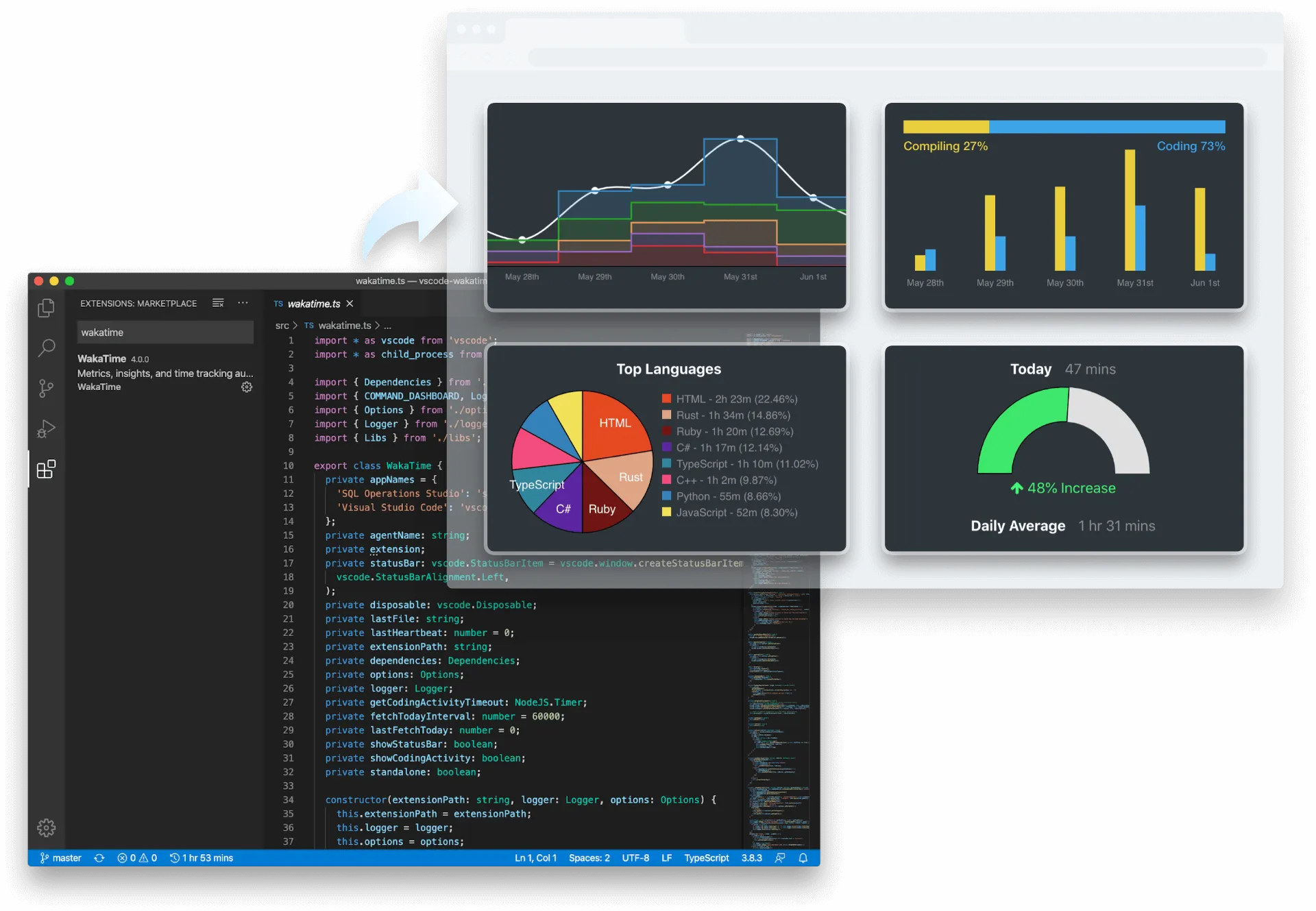
Recent versions have shifted toward the questions AI coding has brought. The site lists six measures for it, covering AI spend, AI adoption, the efficiency of AI output, model efficiency, a breakdown by model, and prompt length. They answer a different sort of question: how much a team puts into AI, which models genuinely carry part of the work, and how much generated code is kept versus thrown away and rewritten.
Where free ends and paid begins
The free plan already gives useful ground: one week of dashboard history, unlimited projects, shareable project charts, a weekly coding report by mail, the ability to set one programming goal, and the option to put your own figures on a public leaderboard. The paid plan opens the full history and the AI related insight, at fourteen dollars a month for an individual.
That one week of history is the only time limit in the free tier. For someone who wants to watch their own rhythm for a few days, the window is enough to form an early judgement; seeing change across seasons or quarters calls for an upgrade.
A new ledger for AI coding
Counting the AI generated part separately is a recent demand for tools of this kind. The site explains the data through three viewpoints, namely the developer, the team lead and the decision maker. An individual cares which tools genuinely make them faster and which introduce rework; a team lead cares about overall adoption and the output trend; a decision maker wants objective numbers for return on investment rather than questionnaires and self reporting.
Public data and what stays private
By default the data is visible only to you. Whether to publish coding activity is decided in the settings; only after that does it appear on a profile page and a public leaderboard, and it is also possible to join a private leaderboard only. The documentation lists the scope item by item: signals such as file edits and activity duration are collected, while full source content, clipboard contents and keystrokes are not.
What it is good for
An individual can watch their own rhythm and judge whether a skill is really getting time. A freelancer can attach the weekly report to a conversation and make the hours more convincing. A technical team can watch the overall trend and use it as a reference when planning. The precondition is that the plugin keeps running, because once recording stops the data shows gaps, and those gaps appear on the timeline as plainly as anything else.
Item | Official information |
|---|---|
What it is | Coding analytics and AI coding analytics for developers |
Platforms | Windows, macOS, Linux and the web |
Collection | Open source editor plugins, plus a desktop program |
Free plan | One week of history, unlimited projects, public leaderboard |
Paid plan | Fourteen dollars a month, full history and AI insight |
Command line version | 2.27.4 |
Recording time does not make the work faster by itself, but it turns the question of where the time went from a guess into a number you can look at. For anyone used to arranging their pace by feel, that visibility carries a little discipline of its own.