
Vnite Turns a Scattered Game Collection Into a Shelf
Summary
An open-source launcher for keeping a personal game library in one place: entries get covers, tags and categories, launch settings live with the entry, and the whole shelf can be browsed as a wall of artwork instead of a folder of shortcuts.
Recommend- Name
- Vnite
- Version
- 20260507
- Pricing
- Free
- Open source
- Open source
- Operating system
- Windows
- Website
- https://vnite.ximu.dev/zh-CN/
- Updated
- 2026-10-16 22:00
A collection is not the same thing as a folder
A game library accumulates in a way nobody plans. A few titles arrive through a store, a few more were bought somewhere else, a handful were installed by hand from a folder that has since been renamed twice, there is an emulator in the mix, and one evening you realise that the fastest way to find any of it is to remember which folder it went into years ago. Nothing is lost, technically. The problem is that a collection which cannot be seen cannot be enjoyed, and a wall of shortcuts with official icons is not a view of anything. The idea behind Vnite is simply that games deserve the treatment photographs and books already get: a shelf, with spines facing out and a way to look along it.
Not a replacement for a store, a centre of your own
The important distinction is what the program is not trying to do. It is not competing with the store it took the game from, and it is not asking anyone to move their purchases. It is a shell around the collection: whatever the origin of a title, it becomes one entry in one place, and that place is the one you open when you want to play something rather than when you want to buy something. Compared with managing by folder, the difference is that a game stops being an executable file and becomes a record — cover, title, tags, category, launch settings — which is enough structure to sort, to browse and to remember.

Open, and pleasant to look at, without a trade-off
The project is open source, which for a tool meant to sit on top of a personal collection of files counts for more than a badge. It means the behaviour can be inspected, the direction of development can be followed, and the library itself is not held hostage by a company's plans for its own product. Someone building a library intends to keep it for years, and a tool for keeping things for years should not be a black box that might stop opening.
The visual side is treated as a first-class requirement rather than decoration. The layout is modern and uncluttered, covers are displayed large enough to be recognised at a glance, and the cover-wall presentation works particularly well on a big screen. The point is not prettiness for its own sake; it is that recognition is visual, and a shelf you can recognise is a shelf you actually use.
What it actually does
Everything hangs off one place. Games from different sources are gathered into a single library and opened from a single entry point, which removes the small daily tax of switching between folders and stores to find the thing you already decided to play. Search and filtering work across the whole set rather than inside one directory, so the question becomes what you feel like playing instead of where the file went.
Presentation is cover-first. A wall of artwork is easier to navigate than a list of names, because visual memory does most of the work: you recognise the game you want before you read its title, and the library starts to look like a collection rather than a directory listing.
Sorting is where a small library and a large one diverge. With a few dozen entries, folders are enough; past a certain size, categories stop being optional. Entries can be arranged by genre, by status, by store of origin, by progress — playing, finished, unplayed — and by whatever grouping the owner invents, which is what makes a hundred-title library searchable by intent rather than by memory.
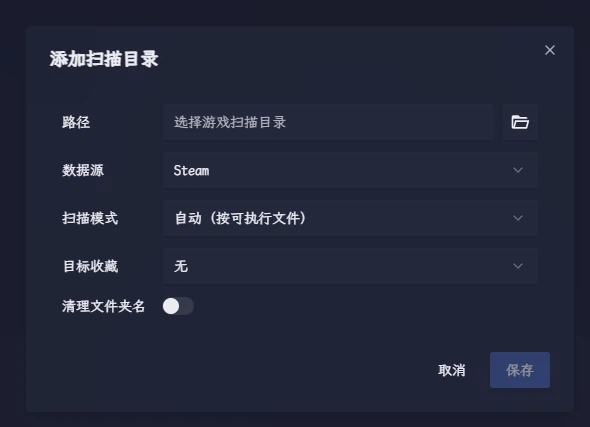
Launch settings live with the entry. For anything that did not come from a store — an indie title, an older game, a manually installed one — the launcher properties are what make the library usable in practice: a path is recorded once, the entry becomes clickable, and the game stops being scattered somewhere in the filesystem. From then on it is one item on a shelf, which is the whole promise.

The recommendation, stated plainly
What makes it worth recommending is a change of process rather than a list of features: managing a library stops being the chore of finding a file and clicking a shortcut and becomes the pleasant work of arranging a collection and opening it. It is open, it looks good, its logic is clear, and it is aimed at people who want a game centre of their own rather than another storefront.
Who will get something from it
Someone who plays one or two games occasionally is fine with shortcuts on a desktop, and nothing here is addressed to them. The tool earns its place for anyone whose collection has outgrown the folder: many titles, and especially the ones that never came from a store — independent works, older games, local installs, emulated material. It also suits people who enjoy arranging digital possessions as such, and anyone who wants one entrance to everything instead of six.
There is a second, less obvious audience. Anyone who writes about games, reviews them, or keeps notes on what has been played benefits from a structure: covers, tags and categories make it possible to record what has been experienced and what is still waiting, which is exactly the kind of record that is impossible to keep in a folder tree and tedious to keep in a document.

How it feels to use
The flow is short and does not require learning. Add a game, fill in a cover, a category, some tags and the launch information, and from then on it appears in the main view with everything else. That is closer to arranging a collection than to configuring software, and someone using a library manager for the first time will follow the sequence without instruction.
The value also grows with the collection rather than staying fixed. With a few dozen titles the benefit is convenience; with a hundred it is the difference between a library and a storage problem. Browsing by cover, searching by filter and grouping by tag all scale in a way that scrolling through folders does not — and the pleasant side effect is rediscovery, since a game that was forgotten in a corner of a disk is visible again the moment it has a cover.

A clear scope, honestly kept
The appeal is that nothing here is ambitious in the wrong direction. This is not an attempt to be a platform, a store or a social network; it is a shelf with a good index, and the features follow from that. Arranging, presenting, launching, sorting — the four things a player actually does with a collection — are done directly, with an interface that stays out of the way. For anyone who has accumulated games faster than they have organised them, which is most people who have been playing for a while, that is enough to be worth the evening it takes to set up.