
VeraCrypt 1.26.31 goes after the one step that keeps breaking upgrades
Summary
Version 1.26.31 repairs the upgrade path itself: replacing a locked service file now waits, retries and falls back to a restart, and the boot loader backup migration plus the secure boot check on encrypted system drives were fixed together. Rescue disks also get a warning about the signing rotation.
Recommend- Name
- VeraCrypt
- Version
- 1.26.31
- Pricing
- Free
- Open source
- Open source
- Operating system
- WindowsmacOSLinux
- Website
- https://veracrypt.io/
- Updated
- 2026-11-06 23:00
The longer a volume has been in service, the more an upgrade feels like a risk. VeraCrypt 1.26.31 adds almost nothing new and spends its effort on keeping the upgrade itself from stalling.
Version 1.26.31 landed on 2 November 2026, nine days after 1.26.30 on 24 October. Only the last digit of the version number moved by one, which usually signals a quiet patch. The release notes say otherwise: nearly every change sits on the upgrade path, the place where a mistake costs a machine rather than a feature.
The step that breaks, now handled on its own
Coming up from 1.26.30, the installer has to replace the executable behind the system service. If that service is still running the file is locked, the replacement fails, and the whole installation stops right there. The new build waits for the privileged service process to exit, retries the locked files, and if they still refuse to be swapped it queues the job for the next restart. For software that is already installed and used every day, a failure that gets caught and finished later is worth more than an extra menu.
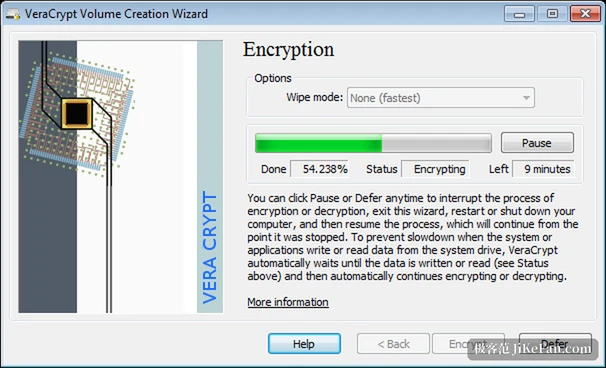
Machines with an encrypted system drive carry a second layer of trouble. Upgrading from the package has to migrate the backup of the original boot loader, refresh the boot loader itself, and run a compatibility check against secure boot. If any one of those three fails, the machine can stop before it ever reaches the operating system. This release repairs that chain and also touches the configuration used when the platform ships a feature update, the way a failed backup migration is recovered, and what happens when the service update fails: the message now names the file or the registry value that went wrong instead of returning one generic code.
A warning that arrives before it hurts
The authority that signs boot components is being rotated from the older Windows Production PCA 2011 to Windows UEFI CA 2023. A rescue disk made today can still hold a copy of the boot manager signed under the old authority, and once the rotation finishes that copy may no longer be recognised, which would leave the rescue disk unable to see the system. The creator now says so out loud: the backup inside is not refreshed automatically, and the disk has to be made again. In the same batch, cleanup of the legacy system encryption folder under ProgramData became more careful. Read-only files and redirected paths are protected, a restored backup is kept, and old driver files are only removed after the change to the installer registration has been verified.
A quieter change on the other platforms
On Linux, macOS and BSD the fix is less visible but security shaped. Programs launched from within VeraCrypt no longer inherit the pipe to the privileged service, and no longer inherit other open file or device descriptors. The notes also mention better mounting reliability, with translations and documentation refreshed. Nothing here shows up on screen; the point is to close a handle path that could otherwise be used against the process.
What the tool is actually holding shut
VeraCrypt is free, open source disk encryption for Windows, macOS and Linux, and its code descends from TrueCrypt 7.1a. It can build a virtual encrypted disk inside an ordinary file and mount it as a real drive, encrypt a whole partition or a removable device, or encrypt the drive that holds Windows so that a password is required before the system starts. Encryption runs in real time and stays invisible: reads and writes are processed in parallel and pipelined, modern processors contribute hardware acceleration, and daily use feels much like an unencrypted disk. Hidden volumes and a hidden operating system add a plausible deniability layer for the situation where someone is asked to hand over a password.
The strength difference lives in key derivation. The documentation puts the default at 200,000 iterations when a system partition is encrypted and 500,000 for a standard volume, and a custom PIM can raise either figure. The price is a few extra seconds while mounting, with no cost during use. Decrypted data is described as existing only in memory and never written back to disk, so shutting down or losing power unmounts the volume and returns its contents to unreadable.
Who should move now
Three groups gain the most. The first is anyone who was stuck on the service file replacement last time and only recovered by reinstalling; that path was rewritten for them. The second is anyone running an encrypted system drive deployed from the package, whose situation is exactly the boot loader backup migration and the secure boot check. The third is anyone using VeraCrypt as an infrastructure component on Linux or BSD, where the descriptor inheritance fix and the mounting reliability matter more than the interface.
One reminder that never gets less important: there is no recovery channel. A forgotten password or a lost key file leaves the contents of the volume inside it. Confirming that the password and the key file are backed up before starting the upgrade is worth more than the upgrade itself. Machines that never shut down and keep a volume mounted all year are also worth training out of that habit.
1.26.31 will not excite anyone. It repairs the roughest spots on the upgrade road, and with an encrypted disk, one failed restart fewer is one more chance that the data is still there.