
HiFile 0.9.20: A Dual-Pane File Manager That Opens Archives Like Folders
Summary
HiFile is a dual-pane file manager for Windows, macOS and Linux that shows two directories side by side, steps inside archives as if they were folders and previews images and text without another program.
Recommend- Name
- HiFile
- Version
- 0.9.20
- Pricing
- Free
- Open source
- Proprietary
- Operating system
- WindowsmacOSLinux
- Website
- https://www.hifile.app/
- Updated
- 2026-11-05 21:20
Copying files is rarely the slow part. Confirming where you actually are is. The source sits on the left, the destination on the right, and a single-pane tool makes that a loop of switching, finding the place, switching back and dragging. HiFile uses the oldest and most durable layout in file management: two panes, each with its own address bar, tabs and view settings.
It runs natively on Windows, macOS and Linux, with the same logic on all three while keeping each system's habits. The current version is 0.9.20, and the author is explicit about the ambition: not a platform, just file handling that feels less awkward.
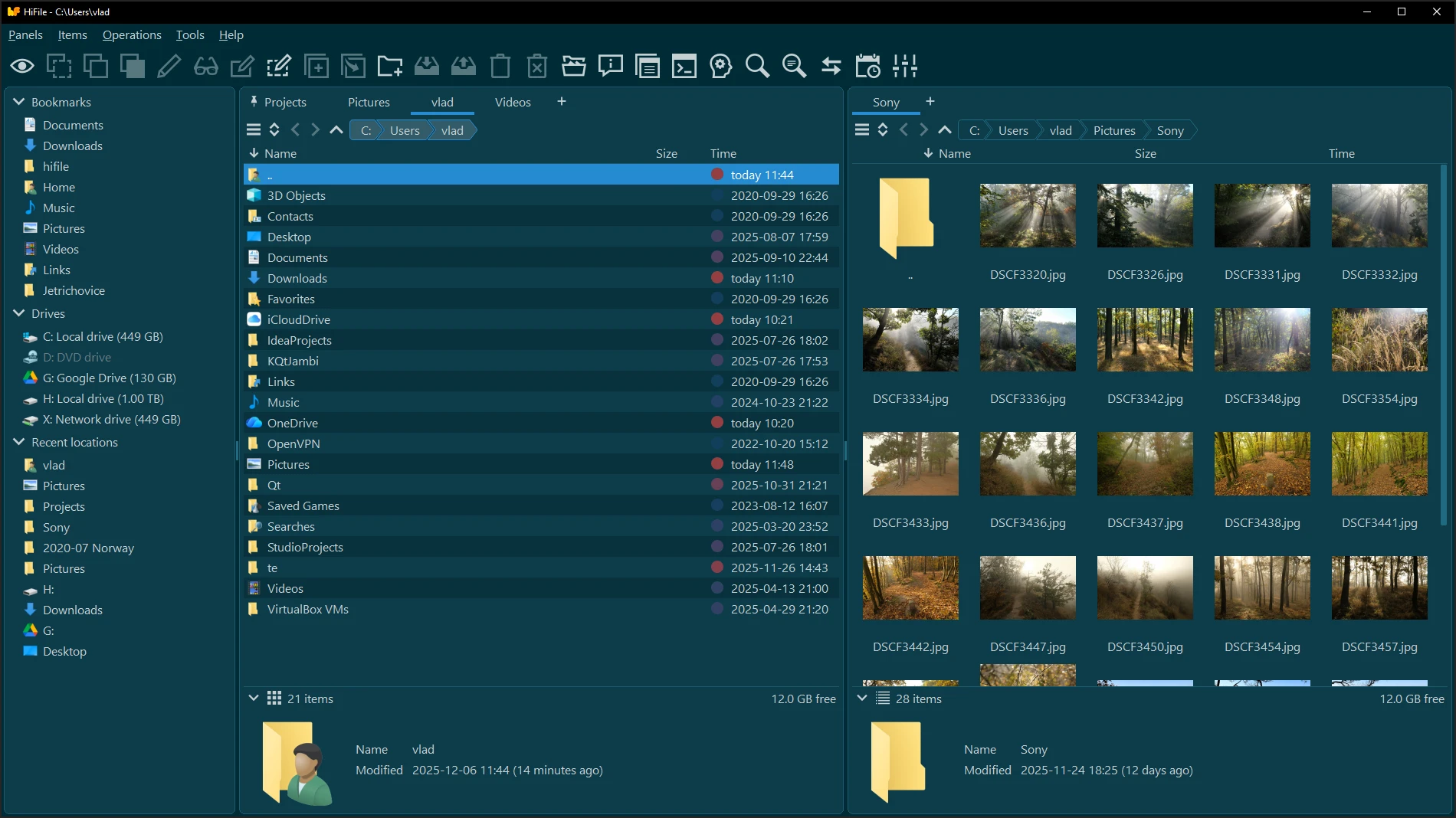
Drag across and the copy is done
The two panes pay off most when drives differ. The left side lists bookmarks, drives and recent places; the right side shows the current directory. Dragging a file from one pane to the other copies or moves it. Each pane opens its own tabs, the address bar takes a typed path, and the breadcrumb is clickable. A permanent status bar reports how many items are selected and how much space is left, so a long path never disappears behind a truncated title.
Rename, delete, create, filter, search and synchronise two directories all happen in the same window instead of another one. The list sorts by name, size or date, switches to thumbnails, and fills an image folder with previews automatically.
Archives behave like folders
HiFile treats an archive as one more file system layer: double-click and you are inside, browsing directories, opening files and previewing them exactly as in a real folder. Subdirectories can be created inside the archive, files renamed or removed, and the result written back on exit. Writing offers a format, a compression level, a password and encrypted file names.
What that removes is the unpack, edit, repack loop. Looking at what an archive holds, or changing a single file inside it, is much cheaper when you never unpack the whole directory and then clean up after yourself.
The keyboard is faster than the mouse
The author says it plainly: everything is reachable with a mouse, but real speed comes from the keyboard. Space brings up a quick jump where a few letters reach a bookmark or a recent directory. Typing letters in the current directory filters the list live, without clicking into a search field first. Copy, move, rename and new folder have shortcuts, and the detail strip at the bottom shows the selected item's name, modified time and size, long names included.
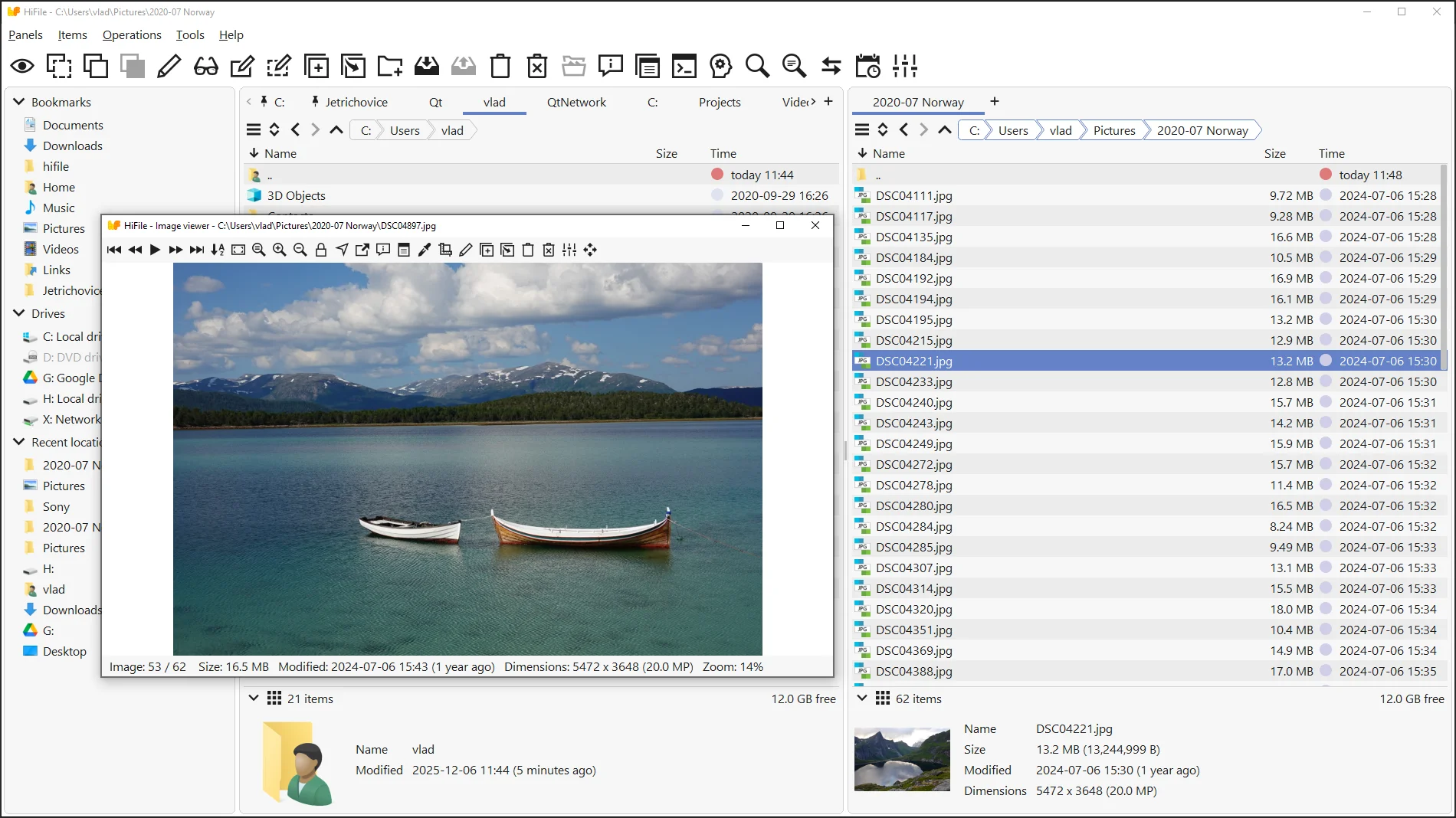
More settings than expected
Preferences cover interface scale, colour themes, corner radius, button gradients, font and line height, item spacing, thumbnail size and content, date and time formats, even whether relative labels such as today and yesterday are used, and how bookmarks and drives are ordered. For a tool opened dozens of times a day, those details decide whether it feels natural or grating.
The built-in viewer follows the same idea. Images, text and binary files open on the spot, images zoom and browse as thumbnails, text can be edited lightly, and no second program has to start just to look at something.
Free, with licences paying for it
HiFile downloads and runs free on every platform with no feature gating. The author says development is funded by Windows and macOS licence sales, so buying and registering a copy is a way to support it. The site also promises no advertising, spyware or viruses; such promises cannot be verified, but they are at least written down.
The version number still sits at 0.9.20, which says the polishing continues and edge cases can still bite. Anyone who works through a file manager should keep confirming before destructive operations and keep a backup of anything important.
HiFile does not try to reinvent the file manager. It makes the old pieces solid: two panes, archive browsing, a built-in viewer and keyboard control. For anyone who moves files between two directories every day, that conservatism is what saves the time.