
Todo.txt: a task list kept in plain text, an open format that has not aged in twenty years
Summary
Tasks as ordinary lines of text with priority, dates, projects and contexts: readable by people, parsed by scripts, and portable between every editor and system you will ever use.
Recommend- Name
- Todo.txt
- Version
- 2.14
- Open source
- Open source
- Operating system
- WindowsmacOSLinuxAndroidiOS
- Website
- https://todotxt.org/
- Updated
- 2026-10-06 17:18
The final form of a task list is a text file
Plenty of people move from one task application to the next for years before settling on the plain answer: a single text file. Todo.txt is that answer formalised — an open format for task lists plus the tools built around it. A task is an ordinary line of text. A priority letter in brackets at the start, then the description, with plus-tags naming a project and at-signs naming a context, and dates where they belong. The rules are simple enough that a person reads the file directly and a script parses it without a library. The format and the reference tooling are maintained by a community under the GPL, the command-line scripts are still updated, work continued through 2026, and the main repository carries several thousand stars.
The format is the specification: three rules to learn
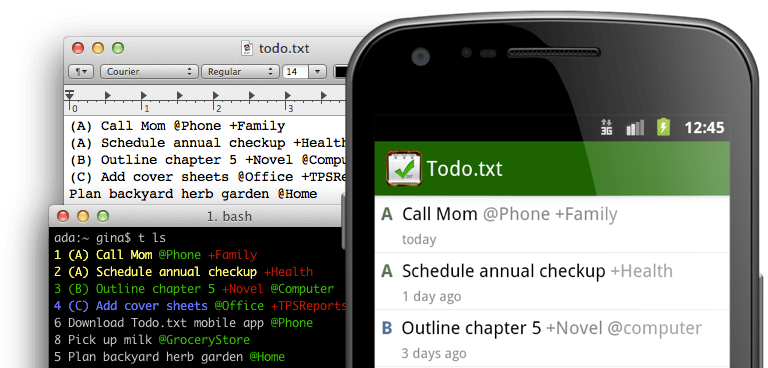
One line, one task. A priority sits in parentheses at the front. A plus sign marks the project a task belongs to, an at-sign marks the situation in which it can be done, and a completion date goes at the start of the line once the work is finished. Filing a certificate renewal as the highest priority item under an operations project is one line of text following a published convention — not a private format owned by a company. That matters more than it sounds: whatever editor and whatever operating system you use, the file opens and can be edited. A decade from now, after the software has turned over several times, the list is still that file. Nothing is held hostage inside an application.
The command line is home ground
The reference tool is a shell script called todo.sh. One command adds a task, one lists them, sorting by priority and filtering by project or context come as options, and tab completion finishes tags and contexts for you. Finished work is archived into a done file, so the history stays readable instead of piling up. For a server administrator or a developer, managing a list without leaving the terminal is simply more natural than alt-tabbing to a graphical application, and a scheduled job can turn the file into a daily summary. A plugin directory maintained by the community adds statistics, extra filters and whatever else a script can be persuaded to do.
Clients exist everywhere, syncing is your own business
The official mobile app stopped being maintained long ago, but the ecosystem around the format filled the gap. Desktop clients include cross-platform graphical tools, Android has several applications built specifically for the format, iOS has paid editors, and most code editors have a syntax-highlighting plugin. Synchronisation follows the same philosophy: drop the file into whatever sync service or peer-to-peer tool you already trust, point each client at the same path, and the syncing is done by moving the file itself rather than by an account on someone's server. The cost is that you assemble the sync chain yourself. What comes back is complete freedom of exit — there is nothing to migrate away from.
The extra dividends of plain text
Keeping tasks in text unlocks things an application cannot offer. Anyone comfortable with regular expressions can write a batch analysis: count what got finished each week, surface the tasks that have been sitting for months. Put the file under version control and every edit has a history, which means a deleted task can be recovered. A text search finds an old entry across projects without clicking through folders. People who write also tend to keep the list beside a journal and a notes file in the same synced directory, ending up with a personal system they defined themselves rather than one a vendor designed for them. The learning cost is small: ten minutes for the format, half a day with the documentation for the command-line basics, and after that it becomes an asset that improves with use. Anyone who remembers paper knows the rule — the simpler the tool, the longer the habit survives.