
Soft Organizer Review: Uninstalling That Leaves Nothing Behind
Summary
Soft Organizer watches an installation from start to finish and writes down everything it touches, so removal can follow the same list back out. The difference shows up months later, when the disk is not filling with ghosts.
Recommend- Name
- Soft Organizer
- Version
- 20260923
- Pricing
- Free
- Open source
- Proprietary
- Operating system
- Windows
- Updated
- 2026-10-07 21:36
The problem is the quiet departure
Everyone has removed a program and found the folder still there afterwards, half empty, with a configuration file and a log nobody will ever read. Multiply that by a few years of installing and trying things and the system becomes heavier for reasons that are hard to point at. Soft Organizer attacks the cause rather than the symptom by watching the installation. While a setup program runs, the tool records what changes in the file system and in the registry, and the result is a complete list attached to that application rather than a guess assembled afterwards from a name pattern.
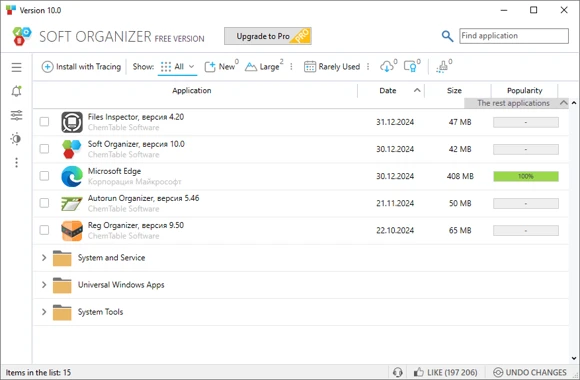
Removal then works from that list, and a second pass scans for leftovers that the vendor uninstaller forgot or deliberately kept. The registry entries that hid under an unrelated key name get found because the address was written down at install time, not inferred from the product name later. This is the accounting difference that the ordinary control panel cannot offer, and it is the whole reason the program exists.
More than a removal button
The rest of the design treats installed software as an inventory that deserves management. Programs can be sorted by how much space they occupy or how often they are actually used, applications from the store are included in the same view, and online ratings plus update notices help with the decision of what to keep. The interface is plain and the engine is light enough to sit in the background without being noticed, which matters for a tool whose job is to observe other tools.
The free edition covers the core capability, and daily removal work is well within it; batch operations and deeper automation belong to the paid tier, which is a fair split for a utility of this kind. Years of steady releases place it among the quieter, more competent entries in its category, and the licence is a one time purchase rather than a subscription.
One nuance the accounting model exposes: portable programs that never installed themselves leave no record at all, so the inventory will not know about them. That is not a fault, it is a reminder that the list describes what the system was told about, not everything on the disk. Pairing the inventory with a plain folder scan once in a while closes that gap, and the two views together give a more honest picture than either alone.
The reliability here comes from bookkeeping: note it clearly on the way in, and the way out adds up. A tidy system is the sum of every application leaving properly.
Getting the most from it
The habit that pays off is to switch monitoring on before installing anything important, because an application installed without a record can only be removed the ordinary way. When a leftover scan returns a list, read it item by item before confirming: a shared library or a folder belonging to another program will occasionally appear, and keeping one stray file is cheaper than breaking something adjacent.
There is a second, less obvious use. Exporting the list of installed programs before reinstalling a system turns a weekend of guesswork into a checklist, and importing it afterwards brings back the same set in the same order of priority. Combined with the removal side, that makes the program a small piece of system housekeeping rather than a one trick utility, and it earns its place on a machine that gets used for years.