
Scrcpy: the phone screen on your desktop, with almost no perceptible delay
Summary
An open source mirroring tool that puts an Android screen on a computer over USB or Wi-Fi and lets you drive the phone with a keyboard and mouse. No root, no app on the phone, very low latency, and it runs on Windows, macOS and Linux.
Recommend- Name
- Scrcpy
- Version
- 3.3.4
- Pricing
- Free
- Open source
- Open source
- Operating system
- WindowsmacOSLinux
- Updated
- 2026-10-24 22:00
A phone held up in a meeting shows its contents to nobody. Mirroring is not a convenience feature; it is the difference between demonstrating something and describing it.
The scenarios you already recognise
You want to show a colleague how a flow behaves in the app, and the phone waves in the air while three people lean in and squint. You want to answer a message that arrived on the phone without letting go of the keyboard. You want to record a short walkthrough of an interface, and your finger jitters across the glass until the whole clip looks unsteady. None of these is exotic; they happen most weeks. What they share is that the small screen is in the wrong place.
The obvious fix is to put that screen on the monitor and let the desk's own input devices do the work. That is what a mirroring tool is for, and the question is only which one, and at what price in delay, in money and in dependencies.
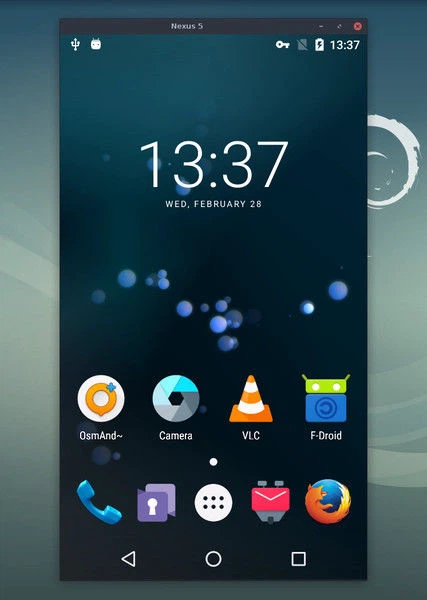
How it avoids the delay
The project comes from a studio with a long history in Android emulation, and it is released as open source; its repository has collected well over a hundred and forty thousand stars, which is a fair proxy for how many people rely on it. The architectural decision that matters is simple to state: it does not record the screen and then send the recording. It talks to the device over the Android debugging protocol, takes the video stream directly and decodes it for display. There is no intermediate capture, no re-encode for transport, no player on the far end.
That single choice explains the latency figure the project is known for, a few tens of milliseconds by its own account. It also explains why the window feels like a slow monitor rather than like a video call with your own phone, and why typing into the mirrored screen is tolerable at all.
Two ways to connect
Over a cable is the simplest path. Enable debugging in the phone's developer options, plug the cable in, invoke the tool once from a terminal, and the screen appears as a window on the desktop. Nothing is installed on the phone; nothing is registered as a service; the connection ends when the cable comes out.
Wireless is the more comfortable path, and it is a two-step arrangement: connect once over the cable to switch the device into network mode, then unplug and work over the local network. The test phone can sit on a desk across the room while you debug it from your chair, and the cable stops being a constraint on where you sit.
What the mirroring is good for
The picture is only the entry point. The more consequential capability is two-way control: the computer keyboard types into the phone, the mouse acts as a touch, the wheel scrolls a page, the right button goes back and the middle button returns to the home screen. Anyone who types for a living will notice immediately how much of their speed was being lost to two thumbs.
The details around that core are where daily use is won or lost. Recording: the same command that mirrors also writes a file, so no separate screen recorder is needed. Screen off: once the picture is on the monitor, the phone's own display can go dark, which saves battery and keeps the content out of sight of people walking past. Clipboard sharing: text copied on the computer can be pasted on the phone. Audio: newer builds forward the device's sound to the computer as well. Several devices at once: useful for testing anything that involves more than one handset. Quality controls: resolution and bit rate can be lowered to chase latency, or raised to record a clean tutorial.
The honest comparison, and the cost
Most mirroring products in the market are commercial in one way or another: a paid tier, advertising, a companion application that must be installed on the phone, a watermark on the free plan, a resolution cap behind a subscription. This one has none of those, and the reason is structural rather than generous. Open source means the code can be inspected. Free means there is no meter running. No advertising means the interface exists to do the job and nothing else.
The price is a real one and should be named: it is a command line tool. There is no window with buttons, and setting up the debugging connection or tuning parameters happens in a terminal. For people who would rather not, third-party graphical shells wrap the same engine and lower the threshold considerably, at the cost of a layer that can lag behind.
Who should bother
If you demonstrate mobile software, record interface walkthroughs, test on real handsets, or simply prefer a full keyboard for long messages, five minutes spent learning one command pays back more than any subscription in this category. If you need a polished window with a wizard and a settings dialogue, use a graphical shell over it, or accept that this is not the tool for that preference.
It is not the friendliest mirroring tool and does not try to be. It is the purest one: free, open, low in delay, and free of dependencies — which is a different kind of friendliness, aimed at people who will read one line of instructions and then stop thinking about the tool entirely.