
Fing 4.0.3: a free scanner that names every device on the network
Summary
A network scanning tool for home and office use that finds and identifies every device on a wireless or wired network within seconds, reports brand and model, and adds alerts for unknown devices, a router check, open port scanning and automatic speed tests.
- Name
- Fing
- Version
- 4.0.3
- Pricing
- Free
- Open source
- Proprietary
- Operating system
- WindowsmacOS
- Website
- https://www.fing.com/
- Updated
- 2026-10-16 21:58
The router knows exactly what is plugged in. It just never tells anyone in a form anyone can read.
A network you did not inventory
Households accumulate connected things without ever deciding to. A television, two phones, a tablet, a printer bought years ago, a thermostat, a doorbell, a game console, a laptop from work. Each was added on its own, each is on the same network, and nobody holds a list. The router holds the list, buried in an administrative page that most people open once and never again.
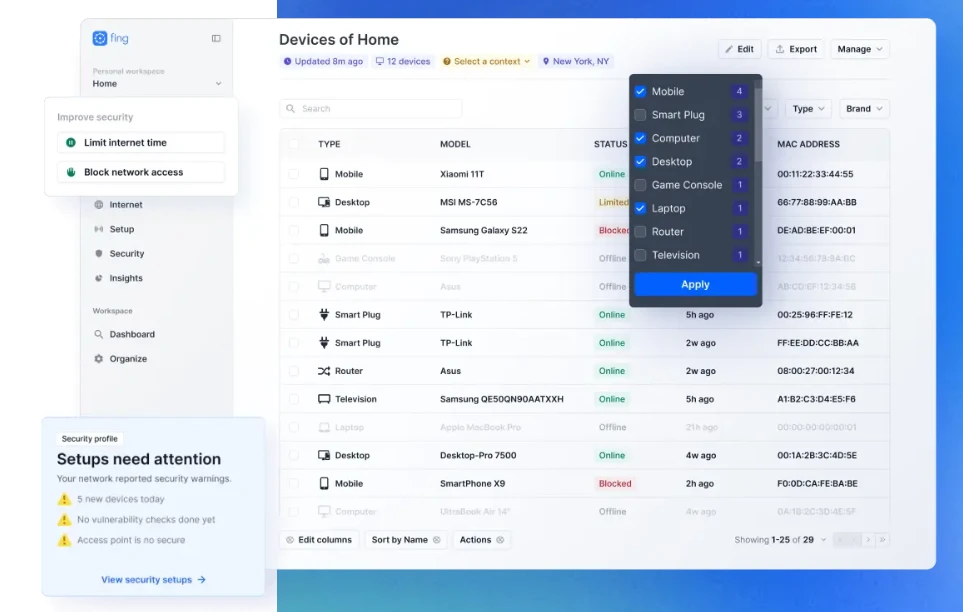
Fing is a scanner for that gap. The official description promises to find and identify every device on a wireless or wired network within seconds and report brand and model. The interesting part is the identifying: a bare address tells you nothing, whereas a name, a vendor and a device type turn a row of numbers into something a person can recognise.
That matters most in the negative case. The question people actually ask is not what is connected but whether something is connected that should not be, and answering it requires knowing what the baseline looks like. A first scan establishes that baseline; later scans show what changed.
What the scan reports, and what else it does
Beyond device discovery, the tool raises an alert when a device it has not seen before joins the network. For a home network that is the practical version of intrusion detection: you may not care about most arrivals, but you want to be told rather than to find out later.
A router check inspects the gateway for common weaknesses, such as an outdated firmware notice or a remote administration interface left reachable. Open port scanning lists services a device is exposing to the local network, which is how a printer with an unauthenticated web console or a camera with a debug service gets noticed.
Automatic speed tests round it out, recording throughput over time rather than as a single number. A reading taken once tells you little; a series shows whether the evening slowdown is the provider, the wireless signal, or one device saturating the link.
Reading the results sensibly
Two cautions belong here. First, a device name can be wrong. Vendors reuse hardware across product lines, and a scanner that guesses from a network card identifier will sometimes label a camera as a switch. Treat the name as a hint and confirm by address or by unplugging.
Second, scanning your own network is fine; scanning someone else network is not, and the same tool works equally well on a network you do not own. On shared or workplace networks, ask before scanning, because port probing looks exactly like what it is.
Item | Official information |
|---|---|
Current version | 4.0.3 |
Purpose | Network scanning for home and office |
Discovery | Every device on a wireless or wired network, within seconds |
Identification | Brand and model reported |
Extras | Unknown device alerts, router check, open port scan, speed tests |
Platforms | Desktop and mobile |
Knowing what should be on the network is worth more than any alert about what should not.
Practical notes: take a baseline scan when the network is quiet and save it, so later additions stand out; rename devices as you identify them, since the names persist and save the same guessing next time; and treat an unknown device as a question rather than a verdict, because it is usually a forgotten phone rather than an intruder.