
Reg Organizer 9.93: tracking down what an uninstall leaves behind
Summary
Reg Organizer is a maintenance suite for Windows whose core idea is watching an install so the uninstall can be traced: settings are recorded while a program goes in, and the same trail is followed out, taking stray files and entries with it. Startup control, automatic cleanup, an editor with import and export and a tree preview of registry files round it out. Version 9.93, shareware with a trial.
Recommend- Name
- Reg Organizer
- Version
- 9.93
- Pricing
- Paid
- Open source
- Proprietary
- Operating system
- Windows
- Updated
- 2026-10-06 16:22
The leftovers nobody asks for
Uninstalling software on Windows has a familiar ending: the program is gone, and a scatter of settings, empty folders and stale entries stays behind. None of it breaks anything on its own, and all of it accumulates. After a few years of installing and removing tools, a machine carries a sediment layer of things that no longer correspond to anything.
The usual remedy is to run a cleaner afterwards and let it guess which leftovers belong to which program, which is exactly the weak point: without a record of what the installer did, a cleaner can only pattern-match on names. This suite takes the other route. Its central mechanism watches the system while a program is being installed, notes what changed, and then follows that same trail backwards at removal time, so stray files and entries are collected by evidence rather than by guesswork.
Why the monitoring approach works better
An installer is not shy about touching things. It writes settings in several places, registers components, drops files outside its own folder and leaves services or scheduled tasks behind. A post-hoc search sees the results but not the relationships, so a folder called common or a key that looks generic is a coin flip. A record taken during the install keeps the relationship: this key, that folder, that file and that service all arrived together in one operation, and they can leave together as well.
That also explains why the newest update spends its effort on detection rather than on interface. Version 9.93 improved how associated drivers are recognised during the leftover scan, which is the part of this problem where a wrong guess is expensive: a driver that still has a device attached should not be swept up with the program that brought it.
A small box of maintenance tools
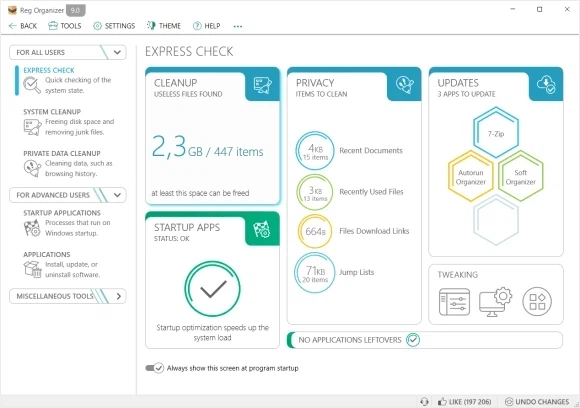
Removal is the headline, but the suite ships with the utilities people reach for between removals. A startup manager decides what is allowed to run at boot, which on a machine that has been in use for a while is often more effective than any cleaning. A cleanup module works automatically, dealing with the junk that accumulates on the system drive and offering to remove old update packages, a category that quietly grows into gigabytes.
The registry editor goes past what Windows provides, with export and import, search and replace across keys and values, and a viewer that shows a registry file as a tree before it is imported. That last part matters more than it sounds: the usual way to apply such a file is to double-click it and accept whatever happens, and being able to look at the structure first turns a blind commitment into a decision.
An earlier release added a community library of cleanup rules with more than three thousand entries aimed at specific programs, so the knowledge of what a given application leaves behind does not have to be rediscovered on every machine.
How it fits into a routine
The tool works better as a habit than as a rescue. Watching an install costs nothing while it happens, so the practical advice is to let the monitor run whenever something unfamiliar is being installed, and to look at the startup list every few months. Neither takes long, and together they prevent most of what people later describe as a machine that has become slow.
Version and licensing
The current build is 9.93, published on 16 June 2026. It is shareware: the download can be tried, and the full feature set needs a licence. The home edition is priced by the number of machines, and the vendor runs discounts often enough that paying the list price is rarely necessary.
A maintenance tool earns its place by being used regularly rather than by having many buttons: clearing out startup entries and leftovers every few months is what keeps a system tidy. The leftover scan is where this one is clearly stronger than its neighbours, and anyone who installs and removes a lot of software will get the value back quickly.