
Pyspread Review: A Spreadsheet Where Every Cell Is Python
Summary
Write a Python expression in a cell instead of a nested formula, and get back a number, an array or a figure. The whole scientific stack is importable, so the grid doubles as an executable notebook.
Recommend- Name
- Pyspread
- Version
- 2.4.5
- Pricing
- Free
- Open source
- Open source
- Operating system
- WindowsmacOSLinux
- Website
- https://pyspread.gitlab.io/
- Updated
- 2026-10-08 11:59
The formula bar has gone too far
Anyone who has maintained a serious spreadsheet knows the moment it turns against you: a cell containing seven nested functions, three of which are there to work around the other four. It computes, nobody can read it, and the person who wrote it left two years ago. Pyspread proposes a different unit. The cell contains a Python expression, and the grid evaluates it. Summation is one call, a matrix operation is one call, cleaning text with a pattern is one call, and the person reading it next month can follow the line.
What makes the idea more than a gimmick is the return type. A cell does not have to yield a number. It can yield an array, a rendered figure, an image, or a block of markup, and the grid will display it. The boundary between spreadsheet and program thins out; the file is both a table and an executable notebook, and the logic lives in named functions rather than in copy-pasted formulas.
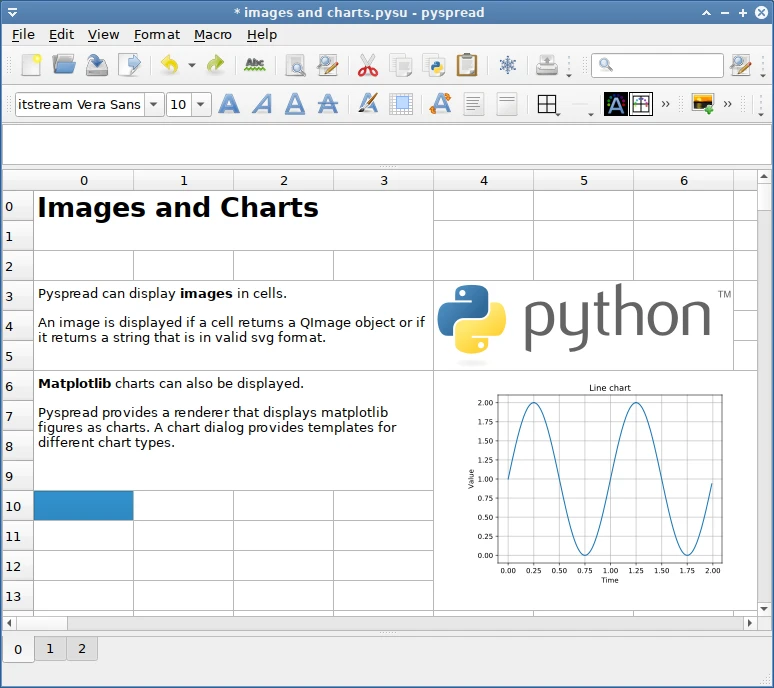
The whole stack is one import away
This is the part that changes what the tool is for. Numerical computation, array handling and plotting libraries can be called directly from a cell, so a column of measurements can be summarised, fitted and drawn without leaving the grid or converting formats. A researcher keeping an experiment log, a teacher building a demonstration, an analyst cleaning a batch of exports: each of them gets the same benefit, which is that the analysis and the presentation live in one file that can be re-run.
Rerunning is the quiet advantage. Change an input, and every dependent cell recomputes, which is what a spreadsheet promises and what a folder of scripts does not. The project is open source, published under a free licence, available on the three desktop systems, and still receiving releases. Anyone comfortable with the language will recognise the satisfaction of the first minute.
The philosophy is clean: rather than inventing a small language just for tables, borrow a real one. The table becomes code, and the code becomes the table.
Where the friction is
Honesty demands the caveats. The interface is a programmer's interface: correct, complete and not friendly to someone who expects a ribbon. Loading a large array into a cell will produce a display that is technically valid and practically unreadable, so the scale of what is shown has to be decided deliberately. And the file format is not something an ordinary office suite will open, which matters the day the file has to be shared.
The last point has a workaround that should be a habit: export to a conventional format before sending anything to someone who does not program. A hard tool is allowed to be hard, but it should not force its difficulty onto the recipient. Do that, and the file becomes portable again.
Habits that keep a sheet maintainable
Define functions in the macro area rather than repeating expressions across cells, because a change then happens in one place. Keep the heavy computation out of the visible grid and put only its result there, so the sheet stays readable while the work stays correct. Name the inputs at the top and refer to them, instead of scattering constants through the cells; six months later, a named input is the difference between adjusting a parameter and rewriting the sheet.
Finally, treat the file as source code. Keep it in version control, write a line at the top explaining what it computes, and resist the urge to make one sheet do everything. Three small sheets that each answer one question will outlive one large sheet that answers none of them clearly.