
Wavebox Review: A Window That Holds Every Work Tab You Own
Summary
Two mailboxes, four chat tools and three document suites, each logged in separately and arranged like a taskbar. Spaces separate work from home, badges show unread counts, and the engine underneath was replaced this year.
Recommend- Name
- Wavebox
- Version
- 20260923
- Pricing
- Paid
- Open source
- Proprietary
- Operating system
- WindowsmacOSLinux
- Website
- https://wavebox.io/
- Updated
- 2026-10-08 11:57
Fifteen tabs is not a workflow
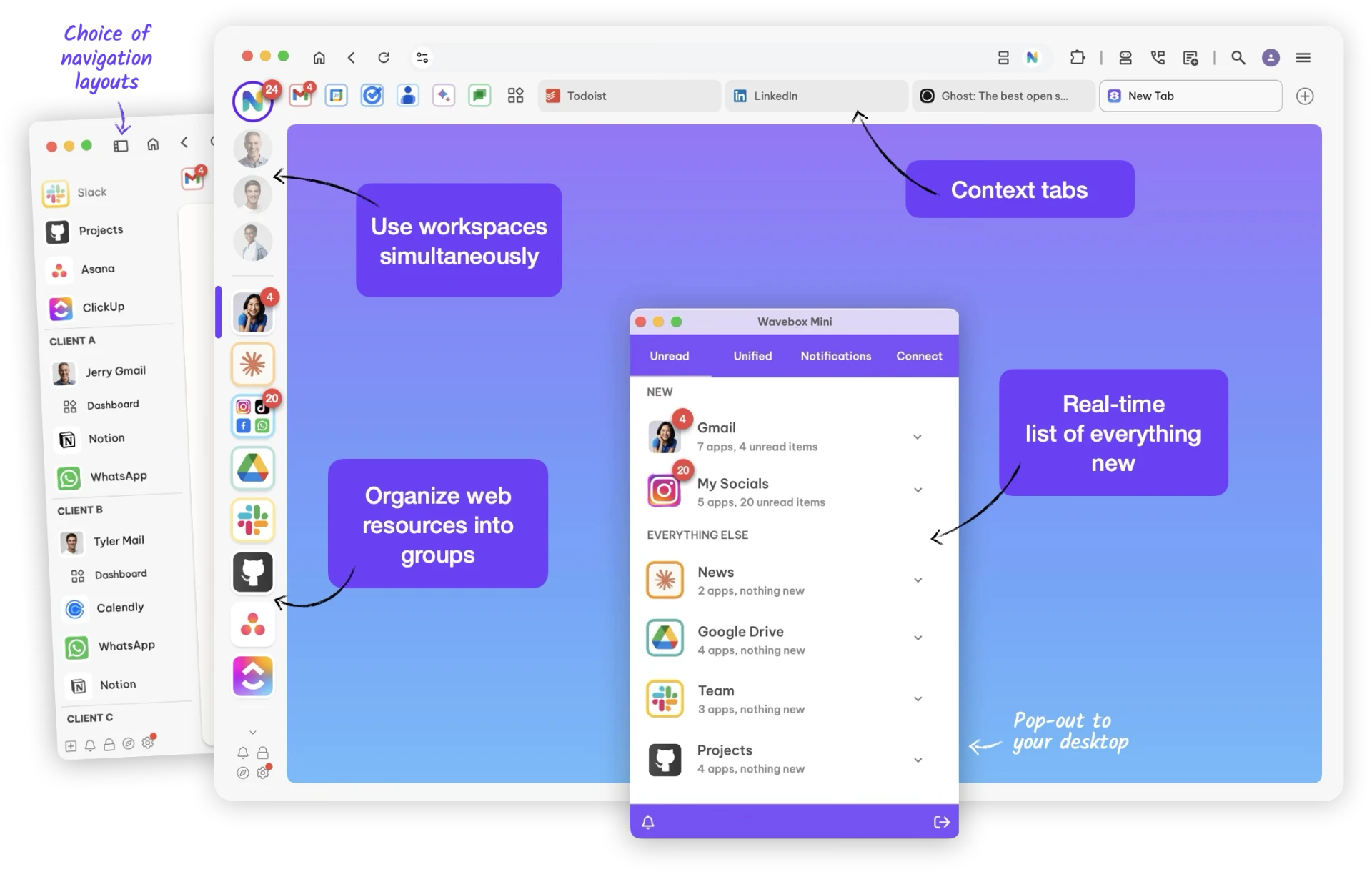
An ordinary working day now involves two mailboxes, four chat tools, a document suite, a ticketing system and a calendar, most of them in the browser. Opening all of that as tabs produces the familiar mess: no way to see which account you are in, no way to keep work and personal separate, and a row of icons too short to read. Wavebox changes the unit of organisation. Each web application becomes its own small application with its own session, so two Gmail accounts never see each other's cookies, and the left edge becomes a taskbar rather than a tab strip.
Spaces are the second idea and the more useful one. Instead of grouping by product, you group by context: a work space containing the work mailbox, the team chat and the project board; a personal space with the other mailbox and the family calendar. Switching the space switches the entire context, including which notifications are allowed through, which turns a machine that interrupts constantly into one that interrupts only when the current context is relevant.
What changed underneath
The most consequential work this year was not a feature. The application moved off the older wrapper approach onto a native engine, and the difference is felt before it is explained: start-up is quicker, switching between applications is instant rather than a small pause, and memory use is better behaved with a dozen applications loaded. Anyone who abandoned this category after trying one of the earlier wrappers should treat that judgement as expired.
Around the engine sit the details that decide whether a tool survives daily use. Desktop notifications that actually appear, a tray icon, global shortcuts to jump to a specific application from anywhere, unified search across the contents of the applications, and the ability to keep a sleeping application from consuming anything until it is opened. A browser can do some of this through profiles and pinned tabs, but it cannot badge fourteen icons independently or suspend a single site while leaving the rest awake.
The bet is on a new normal: more and more work happens inside web applications, and web applications deserve to be managed as real applications rather than as tabs someone forgot to close.
The honest cost
It is a subscription, and that is the first thing to weigh. The trial exists for a reason, and the right way to use it is to move a real working day into the program rather than clicking around for ten minutes. If the day ends with fewer lost minutes and a cleaner head, the price is a rounding error against a salary; if the day feels the same, do not renew, and no amount of feature list should change that verdict.
The second cost is conceptual. This is a program that wants to own your working surface, and that is a real commitment. Teams that live inside one browser ecosystem, with extensions and enterprise policy, may find the switch has a price beyond the subscription. Individuals and small outfits, who mostly need many accounts to stop fighting each other, get the benefit immediately.
Setting it up so it stays clean
Build the spaces before importing anything: decide whether the split is work and personal, or one space per client, and stick to it for a month. Then add applications one at a time and assign shortcuts only to the three or four that are opened hourly. Everything else can be reached through search, and a shortcut you cannot remember is worse than no shortcut.
Turn off notifications for the applications that merely produce activity rather than require action, and keep them on for the two that genuinely need a response. That single decision does more for a working day than any feature in the list. Review the spaces once a month and delete what has gone quiet, because the value of this kind of tool depends entirely on how little noise it makes.