
DiscReveal maps disk space and duplicates in 5.4 MB
Summary
DiscReveal is a free Windows tool in one 5.4 MB file that shows folder sizes while it scans, groups duplicates by content and lists what can go now.
Recommend- Name
- DiscReveal
- Version
- 20261112
- Pricing
- Free
- Open source
- Proprietary
- Operating system
- Windows
- Website
- https://discreveal.com
- Updated
- 2026-11-13 23:00
DiscReveal is a disk space analyser and cleaner for Windows, and it arrives as a single executable of 5.4 MB that writes nothing to the registry. The window is split into three tabs, and the split follows the three questions people actually ask when a drive turns red: where the space went, which files are copies of each other, and what can go right now without breaking anything.
Space is low is the least useful message a system can give. Who took it, how much, and is it safe to remove are the three that help.
The old method on Windows is to right-click a folder, wait for the properties dialog to finish counting, then move to the next folder. Across a few hundred directories that costs half an hour and still ends without a clear answer about which layer holds the weight. DiscReveal asks the question differently: start a scan at the drive root and watch the answer assemble itself.
Answers arrive during the scan
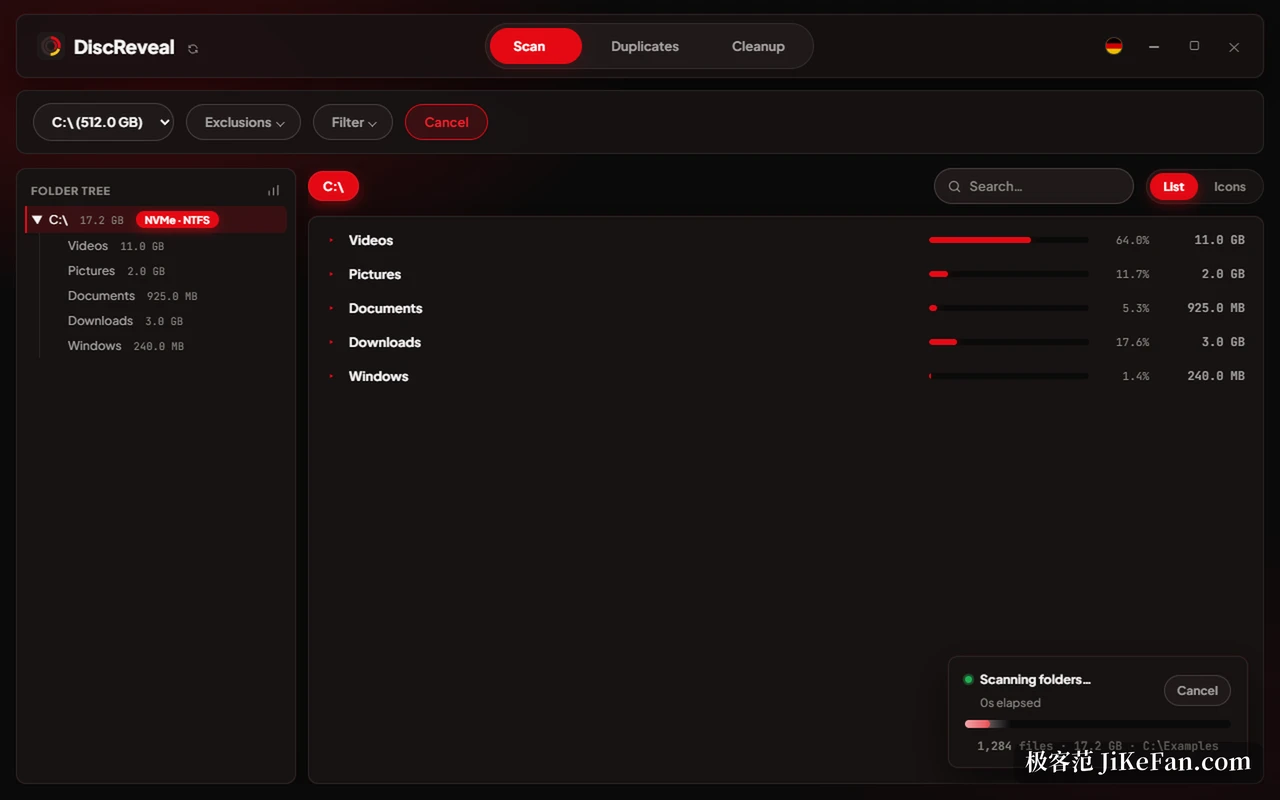
Pick a drive, press start, and the directory tree on the left fills in sizes as the scan runs while the right pane ranks the folders at that level, with a bar and a percentage side by side. In the published benchmark, a directory of about two hundred thousand files close to 15 GB took just over a second to produce a complete result. The speed comes from adapting the number of reading threads to the disk: fewer in parallel on a mechanical drive or a USB stick, more on a solid state drive, so a slow disk is not pushed into appearing frozen.
The scope can be narrowed. Exclusions and filters sit at the top, and several game library folders are excluded by default, among them Steam, Epic, GOG, Riot, EA, Ubisoft and Xbox. Those directories routinely run to hundreds of gigabytes and must not be deleted, so listing them only muddies the picture. Any other folder can be added to the exclusion list.
Duplicates by content, not by name
The duplicate tab decides by content rather than filename, so a video that was renamed and given another extension still lands in the same group. Underneath, files are bucketed by size first and compared afterwards, which keeps large files from being read byte by byte from beginning to end.
Results appear per group, each with the number of files, the size of one copy and the total that could be freed. The constraint is stated at the top: one original always stays, and the copies selected for removal go to the Recycle Bin. Before anything moves, each item is checked again, and a file that changed in the meantime, disappeared, or turns out to be a hard link to another entry is dropped from the queue rather than deleted.
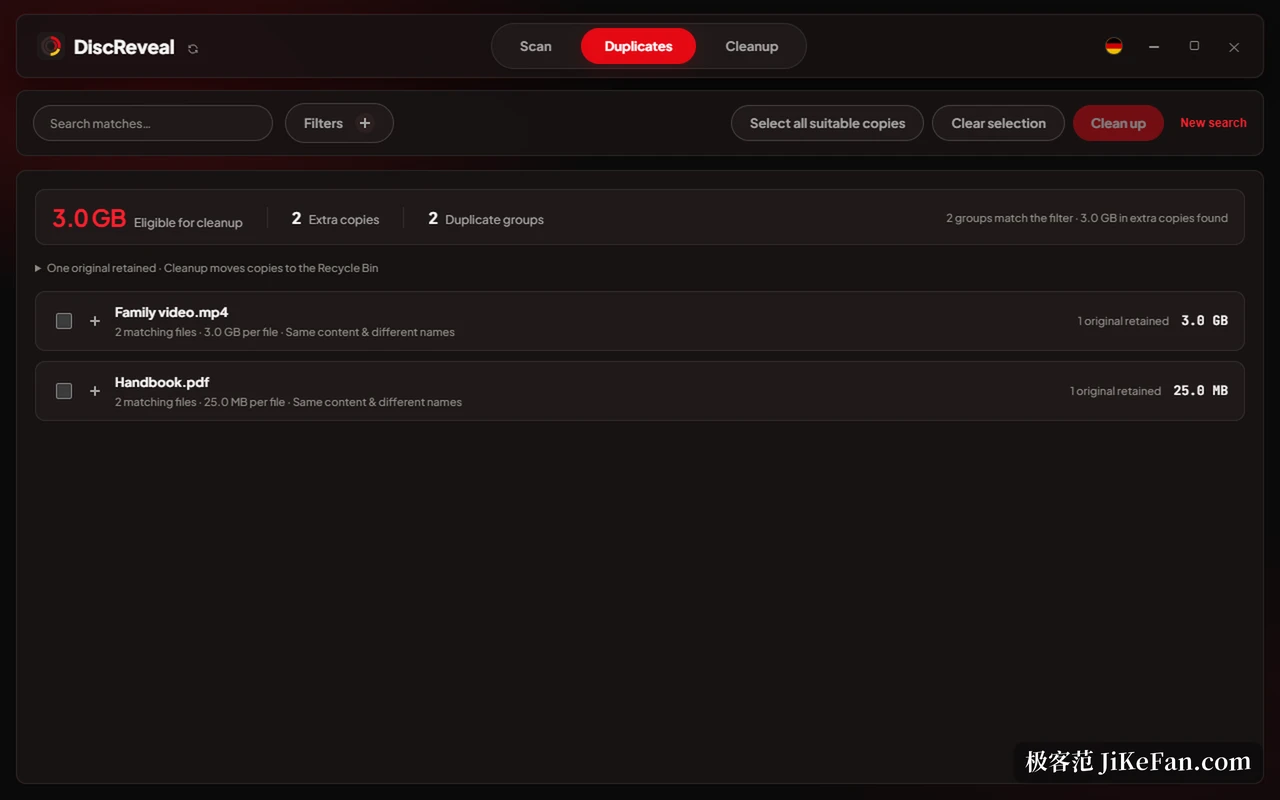
Filtering is fine-grained: a minimum and maximum size, extensions to include or exclude, and live sorting by name, path, size, extension or whether the names match after the list is built. Files under 10 MB are skipped by default, because clearing a heap of small ones frees almost nothing, and the limit can be switched off for a full pass.
Statistics split space three ways
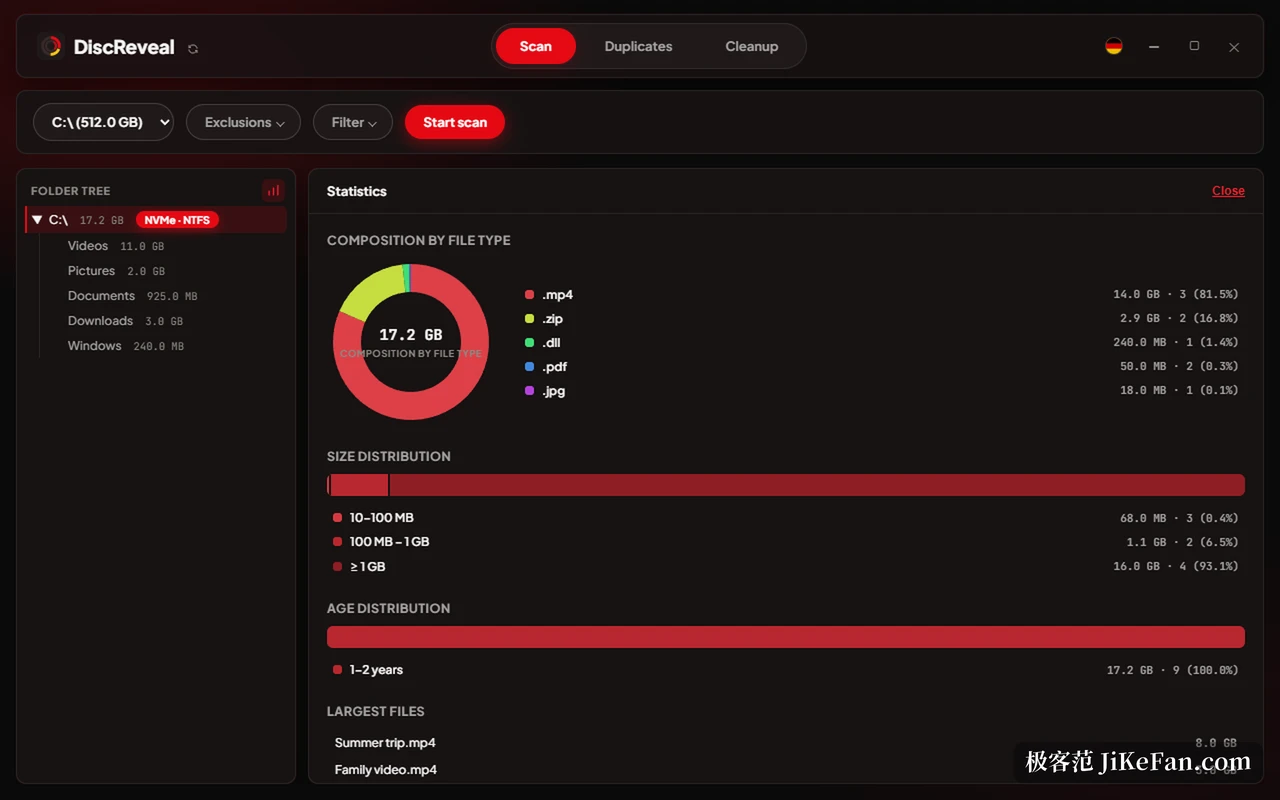
A chart button beside the tree opens a panel with three sections. The first is a ring of file types, so it becomes obvious whether a drive is full of video, of installers or of libraries. The second buckets by size, counting how many files fall between ten and a hundred megabytes, between a hundred megabytes and a gigabyte, and above a gigabyte. The third distributes by age across the last year, one to two years, and older. The largest individual files are listed underneath.
Read together, those three views say far more than one total. A drive holding 11 GB of video recorded this year needs a different decision from one holding 11 GB of installers from three years ago. An optional switch labelled measurement of occupied space counts the space the disk really commits rather than the logical size of the files, which folds in compression and shared blocks, at the cost of a slower scan.
The cleanup tab only subtracts, with a confirmation
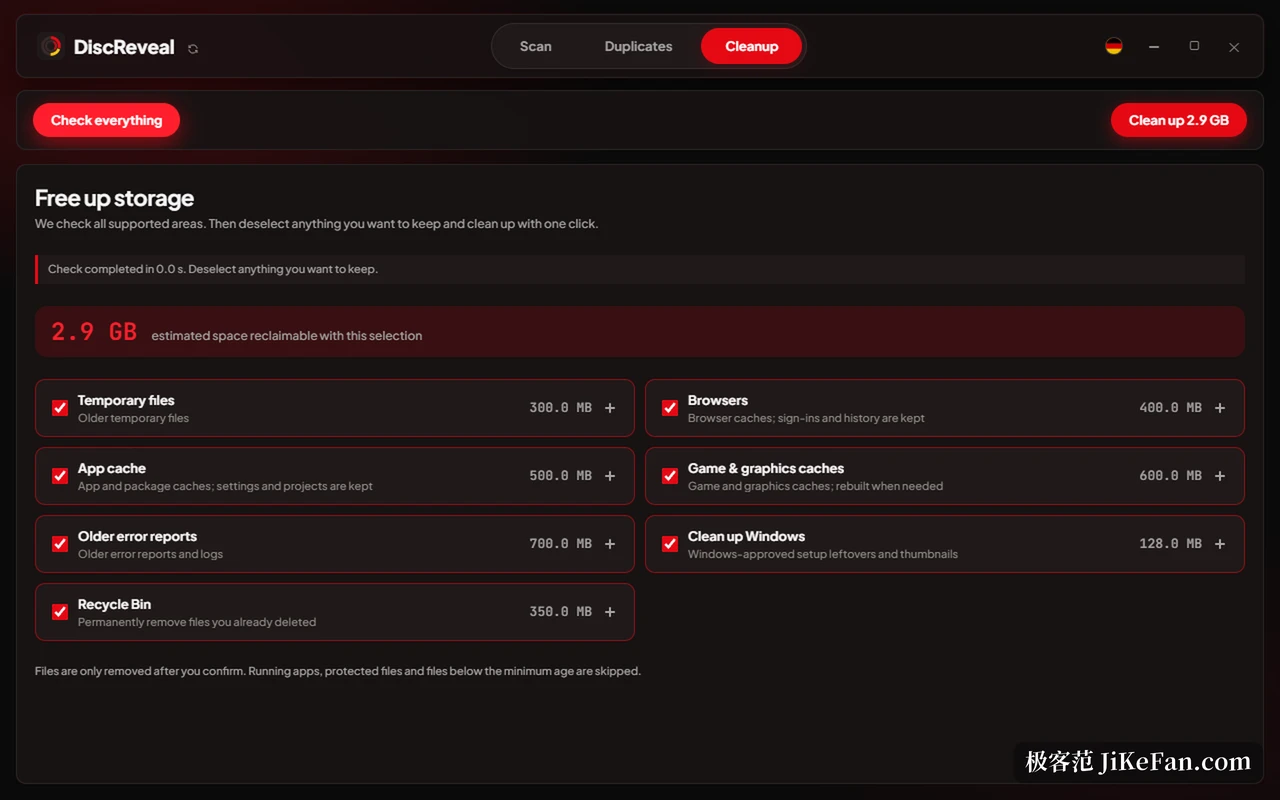
The third tab collects what could go today. After a check it lists categories: temporary files, browser cache, application cache, game and graphics cache, old error reports, installation leftovers that Windows kept, and the Recycle Bin, each with an estimate of what it would free. The default ticks follow whole categories, and anything unwanted is unticked before a single run.
A few details are worth naming. The browser entry states that sign-in state and history are kept, and the application cache states that settings and projects are kept, which means only rebuildable material is touched. Running programs, protected files and anything younger than the minimum age are skipped, since something created minutes ago is usually still wanted. The Recycle Bin and old Windows installations are separate options, and the program says plainly that emptying them cannot be undone, which is why they have to be chosen on purpose.
Portable, local, and honest about limits
The program is one file and runs from anywhere. Scan results live in memory, settings stay local, and nothing is uploaded, not even a path. There is no account, no telemetry and none of the promotional pop-ups this category likes to carry. The interface ships in English and German and switches instantly; Chinese is not among them.
Deletion offers three modes: Recycle Bin, permanent removal, and a secure overwrite that fills the file with random data first. The overwrite is a limited promise on a solid state drive, because wear levelling and retained blocks sit below the program's reach, and hard links are refused outright so that removing one entry cannot break a reference elsewhere. Sensitive locations, meaning the Windows directory, the program directories and the root of a user profile, raise an extra confirmation that spells out the risk first.
The licence covers personal and internal company use at no cost, the source is public, and modification or commercial redistribution needs separate permission. DiscReveal expects the WebView2 runtime, which Windows 10 and 11 normally carry, and offers to guide the installation when it is missing. It does not recover what was deleted, since the Recycle Bin is the only way back, and it does not partition or repair disks, which belongs to another class of tool. The job it takes on is narrow: find out where the space went, then leave the decision to you.