
O&O DiskImage 23 shows backup health on one screen
Summary
O&O DiskImage 23 puts backup history, protection state and advice on the first screen, then copies each local image to a second target on its own.
Recommend- Name
- O&O DiskImage
- Version
- 23
- Pricing
- Paid
- Open source
- Proprietary
- Operating system
- Windows
- Updated
- 2026-11-13 23:00
O&O DiskImage is a full-system backup tool for Windows from the German developer O&O Software. Version 23 arrived on 13 October 2026, sells as a one-off licence at 49.90 euros per machine, needs 64-bit Windows 10 or 11 and takes about 99 MB of space. Its brief is narrow and useful: put system images, single-partition images, file backups, disk cloning and disaster recovery into one program, and ask the operator to decide as little as possible.
The hard part of backup software was never pressing start. It is remembering, six months later, when the last good run finished and whether you can still go back that far.
The first screen answers whether you are safe
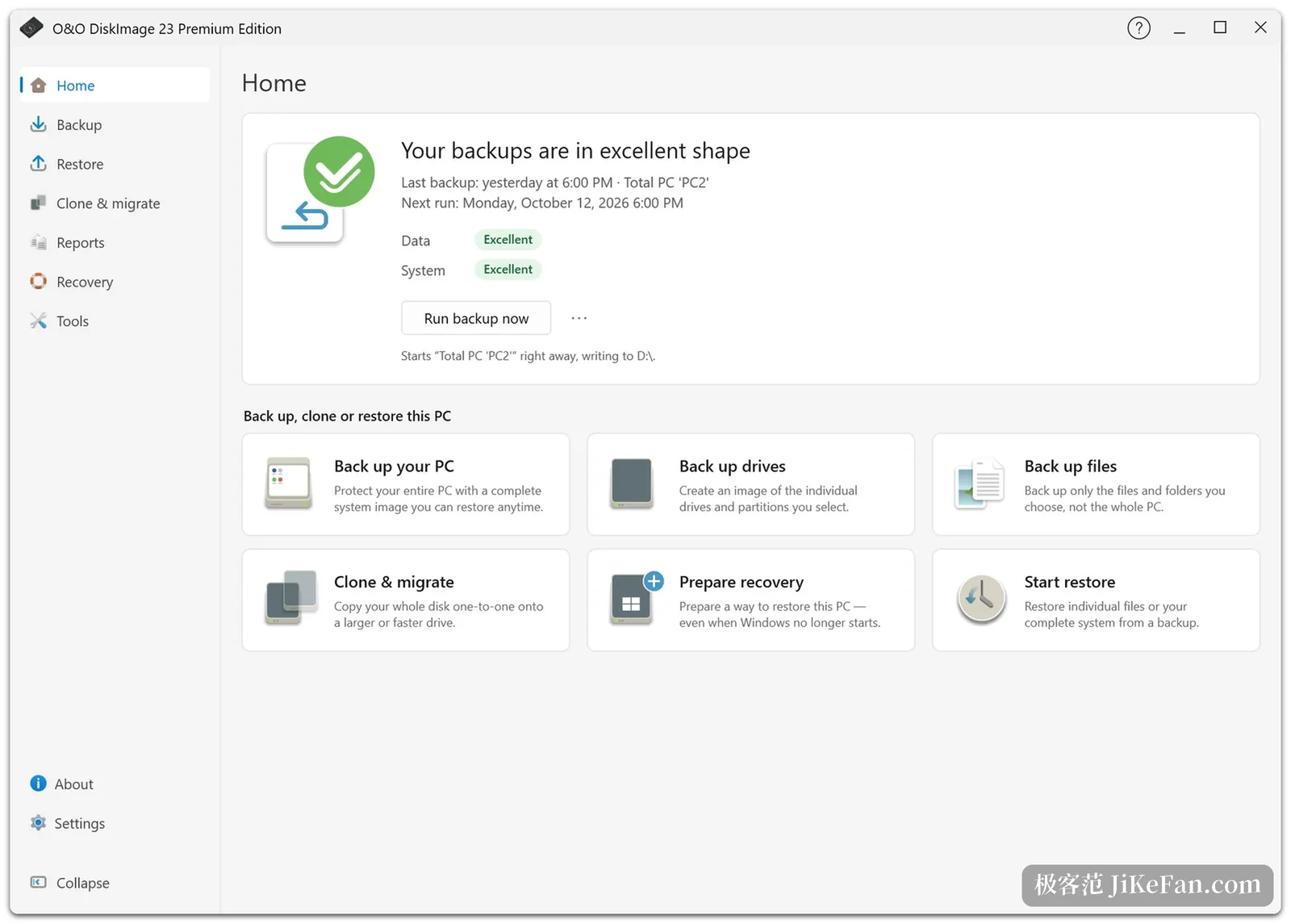
The clearest change in version 23 sits on the home screen. Where tools of this kind used to open on a row of function buttons, this one opens on a verdict, which in the shipped screenshots reads that your backups are in excellent shape. Three facts follow: the last backup ran yesterday at six in the evening, it covered the whole machine, and the next run is queued for Monday, with data and system each carrying a green rating. Only then come six cards for whole machine, disk and partitions, files, cloning and migration, preparing a recovery and starting a restore.
That ordering looks like layout and is really about rhythm. The failure mode that matters with backup software is believing a job is running when it is not, and settling that question needs four facts: when the last run succeeded, what is scheduled next, what is covered, and where the copy physically sits.
The backup page turns protection and depth into numbers
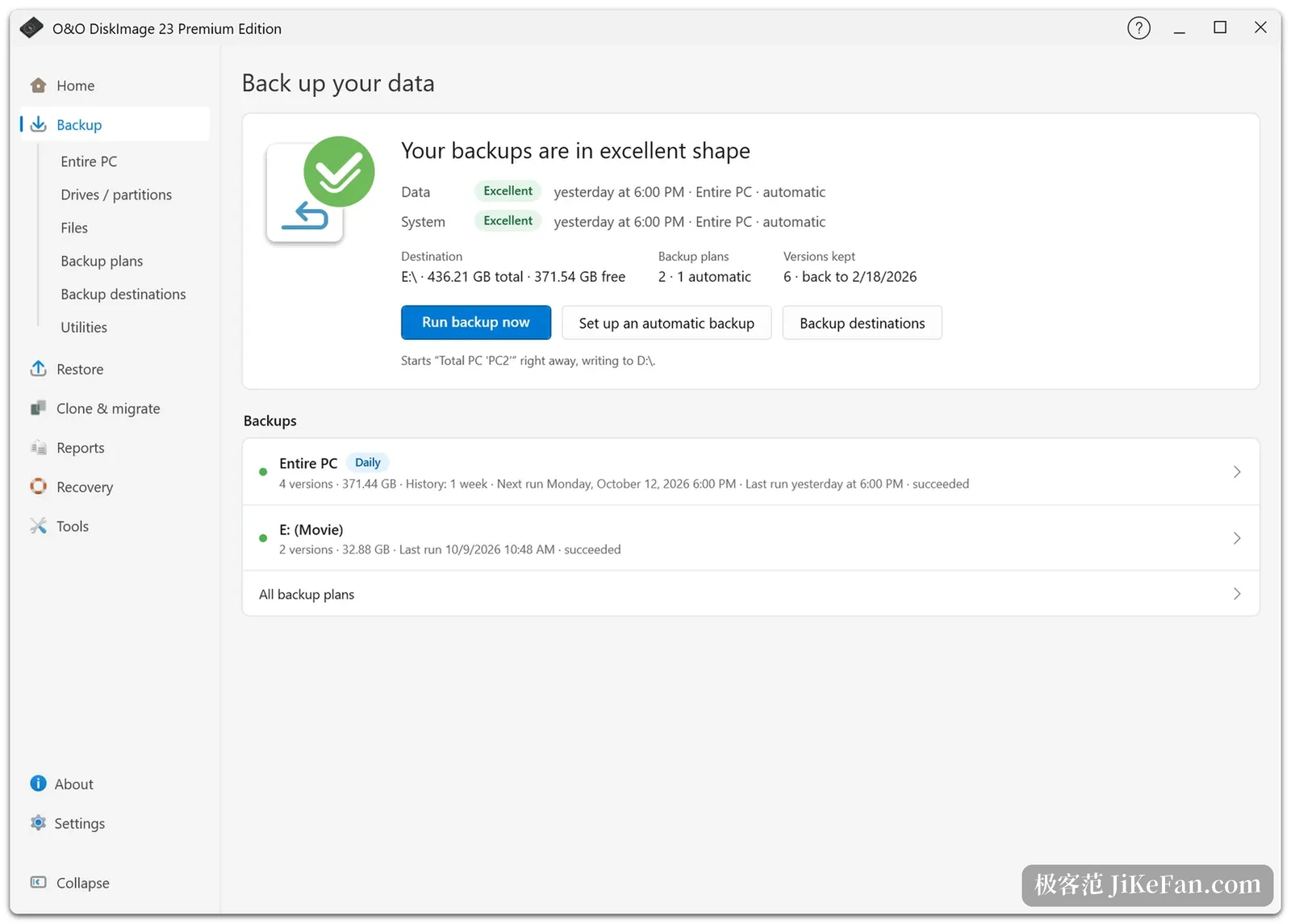
The backup page raises the density. The status strip stays at the top but fills in the detail: the target is the E drive with 436 GB of capacity and 371 GB free, two schedules exist and one of them runs by itself, retention stands at six versions, and the oldest of them reaches back to 18 February 2026. Below that, actual backup sets are listed per job. The whole-machine row is marked daily, carries four versions totalling 371 GB across a week of history, and states both the next run and the last success inside the row. A movie folder on the same drive holds two versions, the last one successful on 9 October.
Keeping six versions and being able to reach February are different promises. The first is a setting and the second is the real insurance, and version 23 makes the retention period, the full schedule and the automatic chain configurable in one place, so the program orders full and incremental runs itself instead of leaving three tasks to be timed by hand.
After the local write, a second copy leaves on its own
The genuinely new capability is that second copy. A backup still lands on a local disk first, which keeps it fast and restorable at once, and the program then copies the result in the background to another destination: an external drive, a network share, a NAS, S3-compatible object storage or WebDAV. The transfer verifies and retries, and it does not interrupt other work.
What the extra step buys is a separation of risks. A failed disk, a stolen machine and ransomware tend to take the local copy and the original together, while writing only to the cloud stretches backup time into hours. Fast first and durable second lets the local copy answer whether you can roll back right now and the remote copy answer whether anything survives the loss of the machine. The entry point for configuring it sits on the backup page itself.
Read the verdict before choosing the granularity
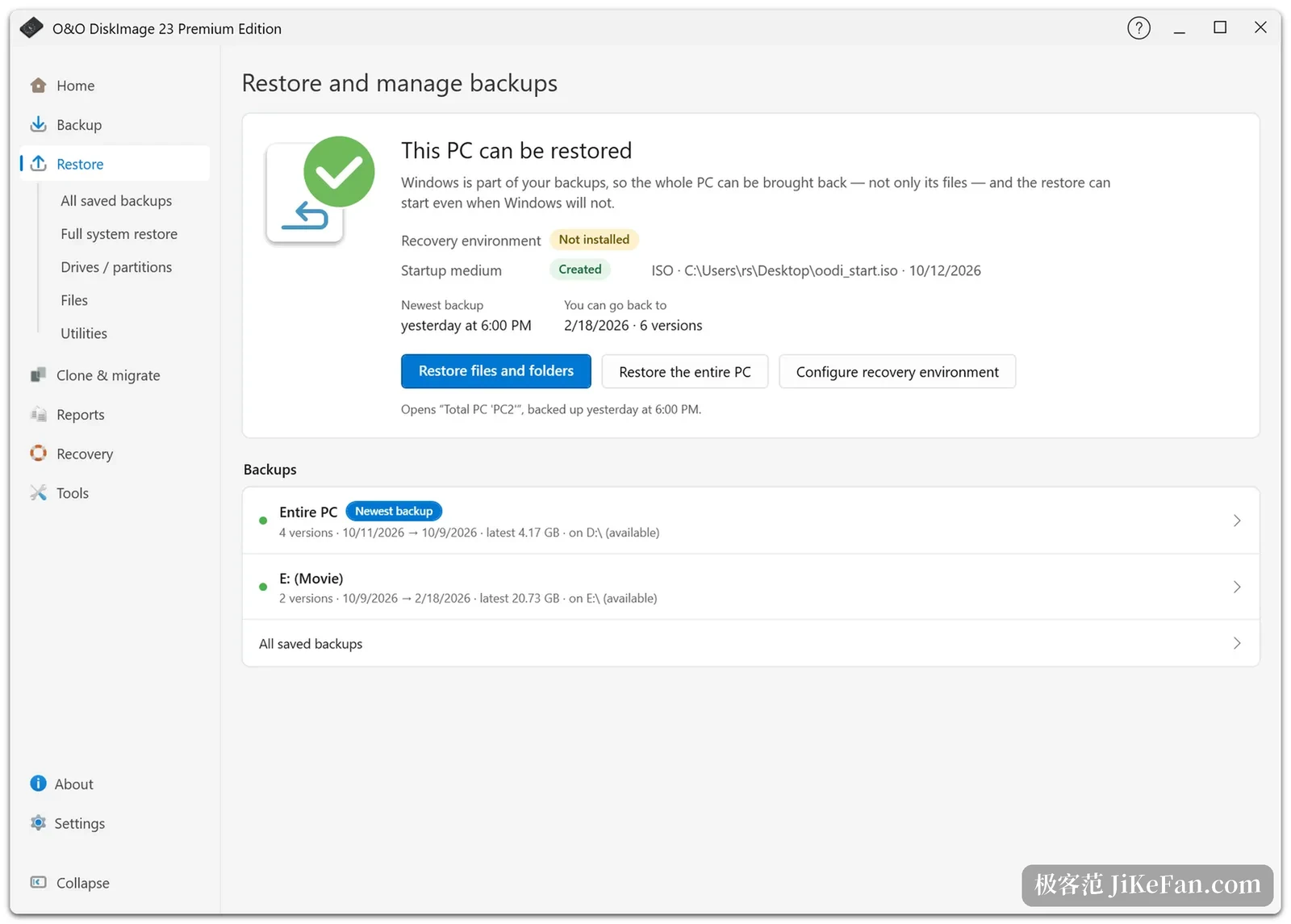
The restore page mirrors the backup page. It opens with a conclusion: this computer can be restored, and because Windows itself is inside the image, what comes back is the machine rather than a set of files. Three status lines underneath are worth reading one by one. The recovery environment is marked as not installed and flagged in yellow. The boot medium is marked as created, with its path and the date of 12 October. The newest backup is from yesterday at six in the evening, and the rollback range reaches 18 February 2026 across six versions.
Three buttons map to three granularities: files and folders, the whole computer, and configuring the recovery environment. Every set in the list also carries its size and the drive it lives on, so it is possible to check that the copy is reachable before starting. That layer says more than a success message, because success only means the write finished, not that the data can be read back.
When the system will not start, another boot path does the work
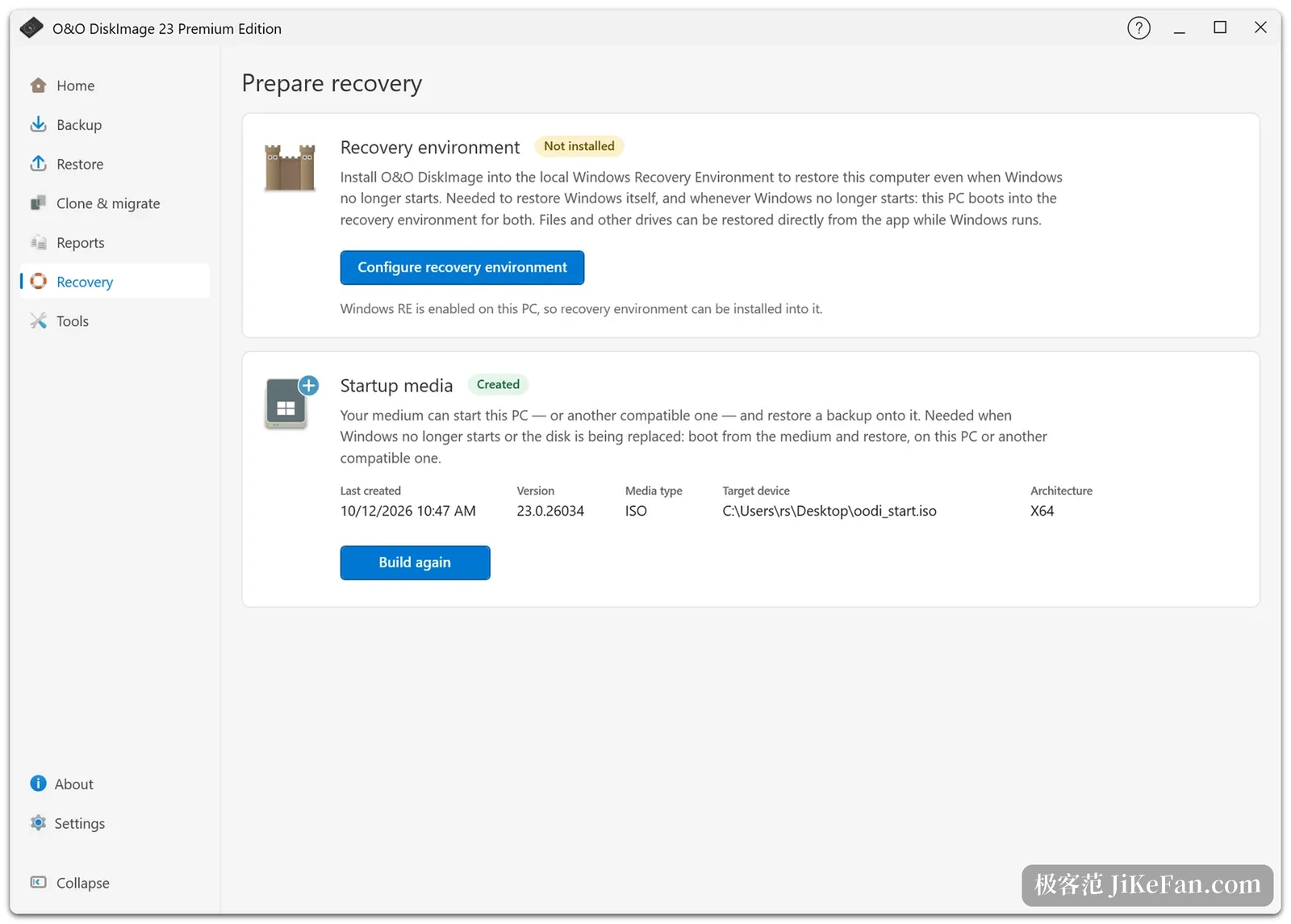
The recovery page handles that case. The recovery environment installs the program into the Windows recovery environment on the machine, so a system that will not boot can still be restored from that entry. A boot medium is the second path: written as an ISO or onto a USB stick, it starts this machine, or another compatible one, before a restore begins. In the shipped screenshots that medium is an ISO for the x64 architecture, and the build number reads 26034.
The Premium edition adds a mode that runs the program inside an isolated Windows environment, where other software cannot disturb a backup in progress, and that mode also allows a forensic disk image recording every sector as it stands. It can be integrated into the Windows recovery environment in advance or shipped as a standalone boot medium, and both can be used together.
People who change machines are covered too. Hardware-independent restoration redetects the new hardware during the restore and adjusts the Windows settings, so an old system moves to a new computer without a reinstall. Images can also be converted to VHD or VHDX and mounted, after which the contents can be browsed as a read-only disk. The reports page keeps the outcome of every job, which is what makes a complaint answerable months later.
Who it suits, and where the edges are
The strength of O&O DiskImage is that the whole machine comes back. The image covers the system, the installed programs and the settings, both fallback paths exist, the isolated mode keeps interference to a minimum, and hardware-independent restoration removes the last obstacle when hardware changes. Anyone who archives a working machine on a schedule will find that combination calmer than file sync.
The licensing and trial edges deserve attention. The per-machine licence is a one-off purchase rather than a subscription, with a 30-day refund, and during the 30-day trial disk cloning, the isolated mode, boot medium creation, image mounting and image conversion stay closed, so a trial only exercises the main backup and restore path. Only 64-bit Windows 10 and 11 are supported, and server systems need a different edition. Anyone who only wants to sync a few folders will find the full feature set heavy.