
MiniTool Power Data Recovery 13.1: 1 GB of recovery, free to try
Summary
MiniTool Power Data Recovery is at V13.1, released on 2026-09-08. The free edition recovers up to 1 GB and covers deletion, RAW partitions, formatting and lost partitions, with file preview included.
Recommend- Name
- MiniTool Power Data Recovery
- Version
- 13.1
- Open source
- Proprietary
- Operating system
- WindowsmacOS
- Updated
- 2026-10-06 19:13
Data recovery rests on one basic precondition: the tool has to be able to read the disk in the first place. MiniTool Power Data Recovery is at V13.1, with the release date in the official upgrade history given as 2026-09-08, and the free edition comes with an allowance of 1 GB.
What the free edition allows
The software comes in a free and a paid edition, and which one is needed depends on the job. The free edition caps recovery at 1 GB, and the vendor positions it as the try-before-you-buy way in: whether the allowance covers the files in question is something a single scan answers. The free edition also carries a genuinely useful capability, namely previewing files before the recovery actually runs, so that what the scan turned up can be looked at one by one and compared against what is being looked for, and only then is the choice of what to recover made. The official preview covers the usual families of documents, graphics and pictures, video and audio, archives and email.

Which data loss situations are covered
The product page breaks the applicable situations down fairly finely, into eight categories. The deletion group covers files removed by accident, files removed with Shift, and the situation after the recycle bin has been emptied. At the partition level there are lost partitions, plus partitions or disks that have turned RAW and will not open in the interface. Formatting is inside the supported range too, since files still have a chance after a partition, a drive or a USB device has been formatted. The remaining categories lean towards hardware and the system itself, namely hard disk failure, a system crash, and data loss after an unexpected power cut. The site's summary of all of them is that each one can be recovered.
Which systems and devices
On systems, the supported range is Windows 8, Windows 8.1, Windows 10 and Windows 11, along with the Windows Server line. One detail is worth repeating: the software is stated to run normally in Windows 10 safe mode, and when the system itself will no longer start, that line matters more than any feature list. On devices, the list covers laptops, HDDs, SSDs, USB drives and memory cards, with external hard disks included as well. Beyond the Windows build there is a Mac version, and both platforms can be tried for free.
What the new version changed
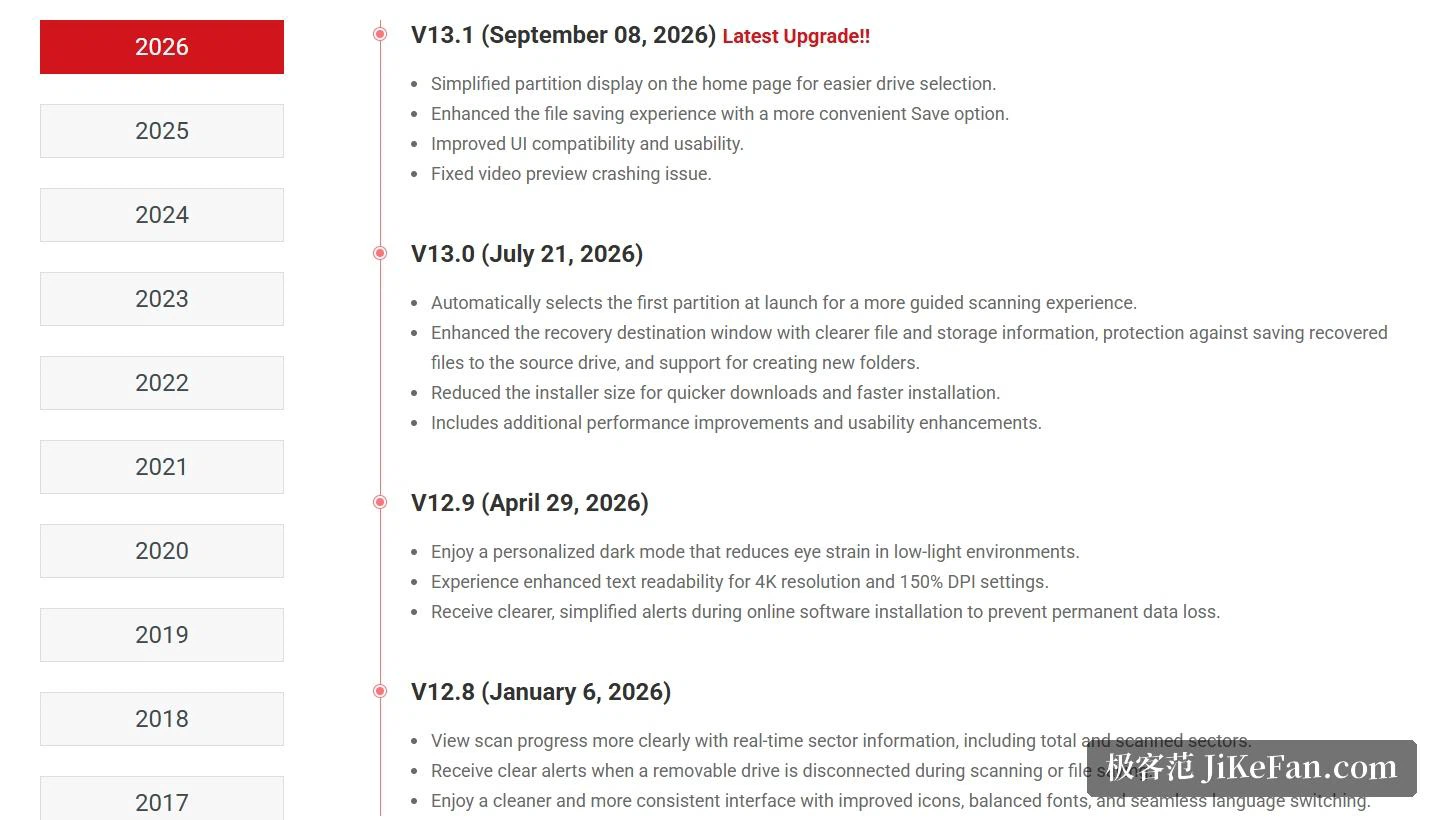
V13.1 is an update at the level of experience: the partition display on the home page has been simplified so that choosing a drive is more direct, the file saving flow has been reworked so that the save entry point sits more naturally under the hand, and interface compatibility and usability have been improved. The version before it, V13.0, came out on 2026-07-21 and changed more substantive things, among them selecting the first partition automatically at launch, adding a warning in the recovery destination window against saving back onto the source disk, and shrinking the installer. Earlier versions had added a scan progress display and a dark mode.
One module deserves a mention of its own: the latest version adds recovery from the desktop, recovery from the recycle bin, and scanning of a named folder. In other words, if it is clear where the files used to live, there is no need to scan the whole disk at all, and the scan can start from the desktop, from the recycle bin or from one folder, which the vendor says saves a great deal of time.
Taken together, the changes are small and they point the same way. Simplifying the partition list, putting the save button where the hand expects it, and offering a shortcut that skips the whole-disk scan are all moves that shrink the distance between opening the program and getting the file back. For a tool that is used in a hurry by someone who has never used it before, that distance is most of the product.
Whether recovery succeeds is half decided before anything is clicked: stop writing to that disk, run a scan on the free allowance, and preview what came up before deciding. 1 GB of free recovery is not much, but it is usually enough to answer the question of whether the file is worth saving.