
MacroDroid: phone automation without learning to program
Summary
An Android automation application built on three steps: choose what should start the rule, choose what it should do, add conditions that limit when it is allowed to run. Over a hundred triggers, over two hundred actions and a library of shared templates.
Recommend- Name
- MacroDroid
- Version
- 20260614
- Pricing
- Free
- Open source
- Proprietary
- Operating system
- Android
- Website
- https://www.macrodroid.com/
- Updated
- 2026-10-24 22:00
Automation on a phone is not a programming project. It is a sentence with three parts: when this happens, if these conditions hold, do that.
Three steps and no syntax
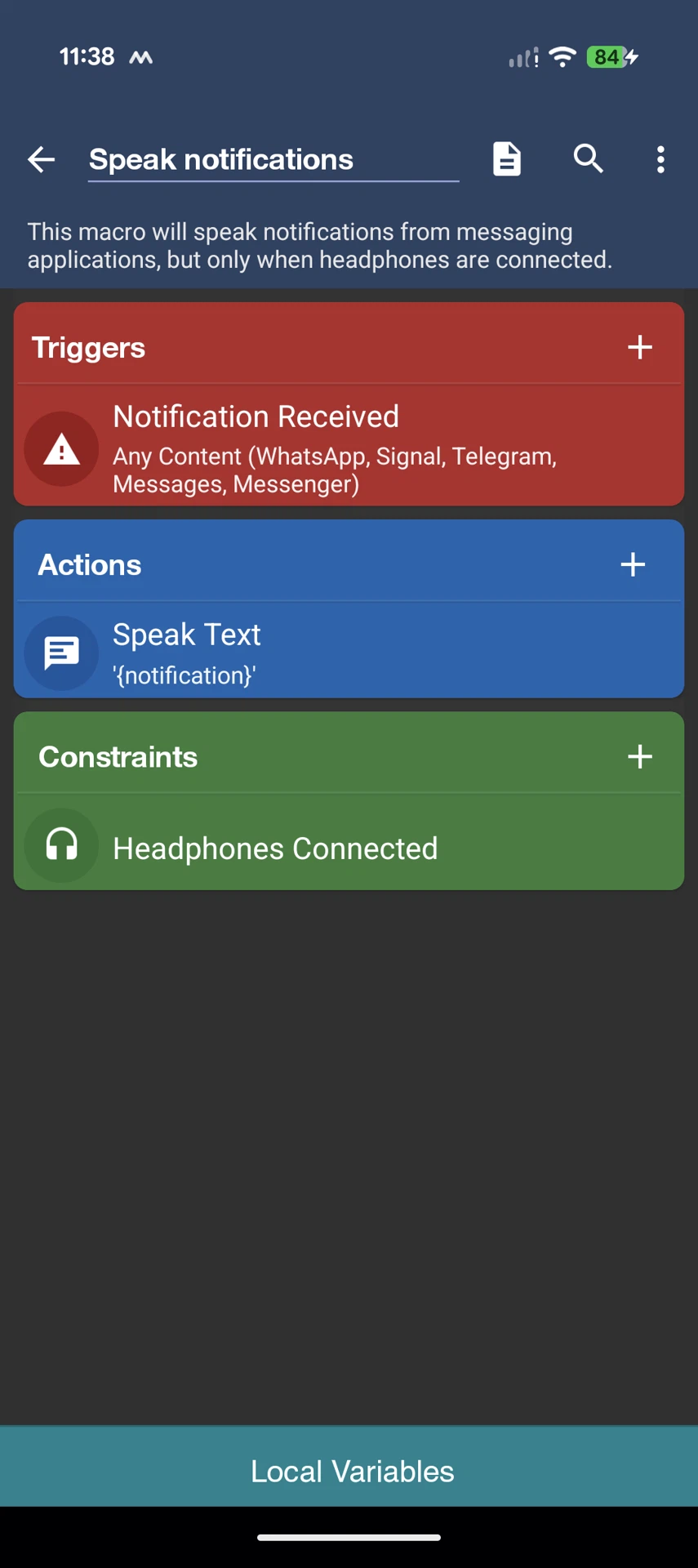
Every rule in this program is assembled the same way. First a trigger, which is the event that starts everything: arriving at a location, connecting to a particular wireless network, a battery falling below a level, an incoming message, a particular time, a shake of the device, an incoming web request. Then one or more actions, which is what should happen. Then constraints, which are the conditions that decide whether the rule is allowed to fire at all. There is no script to write, no variable to declare before the first rule works, and nothing that has to be compiled.
That is the entire design, and it is why the barrier is so low. The people who need this kind of automation most are not developers; they are people who have noticed that every weekday at the same time they perform the same six taps, and who would like the phone to do it instead. A tool that requires learning a language before the first useful rule exists loses those people at the first screen. This one asks them to pick items from lists.

What can start a rule
The trigger list runs past a hundred and twenty entries and covers most of what a phone knows about itself. Position, which is the one that unlocks the most useful rules: arriving at the office, leaving home, entering a particular building. Network state, both wireless and Bluetooth, including which device was connected. Battery level, charging state, screen on or off, application launched or closed, time of day, day of week. Messages arriving from a named sender. Sensors, including shaking, light level and the angle at which a folding device is opened. An incoming web request, which is how an outside service can push an event into the phone. For rules that should only run on demand, a home screen shortcut or a sidebar button.
What a rule can do
Actions number more than two hundred. The everyday ones adjust volume, brightness, wireless state, and the screen timeout. The interesting ones speak text aloud, send a message, take a screenshot, control media playback, open an application, and issue an outgoing web request so that a rule can talk to a service elsewhere. Actions chain: a rule can perform a sequence, wait between steps, and branch on the result of a condition, which is the point at which simple automation becomes a small workflow.
Constraints are where the precision comes from
The third part is the one beginners skip and then wonder why their rules misfire. A constraint limits execution to a date range, a time window, a location, or a device state. The canonical example is a rule that connects to the office network, which without constraints also fires at ten in the evening when the phone happens to be parked near the building. Adding a constraint that it may only run on working days inside working hours turns a rule that mostly works into one that always works. There are more than eighty available constraints, and most real rules use two or three of them.
For people who do want to program
The advanced layer is genuinely advanced and remains optional. Named variables, dictionaries and arrays, explicit intents for communicating with other applications, script execution, conditional blocks with else branches, combined conditions, and loop control are all available. Plugins written for other automation applications can be called, which means an existing investment in this category of software is not thrown away. Nothing above the third step is required to build a rule that works, which is the correct order of priorities: the simple case must be simple, and the complex case must be possible.
Templates, and the community around them
Several hundred ready-made rules shared by other users can be installed with one action and then adjusted. For someone who does not yet know what is worth automating, browsing the library is more instructive than any tutorial, because the useful rules are rarely the obvious ones. Documentation is built in and a forum is active, which matters for a tool whose behaviour depends on the particular phone it runs on.
The application is free, with a paid upgrade available as a single purchase rather than a subscription, and it runs only on Android. The audience is anyone who has a repetitive phone habit and the patience for three lists. Once the first rule works, the second one suggests itself.