
Positron 2026.10.2: the assistant now drives the IDE itself
Summary
Positron is a free data science IDE from Posit: Python and R share one window, the built-in assistant starts apps itself, and outside agents join over MCP.
Recommend- Name
- Positron
- Version
- 2026.10.2
- Pricing
- Free
- Open source
- Proprietary
- Operating system
- WindowsmacOSLinux
- Website
- https://positron.posit.co
- Updated
- 2026-11-10 23:00
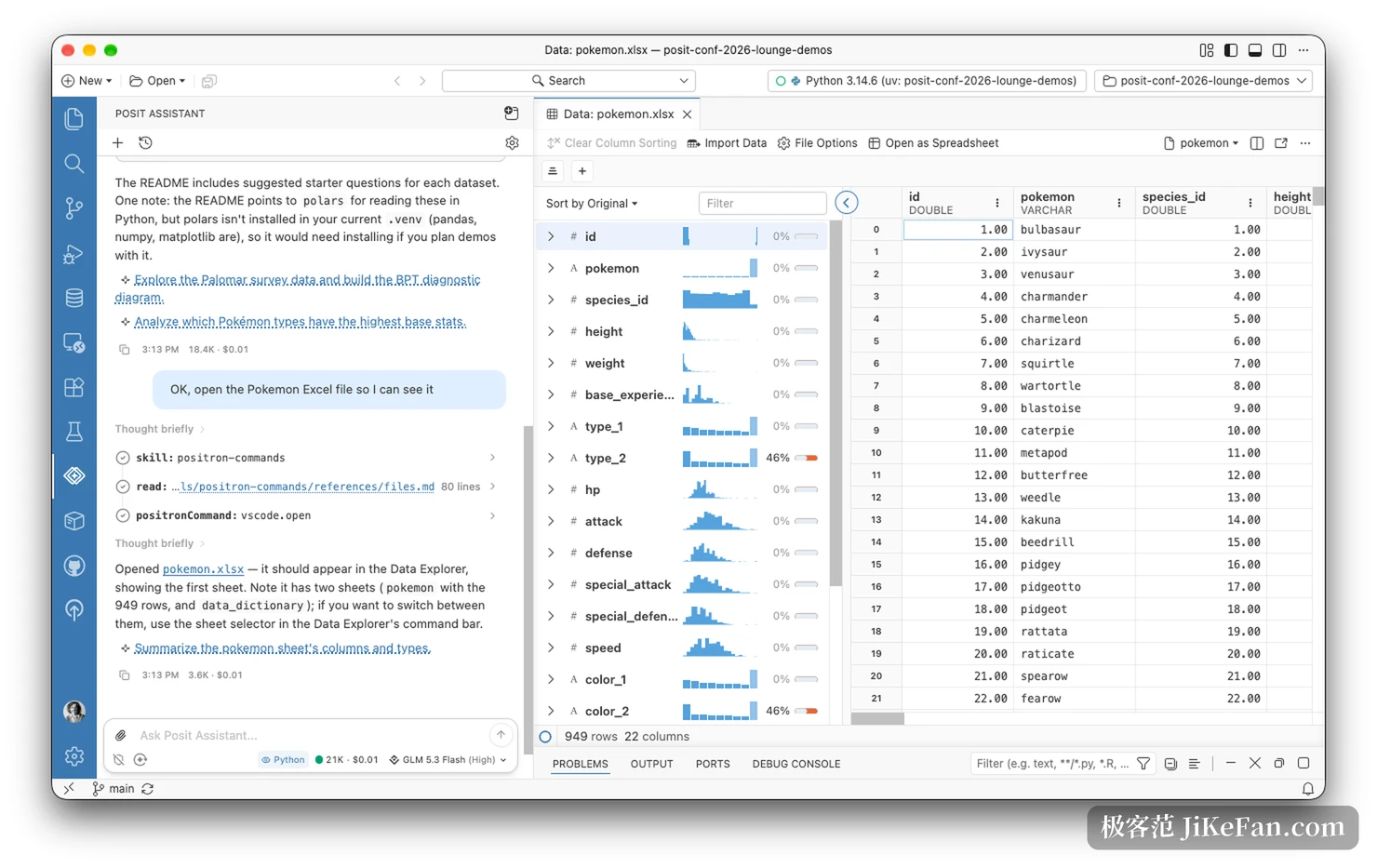
Positron is a desktop IDE from Posit, built for one kind of work: data science. Python and R share a single window, and the table view, the plots, the consoles and the documents sit on one screen. Version 2026.10 puts the weight on agents. The assistant inside the editor can now drive the IDE itself, and a coding agent from outside can attach through an MCP server, read the data you have loaded and run code in your console.
Anyone who spends the day moving between an analysis, a chart and a written report has a reason to look at how much of that loop the tool now holds. Installers cover Windows, macOS and Linux, and the current version is 2026.10.2.
What it is, before anything else
The kernel is Code OSS, the open-source editor core, so the interface and the shortcuts behave like a modern editor. What sits on top is not the same. The data explorer splits a table into columns and shows how each one is distributed. Two consoles run side by side, one for Python and one for R.
The plot pane redraws as the code changes, and variables, environments and interpreters are listed in the sidebar. Nothing has to be arranged into a project layout first: open a folder and start.
Free is part of the design. Posit treats Positron as base equipment for data science, and the desktop build carries no licence fee on any of the three platforms. For a university department, or a team whose budget is already fixed, that decides whether the tool gets one seat or a standard install.
The big move in 2026.10: the assistant runs the IDE
Earlier agents wrote code and left the rest to you. Whether it ran, and what the output looked like, was your problem. In 2026.10 the built-in Posit Assistant acts on Positron directly.
It can start a Shiny app and open the preview in the Viewer, open a Parquet file in the data explorer, list the data connections you have configured and hand back the code that opens one, and work out which interpreter the current project uses, or explain why an interpreter you installed never appears in the list.
What matters is that it reads the same facts you do. The interpreter list, the package list and the connection settings are the ones the interface shows, not a guess assembled from files on disk. Inside the Viewer it can read the page, take a screenshot and click, so once an app is running it can check the result and go back to the code. The debugging loop stops being a person switching windows and becomes the agent taking a few turns on its own.
All of it sits behind a preview toggle and has to be switched on by hand. Shipping the feature as a preview is an honest label: it works, and it will still change.

The other direction: outside agents come in
2026.10 also adds an experimental MCP server. With the switch on, any coding agent that speaks MCP can attach to the current project, see the data you have loaded, your Python and R consoles and your plots, and execute code in those consoles.
The gain is visibility. Without MCP, a third-party agent working on a Positron project is really working in a terminal: it cannot see your session, it sends shell commands to run code, and you cannot tell what it touched. Over MCP, every block it runs appears in the console marked with the name of the agent that ran it. It can pick up an analysis you left half finished, and you can pick up what it hands back.

There is no JSON to write by hand. A command in Positron writes the connection details into the coding agents it knows about, and for anything else there is a copy-connection-details path as a fallback. The server follows the project: two projects in two windows mean two independent servers, and with no project open it does not start at all.
Data connections become the front door
Connecting a database used to take a detour. You attached a connection in the sidebar, then decided which language would run the query. 2026.10 makes Data Connections the default route. It does not depend on a Python or R session, it talks to databases and warehouses directly, and it takes over both the old connections pane and catalogue browsing. Redshift can sign in with an IAM identity. In team environments, Snowflake and Databricks use the credentials the session already holds, so keys stop travelling by clipboard.
In the same release the Quarto language features got faster, and interpreter and project start-up got smoother. Neither is a headline, and both are what daily users notice first.
Who should consider switching
The fit is someone who writes Python or R and moves between analysis, plots and a written report all day. The data explorer, the plot pane and a Quarto document live in one window, and every export that does not happen is a format that cannot break. Teams already publishing through Posit's tooling have the shortest path in.
Someone shipping Python applications with no statistical work probably does not need it, and a team on a heavy engineering codebase has usually settled into its current editor. Switching costs are real. What Positron offers is a tighter loop on the data side of the work, not a better text editor.
One boundary that has to be stated
MCP hands an agent the ability to execute arbitrary code in your console, and that code runs with your account's permissions. Posit's own wording is blunt: exposing the Positron MCP server to an agent is equivalent to giving it unrestricted shell access. Flipping the switch is not a security control, it is a decision to trust the other side. Most clients ask before a destructive step, and not all of them do. Find out how your agent handles permissions before you connect it.
What Positron 2026.10 goes after is a familiar annoyance: the agent writes reasonable code but cannot see what is happening on your screen. Letting the assistant drive the IDE, and letting outside agents into the session over MCP, point at the same thing, an analysis that is no longer cut into pieces by window borders. It is free, it runs on three platforms, and the price is that the most interesting parts still sit behind a preview switch while the permission question stays yours to answer.