
Syncthing 2.1.7: two computers, no cloud in between
Version 2.1.7
Summary
Syncthing 2.1.7 syncs files straight between your own machines, with no cloud in the middle, and hardens protocol checks and database stability.
Recommend- Name
- Syncthing
- Version
- 2.1.7
- Pricing
- Free
- Open source
- Open source
- Operating system
- WindowsmacOSLinux
- Website
- https://syncthing.net/
- Updated
- 2026-11-10 23:00
Syncthing keeps files in step between your own machines in real time. No third-party server carries the data; it moves between your computers, phones and servers only. Clients exist for Windows, macOS and Linux, and FreeBSD, OpenBSD and Solaris run it too, with the source open. The current release is 2.1.7, published on 21 October 2026.
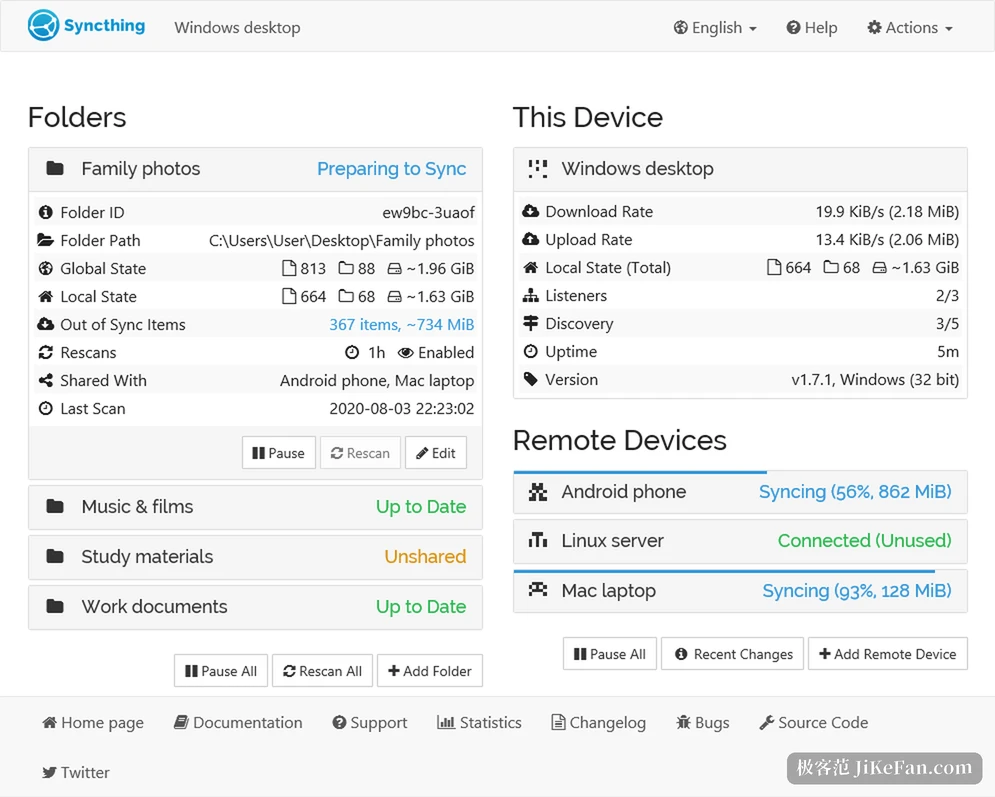
No central server, identity by device ID
Most sync services work the same way: you upload, then you pull from the cloud. Syncthing reverses that. Two devices connect to each other, and nobody needs the machine in the middle. Each install generates a certificate pair, and the public key hashes into a device ID that reads like noise. To pair two machines you add each other's ID and confirm.
The gain is concrete. Files never sit on a stranger's disk, so a platform shutting down, an account being banned or a quota expiring cannot touch them. Transport runs over TLS with forward secrecy, as the official documentation states, so a key leaked later still cannot open earlier transfers. Every device carries its own certificate, and a machine you have not added cannot connect.
The cost is just as plain. Without accounts there is no log-in-to-recover. With both devices offline, files stay where they are. The device IDs are yours to keep, and reinstalling without a copy of the configuration means setting everything up again.
2.1.7 works on the foundation
The changelog for this release is short and points at stability. The protocol layer gains message validation and sensible limits, so malformed requests are stopped before parsing. Dependencies moved along with upstream.
2.1.6 fixed sharper things. Encrypted receive-only files already deleted from the database were being reclaimed too early, which could interrupt a sync. Prepared statements had no limit on some write paths and piled up during long runs.
An introducer could add itself to someone else's shared folder, and that path is now closed. Most outbound HTTP connections dropped keep-alive to cut pointless reconnects. Buttons in the interface gained accessibility labels, and dark-theme contrast was adjusted. On Windows, logging no longer breaks when the process runs without a console.
Folders, versions, ignore rules
The core configuration has three layers, and people who use it daily know them by heart.
- Folder
- A local directory as the unit of sharing, sent to some devices only, or set to receive without sending.
- Versioning
- Overwritten or deleted files keep a few old copies, so an accidental delete can be pulled back.
- Ignore patterns
- A pattern list excludes caches, temporary files and build output, sparing the link pointless traffic.
Two machines on the same local network discover each other and transfer over it, at whatever speed the router and the cable allow. Off that network the traffic is relayed encrypted through relay servers: slower, but the relay cannot see the contents.
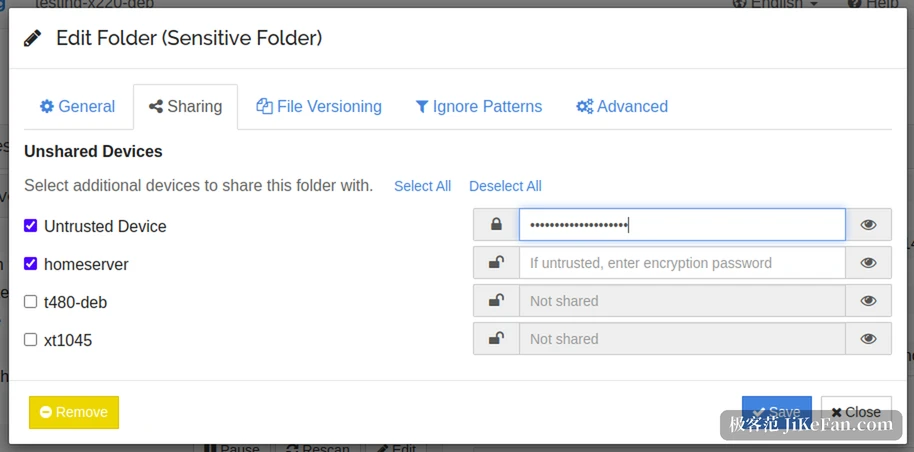
One feature gets mentioned less: untrusted devices. Mark a machine untrusted in the sharing panel, give it an encryption password, and that machine stores only encrypted copies. A disk taken from it reads as noise, and decryption happens on your own devices. Off-site backups at a friend's place rest on this layer.
The entries sit in one menu
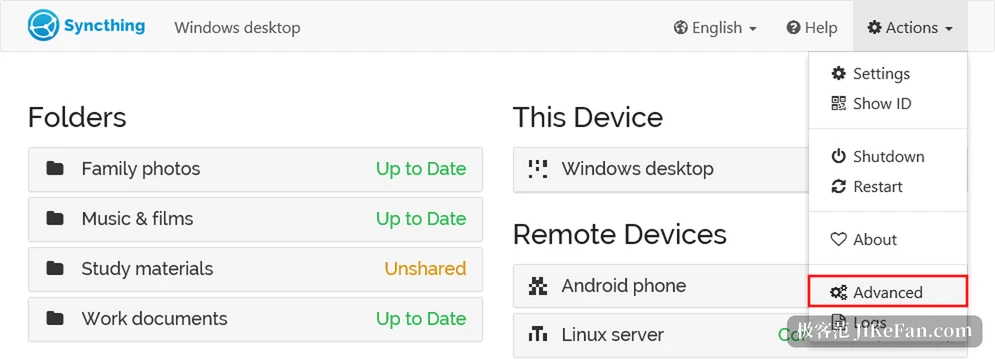
The Actions menu at the top right is the way in. Settings handles the general items, Show ID displays the local device ID so it can be handed over, Advanced opens the deeper parameters, Logs shows what the process has been doing. Daily operations live in those four places, and no command line is required.
Who it suits
Anyone with several machines and files that travel suits best: a desktop and a laptop sharing one data directory, a small always-on host at home as a backup node, or a team sharing one folder of raw material. It does not ask you to run a server; install, add the ID, pick the directory, and it runs.
Whoever only wants a web notebook and two lines edited on the phone will find Syncthing surplus. That need was never a job for a sync tool.