
Greenshot 1.3.328: arrows on the shot, still free
Summary
Greenshot 1.3.328 is a free Windows screenshot tool: capture, then annotate in the same window, and this build closes a leak that sent Windows credentials out.
Recommend- Name
- Greenshot
- Version
- 1.3.328
- Pricing
- Free
- Open source
- Open source
- Operating system
- Windows
- Website
- https://getgreenshot.org/
- Updated
- 2026-11-10 23:00
Greenshot is an open-source screenshot tool for Windows. Press a hotkey to drag a region, grab a window or take the whole screen, and the image lands in a built-in editor where arrows, blur and text go on in the same window. Version 1.3.328 arrived on 19 October 2026 as the 11th stable build of the 1.3 line, with both an installer and a portable package.
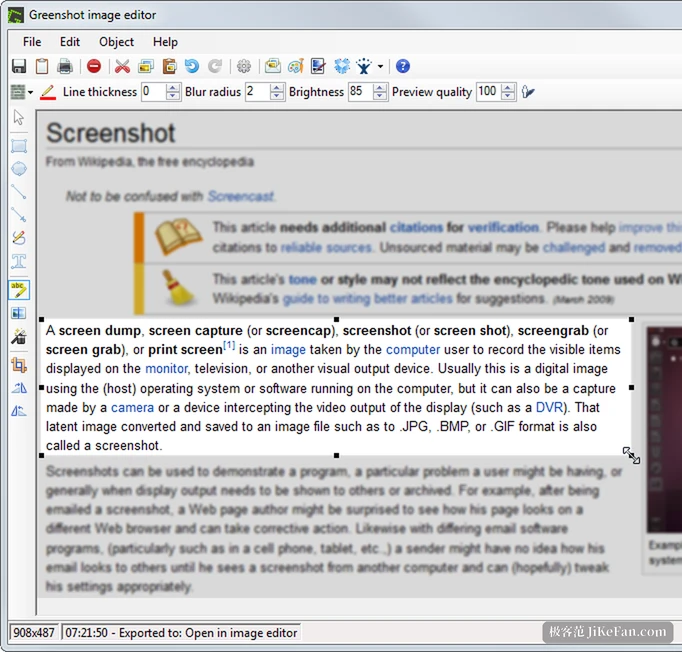
From hotkey to finished image, no other program
The flow is linear. The tray menu lists the capture modes: region, last region, current window, full screen, each with a default hotkey that can be changed. Captures open in the editor by default, and can be pointed at a file, the clipboard or the printer instead.
The toolbar is the part that matters. Rectangle, ellipse, arrow, line, freehand, text and numbering all sit there, and what you draw can be dragged, recoloured and re-weighted afterwards. A blur-radius slider along the top pixelates anything sensitive, which is cleaner than painting over it in black. Brightness and preview quality sit beside it, and dropping the preview quality keeps a huge image moving with the cursor.
Output is handled by plugins. Saving locally, copying and printing come by default, and the official set adds mail, Office files, image hosts and an external command that hands the picture to another program. Each one is switched on in settings, so only what is installed appears.
The security fix is what 1.3.328 is about
The heaviest change in this build is not a feature. The release notes state that Greenshot, whenever it requested content from a server, also sent along the current Windows credentials of the user. An address pointing at a malicious image could therefore trigger an automatic NTLM authentication exchange. That is now closed, under advisory GHSA-gjcr-pccx-w2vg.
For an ordinary user this outweighs any new button. An old build left in place carries the risk for as long as it sits there.
The other change is signing. Every executable and library shipped with Greenshot, plugins and third-party code included, now carries a code signature, so Smart App Control stops treating them as unknown programs. A crash was fixed as well: when the system could not create a notification popup, the program used to exit on the spot.
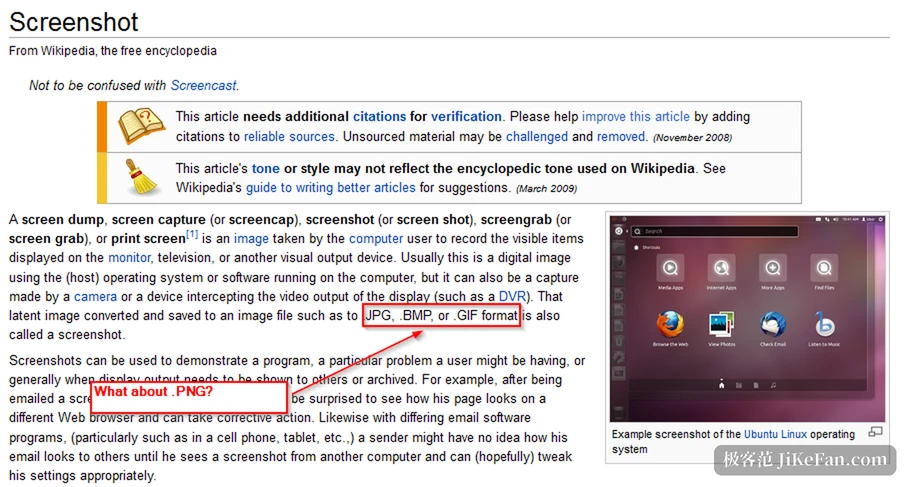
1.3 is not finished, and 1.4 is moving
The official version history shows two lines running side by side. 1.3.328 belongs to the 1.3 series, with 1.3.324 through 1.3.327 as intermediate builds folded into this stable release. The other line is the continuous 1.4 builds: by 4 November there was an unsigned 1.4.434 test package, next to a Light edition and a build carrying MCP, which suggests the project is probing a way to let AI tools call the capture engine.
Anyone who wants stability stays on 1.3.328. Anyone who likes tinkering can take a 1.4 continuous build, accepting that it is unsigned and not thoroughly tested.
Who should use it
Writing documentation, filing a bug report or building a how-to fits best: circle the button, mask the account name, add two lines of explanation, all in one pass, with no separate step of capturing somewhere and dragging the file into an image editor. Batch capture suits it too, since hotkeys and output targets can be preset to a fixed routine.
For the occasional screenshot dropped into a chat, the system shortcut is enough and Greenshot is one more layer. macOS users should note the desktop build is Windows only; the app of the same name on the App Store is another product line, not a port.
- Version
- 1.3.328, published on 19 October 2026, the 11th stable build of the 1.3 line.
- Platform
- Windows only, as an installer or a portable package.
- Price
- free, with the source open.